




About
See Every Key Clearly — High-Contrast White on Black for Low Vision Users
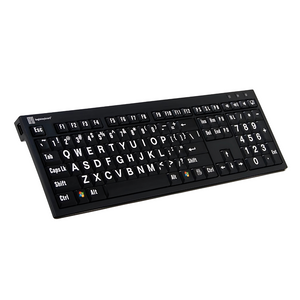
The LogicKeyboard LargePrint White on Black is a professional accessibility keyboard designed for individuals with low vision, visual impairment, cataracts, glaucoma, or age-related vision decline. Featuring white characters 4 times larger than standard keyboards on high-contrast black keys, this full-size wired USB keyboard delivers immediate, effortless visibility — no software, no setup, no squinting.
At Ask Ergo Works, our certified ergonomic specialists have recommended LogicKeyboard LargePrint keyboards for over 30 years to clients in healthcare, education, senior living, and corporate environments. This is the keyboard we reach for when a client needs strong contrast, a familiar full-size layout, and plug-and-play simplicity.
Key Features
- 4x Larger Characters — 10mm wide, 13mm tall white lettering on black keys; visible from normal viewing distance without leaning in
- High-Contrast White-on-Black Design — strong contrast for low vision, cataracts, glaucoma, and age-related vision decline
- Full-Size Layout with Numeric Keypad — complete keyboard including number pad, function row, and arrow keys
- Enhanced Scissor-Key Switches — quiet, responsive, soft-touch keystroke for all-day comfort
- Built-in 2 USB 2.0 Hubs — connect a mouse, flash drive, or other peripherals directly from the keyboard
- Includes Logic Light USB LED Lamp — focused keyboard illumination for low-light environments
- Plug-and-Play Wired USB — no drivers or software required; works instantly with Windows XP through Windows 11
- 5-Foot (1.5m) USB Cable — reliable wired connection, no batteries needed
- Slim Line Low-Profile Design — ergonomic typing angle with thin keycaps
- 🇺🇸 US English Layout | SKU: LKBU-LPWB-BJPU-US
Before vs. After: Standard Keyboard vs. LargePrint White on Black
| Challenge | Standard Keyboard | LogicKeyboard LargePrint White on Black |
|---|---|---|
| Key label size | ~2–3mm characters | 10mm x 13mm — 4x larger |
| Contrast | Low (gray on gray) | High-contrast white on black |
| Eye strain | Constant squinting | Relaxed, confident typing |
| Setup required | Varies | Plug-and-play, no drivers |
| Low-light visibility | Poor | Logic Light USB lamp included |
| USB expansion | None | 2 built-in USB 2.0 hubs |
Technical Specifications
- Character Size: 10mm wide x 13mm tall (4x larger than standard)
- Color Scheme: White characters on black keys
- Connection: Wired USB, 5-foot (1.5m) cable
- Compatibility: Windows XP, Vista, 7, 8, 10, 11
- Layout: Full-size PC keyboard with numeric keypad
- Key Switch: Enhanced scissor-key with soft-touch keystroke
- USB Hubs: 2 built-in USB 2.0 ports
- Included: Keyboard, Logic Light USB LED lamp, warranty card, cleaning tissue and instructions
- SKU: LKBU-LPWB-BJPU-US
Who This Is For
- Individuals with low vision, visual impairment, cataracts, or glaucoma who need larger, higher-contrast key labels
- Users with macular degeneration who prefer white-on-black contrast over yellow-based alternatives
- Older adults experiencing age-related vision decline who want a familiar full-size keyboard layout
- Professionals in healthcare, education, senior living, or government environments needing ADA-compliant accessibility tools
- Users recovering from eye surgery, stroke, or neurological conditions affecting visual processing
- Anyone who wants plug-and-play simplicity without software installation or complex setup
🏥 Ordering for a clinic, senior living facility, or organization? Ask Ergo Works supports B2B and institutional purchasing with volume pricing, net terms, and procurement documentation. Contact us for a quote →
Frequently Asked Questions
Why choose white-on-black instead of black-on-yellow?
White-on-black provides strong, familiar contrast for general low vision needs and suits users who prefer a traditional keyboard color scheme with enhanced visibility. Black-on-yellow offers the highest contrast ratio and is most recommended for severe low vision and macular degeneration. Both feature 4x larger characters — choose based on your contrast preference and vision profile. Not sure which is right for you? Our certified ergonomic specialists can advise.
Is this keyboard good for macular degeneration?
Yes — the 4x larger white-on-black characters significantly reduce the visual effort required to locate keys, which is particularly helpful for users with central vision loss from macular degeneration. Some users with AMD prefer the black-on-yellow model for its higher contrast ratio; our specialists can help you determine which is better suited to your specific vision profile.
Is this keyboard suitable for cataracts or glaucoma?
Yes — the high-contrast white-on-black design and 4x larger characters directly address the reduced contrast sensitivity and visual acuity challenges associated with cataracts and glaucoma. Many of our clients with these conditions report immediate improvement in typing accuracy and reduced eye fatigue after switching.
Can I use this keyboard after eye surgery or during post-surgical recovery?
Yes — the LargePrint White on Black is frequently recommended for users recovering from cataract surgery, retinal procedures, or other eye surgeries where temporary or permanent vision changes affect keyboard visibility. The plug-and-play setup means no complex installation during recovery. Our ergonomic consulting services can help configure your full accessible workstation.
Is this keyboard good for post-stroke recovery or neurological conditions?
Yes — many occupational therapists recommend large-print keyboards for clients recovering from stroke or managing neurological conditions that affect visual processing or fine motor control. The high-contrast design reduces cognitive load during typing, and the plug-and-play USB connection requires no technical setup. We work with OTs and rehab teams regularly — contact us for a professional recommendation.
How much larger are the characters compared to a regular keyboard?
The characters are 4 times larger than standard keyboard lettering — 10mm wide and 13mm tall. This dramatic size increase makes keys visible from normal viewing distance without leaning forward or squinting.
How does this compare to the LogicKeyboard LargePrint Black on Yellow?
Both models feature 4x larger characters and the same Nero Slim Line form factor. The key difference is contrast: white-on-black suits users who prefer a traditional color scheme with strong contrast; black-on-yellow provides the highest contrast ratio and is most recommended for severe low vision and macular degeneration. If you're unsure, our specialists can help you choose based on your specific vision needs.
How does this compare to the LogicKeyboard LargePrint ASTRA 2 Backlit model?
The Nero Slim Line (this model) is a wired USB keyboard with a built-in USB hub and Logic Light lamp — ideal for well-lit environments and users who want plug-and-play simplicity. The ASTRA 2 is a backlit keyboard where the keys themselves are illuminated — better for low-light or dark environments where ambient lighting is insufficient. Both feature 4x larger characters.
What is the Logic Light included in the box?
The Logic Light is a USB LED keyboard lamp that plugs into one of the keyboard's built-in USB hubs. It provides focused illumination on the keyboard for improved visibility in low-light conditions — a useful addition for users working in dimly lit rooms or at night.
Does this keyboard work with Windows 11?
Yes. This keyboard is compatible with Windows XP, Vista, 7, 8, 10, and 11. Simply plug in the USB cable and start typing — no drivers or software required.
Is this keyboard wireless?
No — this is a wired USB keyboard with a 5-foot (1.5m) cable. The wired connection provides reliable, battery-free performance. If you need wireless, the LogicKeyboard Large Print Bluetooth model is available in PC and Mac variants.
Can I order this for my organization, clinic, or senior living facility?
Yes — Ask Ergo Works supports B2B and institutional purchasing for healthcare, education, government, senior living, and corporate clients. Contact us for volume pricing, net terms, and procurement documentation.
Do you offer an ergonomic or accessibility assessment?
Absolutely. Our certified ergonomic specialists offer personalized accessibility assessments — covering keyboard selection, monitor positioning, lighting optimization, and assistive technology recommendations based on your vision profile and work tasks. Learn more about our consulting services.
Complete Your Accessible Workstation Setup
The right keyboard is just one part of a fully accessible workstation. Our certified ergonomic specialists can assess your complete setup — monitor height, mouse, lighting, and seating — to ensure everything works together for your specific vision and comfort needs.
Book an Ergonomics Consulting Session →
Why Ask Ergo Works?
- 30+ years of ergonomic expertise — we've been fitting accessible workstations since before ergonomics was mainstream
- Certified ergonomic specialists — not just a retailer; we assess, recommend, and follow up
- Bay Area roots, nationwide reach — virtual ergonomic consulting available across the US
- B2B and institutional experience — healthcare, education, senior living, government, and corporate clients trust us
- Curated product selection — we only carry products we'd recommend to our own clients
- Post-purchase support — we're here after the sale to make sure your setup works
Stop struggling with tiny keys. The right keyboard makes an immediate, measurable difference — and it ships free.
See Every Key Clearly — High-Contrast White on Black for Low Vision Users
The LogicKeyboard LargePrint White on Black is a professional accessibility keyboard designed for individuals with low vision, visual impairment, cataracts, glaucoma, or age-related vision decline. Featuring white characters 4 times larger than standard keyboards on high-contrast black keys, this full-size wired USB keyboard delivers immediate, effortless visibility — no software, no setup, no squinting.
At Ask Ergo Works, our certified ergonomic specialists have recommended LogicKeyboard LargePrint keyboards for over 30 years to clients in healthcare, education, senior living, and corporate environments. This is the keyboard we reach for when a client needs strong contrast, a familiar full-size layout, and plug-and-play simplicity.
Key Features
- 4x Larger Characters — 10mm wide, 13mm tall white lettering on black keys; visible from normal viewing distance without leaning in
- High-Contrast White-on-Black Design — strong contrast for low vision, cataracts, glaucoma, and age-related vision decline
- Full-Size Layout with Numeric Keypad — complete keyboard including number pad, function row, and arrow keys
- Enhanced Scissor-Key Switches — quiet, responsive, soft-touch keystroke for all-day comfort
- Built-in 2 USB 2.0 Hubs — connect a mouse, flash drive, or other peripherals directly from the keyboard
- Includes Logic Light USB LED Lamp — focused keyboard illumination for low-light environments
- Plug-and-Play Wired USB — no drivers or software required; works instantly with Windows XP through Windows 11
- 5-Foot (1.5m) USB Cable — reliable wired connection, no batteries needed
- Slim Line Low-Profile Design — ergonomic typing angle with thin keycaps
- 🇺🇸 US English Layout | SKU: LKBU-LPWB-BJPU-US
Before vs. After: Standard Keyboard vs. LargePrint White on Black
| Challenge | Standard Keyboard | LogicKeyboard LargePrint White on Black |
|---|---|---|
| Key label size | ~2–3mm characters | 10mm x 13mm — 4x larger |
| Contrast | Low (gray on gray) | High-contrast white on black |
| Eye strain | Constant squinting | Relaxed, confident typing |
| Setup required | Varies | Plug-and-play, no drivers |
| Low-light visibility | Poor | Logic Light USB lamp included |
| USB expansion | None | 2 built-in USB 2.0 hubs |
Technical Specifications
- Character Size: 10mm wide x 13mm tall (4x larger than standard)
- Color Scheme: White characters on black keys
- Connection: Wired USB, 5-foot (1.5m) cable
- Compatibility: Windows XP, Vista, 7, 8, 10, 11
- Layout: Full-size PC keyboard with numeric keypad
- Key Switch: Enhanced scissor-key with soft-touch keystroke
- USB Hubs: 2 built-in USB 2.0 ports
- Included: Keyboard, Logic Light USB LED lamp, warranty card, cleaning tissue and instructions
- SKU: LKBU-LPWB-BJPU-US
Who This Is For
- Individuals with low vision, visual impairment, cataracts, or glaucoma who need larger, higher-contrast key labels
- Users with macular degeneration who prefer white-on-black contrast over yellow-based alternatives
- Older adults experiencing age-related vision decline who want a familiar full-size keyboard layout
- Professionals in healthcare, education, senior living, or government environments needing ADA-compliant accessibility tools
- Users recovering from eye surgery, stroke, or neurological conditions affecting visual processing
- Anyone who wants plug-and-play simplicity without software installation or complex setup
🏥 Ordering for a clinic, senior living facility, or organization? Ask Ergo Works supports B2B and institutional purchasing with volume pricing, net terms, and procurement documentation. Contact us for a quote →
Frequently Asked Questions
Why choose white-on-black instead of black-on-yellow?
White-on-black provides strong, familiar contrast for general low vision needs and suits users who prefer a traditional keyboard color scheme with enhanced visibility. Black-on-yellow offers the highest contrast ratio and is most recommended for severe low vision and macular degeneration. Both feature 4x larger characters — choose based on your contrast preference and vision profile. Not sure which is right for you? Our certified ergonomic specialists can advise.
Is this keyboard good for macular degeneration?
Yes — the 4x larger white-on-black characters significantly reduce the visual effort required to locate keys, which is particularly helpful for users with central vision loss from macular degeneration. Some users with AMD prefer the black-on-yellow model for its higher contrast ratio; our specialists can help you determine which is better suited to your specific vision profile.
Is this keyboard suitable for cataracts or glaucoma?
Yes — the high-contrast white-on-black design and 4x larger characters directly address the reduced contrast sensitivity and visual acuity challenges associated with cataracts and glaucoma. Many of our clients with these conditions report immediate improvement in typing accuracy and reduced eye fatigue after switching.
Can I use this keyboard after eye surgery or during post-surgical recovery?
Yes — the LargePrint White on Black is frequently recommended for users recovering from cataract surgery, retinal procedures, or other eye surgeries where temporary or permanent vision changes affect keyboard visibility. The plug-and-play setup means no complex installation during recovery. Our ergonomic consulting services can help configure your full accessible workstation.
Is this keyboard good for post-stroke recovery or neurological conditions?
Yes — many occupational therapists recommend large-print keyboards for clients recovering from stroke or managing neurological conditions that affect visual processing or fine motor control. The high-contrast design reduces cognitive load during typing, and the plug-and-play USB connection requires no technical setup. We work with OTs and rehab teams regularly — contact us for a professional recommendation.
How much larger are the characters compared to a regular keyboard?
The characters are 4 times larger than standard keyboard lettering — 10mm wide and 13mm tall. This dramatic size increase makes keys visible from normal viewing distance without leaning forward or squinting.
How does this compare to the LogicKeyboard LargePrint Black on Yellow?
Both models feature 4x larger characters and the same Nero Slim Line form factor. The key difference is contrast: white-on-black suits users who prefer a traditional color scheme with strong contrast; black-on-yellow provides the highest contrast ratio and is most recommended for severe low vision and macular degeneration. If you're unsure, our specialists can help you choose based on your specific vision needs.
How does this compare to the LogicKeyboard LargePrint ASTRA 2 Backlit model?
The Nero Slim Line (this model) is a wired USB keyboard with a built-in USB hub and Logic Light lamp — ideal for well-lit environments and users who want plug-and-play simplicity. The ASTRA 2 is a backlit keyboard where the keys themselves are illuminated — better for low-light or dark environments where ambient lighting is insufficient. Both feature 4x larger characters.
What is the Logic Light included in the box?
The Logic Light is a USB LED keyboard lamp that plugs into one of the keyboard's built-in USB hubs. It provides focused illumination on the keyboard for improved visibility in low-light conditions — a useful addition for users working in dimly lit rooms or at night.
Does this keyboard work with Windows 11?
Yes. This keyboard is compatible with Windows XP, Vista, 7, 8, 10, and 11. Simply plug in the USB cable and start typing — no drivers or software required.
Is this keyboard wireless?
No — this is a wired USB keyboard with a 5-foot (1.5m) cable. The wired connection provides reliable, battery-free performance. If you need wireless, the LogicKeyboard Large Print Bluetooth model is available in PC and Mac variants.
Can I order this for my organization, clinic, or senior living facility?
Yes — Ask Ergo Works supports B2B and institutional purchasing for healthcare, education, government, senior living, and corporate clients. Contact us for volume pricing, net terms, and procurement documentation.
Do you offer an ergonomic or accessibility assessment?
Absolutely. Our certified ergonomic specialists offer personalized accessibility assessments — covering keyboard selection, monitor positioning, lighting optimization, and assistive technology recommendations based on your vision profile and work tasks. Learn more about our consulting services.
Complete Your Accessible Workstation Setup
The right keyboard is just one part of a fully accessible workstation. Our certified ergonomic specialists can assess your complete setup — monitor height, mouse, lighting, and seating — to ensure everything works together for your specific vision and comfort needs.
Book an Ergonomics Consulting Session →
Why Ask Ergo Works?
- 30+ years of ergonomic expertise — we've been fitting accessible workstations since before ergonomics was mainstream
- Certified ergonomic specialists — not just a retailer; we assess, recommend, and follow up
- Bay Area roots, nationwide reach — virtual ergonomic consulting available across the US
- B2B and institutional experience — healthcare, education, senior living, government, and corporate clients trust us
- Curated product selection — we only carry products we'd recommend to our own clients
- Post-purchase support — we're here after the sale to make sure your setup works
Stop struggling with tiny keys. The right keyboard makes an immediate, measurable difference — and it ships free.
LogicKeyboard LargePrint White on Black Keyboard — High Contrast for Low Vision | PC Wired USB
SKU:LKBU-LPWB-BJPU-US
- Regular price
- $129.90
- Sale price
- $129.90
- Regular price
-
Need expert help choosing the right setup?
Our certified specialists offer professional ergonomic evaluations tailored to your workstation.
Request a Quote →Couldn't load pickup availability


Trusted By


