




About
See Every Key Clearly. Feel Every Key Precisely. — Built for Low Vision & Braille Users
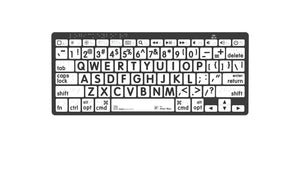
If standard keyboards leave you squinting, guessing, or making costly typos, the LogicKeyboard Braille + Large Print Bluetooth Keyboard was designed for you. With key labels 4x larger than standard keyboards, high-contrast black-on-white printing, and Grade 1 Braille dots on every key, this is the only wireless Bluetooth keyboard that serves both low vision and Braille-literate users — whether you're managing macular degeneration, low vision, or need tactile Braille confirmation alongside large print.
At Ask Ergo Works, our certified ergonomic specialists have recommended LogicKeyboard products for over 30 years to clients in healthcare, education, government, and corporate environments. This is the keyboard we trust for low vision and Braille accessibility.
💡 Which variant do I need? Choose PC for Windows computers. Choose Mac for Apple Mac, iPad, or iPhone — the Mac version includes Command and Option keys. Not sure? Ask a specialist.
Less than one optometrist visit. Built to last years. Recommended by OTs, low vision specialists, and Braille instructors nationwide.
Key Features
- 4x Larger Key Labels — 10mm x 10mm high-contrast black-on-white print, dramatically easier to read than standard keyboards
- Grade 1 Braille Dots on Every Key — tactile Braille confirmation for Braille-literate users and those transitioning to Braille
- Bluetooth 3.0 Wireless — connects to PC, Mac, iPad, and iPhone without cables or dongles
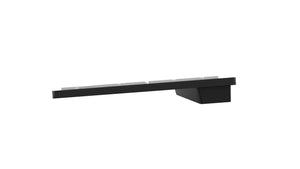
- Compact Mini Form Factor — 287mm wide, smaller footprint than full-size keyboards while retaining a complete key layout
- 78/79 Full-Size Keys — complete layout including function row, number row, and arrow keys
- Long Battery Life — powered by 2x AAA batteries (included); no charging required
- X-Switch Key Structure — stable, responsive keystroke with consistent tactile feedback
- Cross-Platform Compatible — works with Windows PC, Mac, iPad, and iPhone
- 12-Month Warranty — backed by LogicKeyboard's manufacturer warranty
- 🇺🇸 US English Layout
Before vs. After: Standard Keyboard vs. Braille + Large Print
| Challenge | Standard Keyboard | LogicKeyboard Braille + Large Print |
|---|---|---|
| Key label size | ~2–3mm characters | 10mm x 10mm — 4x larger |
| Contrast | Low (gray on gray) | High-contrast black on white |
| Braille tactile dots | None | Grade 1 Braille on every key |
| Typo rate | High — guessing key positions | Dramatically reduced |
| Eye strain | Constant squinting | Relaxed, confident typing |
| Cable clutter | Varies | None — fully wireless Bluetooth |
| Device compatibility | Varies | PC, Mac, iPad, iPhone |
Technical Specifications
- Dimensions: 287mm x 121mm x 22mm (compact mini form factor)
- Weight: 315g
- Key Label Size: 10mm x 10mm
- Braille: Grade 1 Braille dots on all keys
- Connectivity: Bluetooth 3.0
- Operating Voltage: <3.3V
- Battery: 2x AAA (included)
- Layout: 78 keys (PC) / 79 keys (Mac)
- Compatibility: Windows PC, Mac, iPad, iPhone
- In the Box: Keyboard, 2x AAA batteries, Quick Setup Guide, Warranty Card
- Warranty: 12 months
- SKU (PC): LKB-BRALPBW-BTPC-US | SKU (Mac): LKB-BRALPBW-BTON-US
Who This Is For
- Individuals with macular degeneration, low vision, or visual impairment who benefit from large print
- Braille-literate users who want tactile key confirmation alongside visual large print labels
- Users learning Braille who need both visual and tactile cues during the transition
- Professionals in healthcare, government, education, or corporate environments needing ADA-compliant accessibility tools
- Older adults who find standard keyboards difficult to read
- Anyone who wants a cleaner, more readable keyboard without sacrificing a full key layout
- Users who need wireless flexibility across multiple devices (PC, Mac, iPad, iPhone)
- Occupational therapists and rehab specialists equipping clients with post-stroke or neurological recovery workstations
What Customers Are Saying
"I have macular degeneration and was making constant typos on my old keyboard. This one changed everything — I can actually see every key without leaning in. Worth every penny."
"We ordered 6 of these for our low vision clinic. Patients love them. The Bluetooth setup is simple and the keys are genuinely easy to read even under fluorescent lighting."
"My occupational therapist recommended Ask Ergo Works and I'm so glad she did. The keyboard arrived quickly, paired instantly with my Mac, and I haven't strained my eyes once since switching."
🏥 Ordering for a clinic, rehab facility, or organization? We support B2B and institutional purchasing with volume pricing, net terms, and procurement documentation. Contact us for a quote →
Frequently Asked Questions
Does this keyboard have Braille dots on the keys?
Yes — this is the Braille + Large Print model. Every key has both a 4x larger high-contrast print label AND Grade 1 Braille dots, making it the only wireless Bluetooth keyboard that serves both low vision and Braille-literate users simultaneously.
How is this different from the LogicKeyboard Large Print-only keyboard?
The Large Print-only models (Nero Slim Line series) have oversized high-contrast key labels but no Braille dots. This Braille + Large Print Bluetooth model adds Grade 1 Braille dots to every key, making it suitable for users who rely on tactile Braille confirmation in addition to — or instead of — visual large print. It is also wireless Bluetooth, whereas the Nero Slim Line models are wired USB.
Is this keyboard good for macular degeneration?
Yes — the 4x larger key labels and high-contrast black-on-white printing make it significantly easier to locate and read keys without straining. Many of our clients with macular degeneration report a dramatic reduction in typos and eye fatigue after switching. The added Braille dots also provide tactile confirmation for users whose central vision loss makes visual reading difficult even with large print.
Is this keyboard suitable for someone who is blind or has severe vision loss?
The Braille dots on every key make this keyboard usable by touch for Braille-literate users, even without relying on the large print labels. For users who are fully blind and rely entirely on Braille and screen readers, this keyboard pairs well with screen reader software (NVDA, JAWS, VoiceOver). Our specialists can advise on the full accessible workstation setup — contact us here.
Is this keyboard good for someone learning Braille?
Yes — the combination of large print labels and Braille dots makes this an excellent transitional keyboard for users learning Braille. You can read the large print label visually while simultaneously learning to recognize the Braille dots by touch, reinforcing both skills at once.
Will this work with my Mac?
Yes. The Mac variant includes Mac-specific keys (Command, Option, etc.) and pairs via Bluetooth 3.0 to any modern Mac. The PC variant is optimized for Windows. Please select the correct variant for your operating system at checkout.
Can I use this with my iPad or iPhone?
Yes — both the PC and Mac variants connect via Bluetooth 3.0 and are compatible with iPad and iPhone. This makes it a versatile option for users who work across multiple Apple devices.
Is this keyboard suitable for post-stroke recovery or neurological conditions?
Many occupational therapists and rehabilitation specialists recommend large-print keyboards for clients recovering from stroke or managing neurological conditions that affect fine motor control or visual processing. The Braille dots also provide tactile orientation for users with reduced visual acuity following neurological events. We work with OTs and rehab teams regularly — contact us if you'd like a professional recommendation for your specific situation.
How does this compare to a standard ergonomic keyboard?
Standard ergonomic keyboards prioritize wrist angle and key spacing but use the same small key labels as conventional keyboards with no Braille. The LogicKeyboard Braille + Large Print prioritizes visual and tactile accessibility. If you need both ergonomic positioning and large print/Braille, our ergonomic consulting services can help you find the right combination.
How does this compare to the LogicKeyboard ASTRA 2 Backlit Large Print Keyboard?
The ASTRA 2 is a wired USB keyboard with backlighting — better for low-light environments where illuminated keys are a priority, but it does not have Braille dots. This Bluetooth model is wireless, compact, and includes Braille dots — better for multi-device use and Braille-literate users. If you're unsure which is right for your situation, our ergonomic specialists can help.
How long does the battery last?
Battery life varies by usage, but most users report several months of regular use on a single set of 2x AAA batteries. Replacement batteries are widely available and inexpensive.
How do I connect it via Bluetooth?
Insert batteries, press the Bluetooth pairing button, and select the keyboard from your device's Bluetooth settings. Most users are up and running in under 2 minutes. A Quick Setup Guide is included in the box.
Is this keyboard covered by a warranty?
Yes — LogicKeyboard provides a 12-month manufacturer warranty. Ask Ergo Works also offers post-purchase support to help you get the most from your accessibility tools.
Can I order this for my organization or clinic (bulk/B2B)?
Yes — Ask Ergo Works supports B2B and institutional purchasing for healthcare, education, government, and corporate clients. Contact us for volume pricing, net terms, and procurement documentation.
Do you offer an ergonomic assessment to make sure this is the right keyboard for me?
Absolutely. We offer ergonomic consulting services through our certified specialists — including virtual assessments for clients nationwide. Visit our Ergonomics Consulting page to learn more.
Complete Your Accessible Workstation Setup
The right keyboard is just one part of a fully accessible workstation. Our certified ergonomic specialists can assess your complete setup — monitor height, mouse, lighting, and seating — to ensure everything works together for your specific vision and comfort needs.
Book an Ergonomics Consulting Session →
Why Ask Ergo Works?
- 30+ years of ergonomic expertise — we've been fitting workstations since before ergonomics was mainstream
- Certified ergonomic specialists — not just a retailer; we assess, recommend, and follow up
- Bay Area roots, nationwide reach — virtual ergonomic consulting available across the US
- B2B and institutional experience — healthcare, education, government, and corporate clients trust us
- Curated product selection — we only carry products we'd recommend to our own clients
- Post-purchase support — we're here after the sale to make sure your setup works
See Every Key Clearly. Feel Every Key Precisely. — Built for Low Vision & Braille Users
If standard keyboards leave you squinting, guessing, or making costly typos, the LogicKeyboard Braille + Large Print Bluetooth Keyboard was designed for you. With key labels 4x larger than standard keyboards, high-contrast black-on-white printing, and Grade 1 Braille dots on every key, this is the only wireless Bluetooth keyboard that serves both low vision and Braille-literate users — whether you're managing macular degeneration, low vision, or need tactile Braille confirmation alongside large print.
At Ask Ergo Works, our certified ergonomic specialists have recommended LogicKeyboard products for over 30 years to clients in healthcare, education, government, and corporate environments. This is the keyboard we trust for low vision and Braille accessibility.
💡 Which variant do I need? Choose PC for Windows computers. Choose Mac for Apple Mac, iPad, or iPhone — the Mac version includes Command and Option keys. Not sure? Ask a specialist.
Less than one optometrist visit. Built to last years. Recommended by OTs, low vision specialists, and Braille instructors nationwide.
Key Features
- 4x Larger Key Labels — 10mm x 10mm high-contrast black-on-white print, dramatically easier to read than standard keyboards
- Grade 1 Braille Dots on Every Key — tactile Braille confirmation for Braille-literate users and those transitioning to Braille
- Bluetooth 3.0 Wireless — connects to PC, Mac, iPad, and iPhone without cables or dongles
- Compact Mini Form Factor — 287mm wide, smaller footprint than full-size keyboards while retaining a complete key layout
- 78/79 Full-Size Keys — complete layout including function row, number row, and arrow keys
- Long Battery Life — powered by 2x AAA batteries (included); no charging required
- X-Switch Key Structure — stable, responsive keystroke with consistent tactile feedback
- Cross-Platform Compatible — works with Windows PC, Mac, iPad, and iPhone
- 12-Month Warranty — backed by LogicKeyboard's manufacturer warranty
- 🇺🇸 US English Layout
Before vs. After: Standard Keyboard vs. Braille + Large Print
| Challenge | Standard Keyboard | LogicKeyboard Braille + Large Print |
|---|---|---|
| Key label size | ~2–3mm characters | 10mm x 10mm — 4x larger |
| Contrast | Low (gray on gray) | High-contrast black on white |
| Braille tactile dots | None | Grade 1 Braille on every key |
| Typo rate | High — guessing key positions | Dramatically reduced |
| Eye strain | Constant squinting | Relaxed, confident typing |
| Cable clutter | Varies | None — fully wireless Bluetooth |
| Device compatibility | Varies | PC, Mac, iPad, iPhone |
Technical Specifications
- Dimensions: 287mm x 121mm x 22mm (compact mini form factor)
- Weight: 315g
- Key Label Size: 10mm x 10mm
- Braille: Grade 1 Braille dots on all keys
- Connectivity: Bluetooth 3.0
- Operating Voltage: <3.3V
- Battery: 2x AAA (included)
- Layout: 78 keys (PC) / 79 keys (Mac)
- Compatibility: Windows PC, Mac, iPad, iPhone
- In the Box: Keyboard, 2x AAA batteries, Quick Setup Guide, Warranty Card
- Warranty: 12 months
- SKU (PC): LKB-BRALPBW-BTPC-US | SKU (Mac): LKB-BRALPBW-BTON-US
Who This Is For
- Individuals with macular degeneration, low vision, or visual impairment who benefit from large print
- Braille-literate users who want tactile key confirmation alongside visual large print labels
- Users learning Braille who need both visual and tactile cues during the transition
- Professionals in healthcare, government, education, or corporate environments needing ADA-compliant accessibility tools
- Older adults who find standard keyboards difficult to read
- Anyone who wants a cleaner, more readable keyboard without sacrificing a full key layout
- Users who need wireless flexibility across multiple devices (PC, Mac, iPad, iPhone)
- Occupational therapists and rehab specialists equipping clients with post-stroke or neurological recovery workstations
What Customers Are Saying
"I have macular degeneration and was making constant typos on my old keyboard. This one changed everything — I can actually see every key without leaning in. Worth every penny."
"We ordered 6 of these for our low vision clinic. Patients love them. The Bluetooth setup is simple and the keys are genuinely easy to read even under fluorescent lighting."
"My occupational therapist recommended Ask Ergo Works and I'm so glad she did. The keyboard arrived quickly, paired instantly with my Mac, and I haven't strained my eyes once since switching."
🏥 Ordering for a clinic, rehab facility, or organization? We support B2B and institutional purchasing with volume pricing, net terms, and procurement documentation. Contact us for a quote →
Frequently Asked Questions
Does this keyboard have Braille dots on the keys?
Yes — this is the Braille + Large Print model. Every key has both a 4x larger high-contrast print label AND Grade 1 Braille dots, making it the only wireless Bluetooth keyboard that serves both low vision and Braille-literate users simultaneously.
How is this different from the LogicKeyboard Large Print-only keyboard?
The Large Print-only models (Nero Slim Line series) have oversized high-contrast key labels but no Braille dots. This Braille + Large Print Bluetooth model adds Grade 1 Braille dots to every key, making it suitable for users who rely on tactile Braille confirmation in addition to — or instead of — visual large print. It is also wireless Bluetooth, whereas the Nero Slim Line models are wired USB.
Is this keyboard good for macular degeneration?
Yes — the 4x larger key labels and high-contrast black-on-white printing make it significantly easier to locate and read keys without straining. Many of our clients with macular degeneration report a dramatic reduction in typos and eye fatigue after switching. The added Braille dots also provide tactile confirmation for users whose central vision loss makes visual reading difficult even with large print.
Is this keyboard suitable for someone who is blind or has severe vision loss?
The Braille dots on every key make this keyboard usable by touch for Braille-literate users, even without relying on the large print labels. For users who are fully blind and rely entirely on Braille and screen readers, this keyboard pairs well with screen reader software (NVDA, JAWS, VoiceOver). Our specialists can advise on the full accessible workstation setup — contact us here.
Is this keyboard good for someone learning Braille?
Yes — the combination of large print labels and Braille dots makes this an excellent transitional keyboard for users learning Braille. You can read the large print label visually while simultaneously learning to recognize the Braille dots by touch, reinforcing both skills at once.
Will this work with my Mac?
Yes. The Mac variant includes Mac-specific keys (Command, Option, etc.) and pairs via Bluetooth 3.0 to any modern Mac. The PC variant is optimized for Windows. Please select the correct variant for your operating system at checkout.
Can I use this with my iPad or iPhone?
Yes — both the PC and Mac variants connect via Bluetooth 3.0 and are compatible with iPad and iPhone. This makes it a versatile option for users who work across multiple Apple devices.
Is this keyboard suitable for post-stroke recovery or neurological conditions?
Many occupational therapists and rehabilitation specialists recommend large-print keyboards for clients recovering from stroke or managing neurological conditions that affect fine motor control or visual processing. The Braille dots also provide tactile orientation for users with reduced visual acuity following neurological events. We work with OTs and rehab teams regularly — contact us if you'd like a professional recommendation for your specific situation.
How does this compare to a standard ergonomic keyboard?
Standard ergonomic keyboards prioritize wrist angle and key spacing but use the same small key labels as conventional keyboards with no Braille. The LogicKeyboard Braille + Large Print prioritizes visual and tactile accessibility. If you need both ergonomic positioning and large print/Braille, our ergonomic consulting services can help you find the right combination.
How does this compare to the LogicKeyboard ASTRA 2 Backlit Large Print Keyboard?
The ASTRA 2 is a wired USB keyboard with backlighting — better for low-light environments where illuminated keys are a priority, but it does not have Braille dots. This Bluetooth model is wireless, compact, and includes Braille dots — better for multi-device use and Braille-literate users. If you're unsure which is right for your situation, our ergonomic specialists can help.
How long does the battery last?
Battery life varies by usage, but most users report several months of regular use on a single set of 2x AAA batteries. Replacement batteries are widely available and inexpensive.
How do I connect it via Bluetooth?
Insert batteries, press the Bluetooth pairing button, and select the keyboard from your device's Bluetooth settings. Most users are up and running in under 2 minutes. A Quick Setup Guide is included in the box.
Is this keyboard covered by a warranty?
Yes — LogicKeyboard provides a 12-month manufacturer warranty. Ask Ergo Works also offers post-purchase support to help you get the most from your accessibility tools.
Can I order this for my organization or clinic (bulk/B2B)?
Yes — Ask Ergo Works supports B2B and institutional purchasing for healthcare, education, government, and corporate clients. Contact us for volume pricing, net terms, and procurement documentation.
Do you offer an ergonomic assessment to make sure this is the right keyboard for me?
Absolutely. We offer ergonomic consulting services through our certified specialists — including virtual assessments for clients nationwide. Visit our Ergonomics Consulting page to learn more.
Complete Your Accessible Workstation Setup
The right keyboard is just one part of a fully accessible workstation. Our certified ergonomic specialists can assess your complete setup — monitor height, mouse, lighting, and seating — to ensure everything works together for your specific vision and comfort needs.
Book an Ergonomics Consulting Session →
Why Ask Ergo Works?
- 30+ years of ergonomic expertise — we've been fitting workstations since before ergonomics was mainstream
- Certified ergonomic specialists — not just a retailer; we assess, recommend, and follow up
- Bay Area roots, nationwide reach — virtual ergonomic consulting available across the US
- B2B and institutional experience — healthcare, education, government, and corporate clients trust us
- Curated product selection — we only carry products we'd recommend to our own clients
- Post-purchase support — we're here after the sale to make sure your setup works
LogicKeyboard Braille + Large Print Bluetooth Keyboard | PC & Mac
SKU:LKB-BRALPBW-BTPC-US
- Regular price
- $349.90
- Sale price
- $349.90
- Regular price
-
Need expert help choosing the right setup?
Our certified specialists offer professional ergonomic evaluations tailored to your workstation.
Request a Quote →Couldn't load pickup availability


Trusted By


