




About
Type by Touch — A Full PC Keyboard Built Around Braille
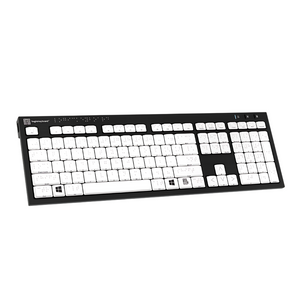
The LogicKeyboard Braille 6-Dot Nero Slim Line is a dedicated Braille keyboard for blind and visually impaired PC users. Every key features 6-dot Braille cell labeling (US/UK standard), allowing Braille-literate users to navigate a full PC keyboard entirely by touch — no visual reference required. With a durable scissor-switch mechanism, built-in USB hub, and plug-and-play setup, this is the professional-grade Braille keyboard built for daily use.
At Ask Ergo Works, our certified ergonomic specialists have recommended LogicKeyboard Braille keyboards to blind users, Braille instructors, assistive technology specialists, and rehabilitation teams for over 30 years. This is the keyboard we trust for tactile-first PC access.
💡 Note on Braille standard: This keyboard uses 6-dot Braille (US/UK standard). If you need 8-dot Braille, please contact us before ordering.
Key Features
- 6-Dot Braille Cell Labels on Every Key — US/UK standard Braille for tactile navigation
- Full-Size PC Layout — 104 keys (ANSI) including full F-row, numeric keypad, and arrow keys
- Enhanced Scissor-Switch Keys — 8° typing angle; rated for 10 million keystrokes per key
- Built-in 2x USB 2.0 Hubs — connect a mouse, Braille display, or other peripherals
- Wired USB Connection — 5-foot (1.5m) cable; reliable, battery-free performance
- Plug-and-Play — no software or drivers required; Windows 7 through 11
- Slim Line Ergonomic Design — low-profile with balanced weight for all-day use
- 🇺🇸 US English Layout | SKU: LKB-BRAILLE-BJPU-US
Technical Specifications
- Braille Standard: 6-dot (US/UK)
- Number of Keys: 104 (ANSI) / 105 (ISO)
- Key Switch: Enhanced scissor-switch, 8° typing angle
- Keystroke Rating: 10,000,000 per key
- USB Hubs: 2x built-in USB 2.0
- Connection: Wired USB, 1.5m (5 ft) cable
- Compatibility: Windows 7, 8, 10, 11
- Dimensions: 446mm x 141mm x 23mm (17.6" x 5.6" x 0.9")
- Weight: 840g (29.6 oz)
- In the Box: PC Braille Keyboard, Warranty Information, Cleaning Tissue, Cleaning Instructions
- SKU: LKB-BRAILLE-BJPU-US
Who This Is For
- Blind users who navigate a PC entirely by touch and Braille
- Visually impaired users who rely on tactile Braille confirmation for keyboard navigation
- Users pairing a Braille keyboard with screen reader software (NVDA, JAWS, Windows Narrator)
- Braille instructors and educators teaching Braille literacy and computer access skills
- Assistive technology specialists and OTs equipping clients with tactile PC access solutions
- Users learning Braille who want to reinforce tactile recognition through daily keyboard use
- Organizations in healthcare, education, government, or corporate environments supporting blind employees or students
🏥 Ordering for a school, clinic, or organization? Ask Ergo Works supports B2B and institutional purchasing with volume pricing, net terms, and procurement documentation. Contact us for a quote →
Frequently Asked Questions
What is a 6-dot Braille keyboard?
A 6-dot Braille keyboard has Braille cell labels on every key using the standard 6-dot Braille system (US/UK). Each key displays the Braille character corresponding to that key's letter, number, or symbol, allowing Braille-literate users to navigate entirely by touch.
How is this different from the LogicKeyboard Braille + Large Print keyboard?
The Braille 6-dot Nero Slim Line has Braille-only labels — no large print visual characters. It is designed for users who navigate entirely by touch. The Braille + Large Print model combines Braille dots with 4x larger high-contrast print labels for users who need both tactile and visual cues.
Is this keyboard compatible with screen readers like NVDA or JAWS?
Yes — this is a standard USB keyboard and works seamlessly with NVDA, JAWS, and Windows Narrator. The Braille labels help users orient to the physical keyboard while the screen reader handles audio output.
Can I use this keyboard with a Braille display?
Yes — the built-in USB 2.0 hubs allow you to connect a Braille display or other USB peripherals directly from the keyboard.
Is this keyboard suitable for someone learning Braille?
Yes — daily use reinforces tactile recognition of Braille characters through repetition. Braille instructors frequently recommend this keyboard for students transitioning to computer-based Braille use.
What is the difference between 6-dot and 8-dot Braille?
6-dot Braille is the standard system used in the US, UK, and most English-speaking countries. 8-dot Braille adds two additional dots used in some European markets. This keyboard uses 6-dot (US/UK standard).
Does this keyboard work with Windows 11?
Yes — compatible with Windows 7, 8, 10, and 11. Plug in the USB cable and start typing — no drivers required.
Is this keyboard wireless?
No — wired USB with a 5-foot (1.5m) cable. For wireless Braille, the LogicKeyboard Braille + Large Print Bluetooth model is available in PC and Mac variants.
Is this keyboard suitable for post-stroke recovery or neurological conditions?
Yes — many OTs recommend Braille keyboards for clients recovering from stroke or managing neurological conditions affecting visual processing. The tactile labels provide navigation that does not rely on visual acuity.
How durable is this keyboard?
Each key is rated for 10 million keystrokes. The scissor-switch mechanism provides consistent tactile feedback throughout the keyboard's lifespan.
Can I order this for my school, clinic, or organization?
Yes — Ask Ergo Works supports B2B and institutional purchasing. Contact us for volume pricing, net terms, and procurement documentation.
Do you offer an assistive technology or ergonomic assessment?
Absolutely. Our certified specialists offer personalized assessments covering keyboard selection, screen reader configuration, Braille display pairing, and full workstation setup. Learn more.
Complete Your Accessible Workstation Setup
A Braille keyboard is most powerful as part of a complete accessible workstation. Our specialists can assess your full setup — screen reader software, Braille display, audio output, and ergonomic positioning.
Book an Ergonomics Consulting Session →
Why Ask Ergo Works?
- 30+ years of ergonomic expertise — including assistive technology for blind and visually impaired users
- Certified ergonomic specialists — not just a retailer; we assess, recommend, and follow up
- Bay Area roots, nationwide reach — virtual consulting available across the US
- B2B and institutional experience — healthcare, education, government, and corporate clients trust us
- Curated product selection — we only carry products we'd recommend to our own clients
- Post-purchase support — we're here after the sale to make sure your setup works
Type by Touch — A Full PC Keyboard Built Around Braille
The LogicKeyboard Braille 6-Dot Nero Slim Line is a dedicated Braille keyboard for blind and visually impaired PC users. Every key features 6-dot Braille cell labeling (US/UK standard), allowing Braille-literate users to navigate a full PC keyboard entirely by touch — no visual reference required. With a durable scissor-switch mechanism, built-in USB hub, and plug-and-play setup, this is the professional-grade Braille keyboard built for daily use.
At Ask Ergo Works, our certified ergonomic specialists have recommended LogicKeyboard Braille keyboards to blind users, Braille instructors, assistive technology specialists, and rehabilitation teams for over 30 years. This is the keyboard we trust for tactile-first PC access.
💡 Note on Braille standard: This keyboard uses 6-dot Braille (US/UK standard). If you need 8-dot Braille, please contact us before ordering.
Key Features
- 6-Dot Braille Cell Labels on Every Key — US/UK standard Braille for tactile navigation
- Full-Size PC Layout — 104 keys (ANSI) including full F-row, numeric keypad, and arrow keys
- Enhanced Scissor-Switch Keys — 8° typing angle; rated for 10 million keystrokes per key
- Built-in 2x USB 2.0 Hubs — connect a mouse, Braille display, or other peripherals
- Wired USB Connection — 5-foot (1.5m) cable; reliable, battery-free performance
- Plug-and-Play — no software or drivers required; Windows 7 through 11
- Slim Line Ergonomic Design — low-profile with balanced weight for all-day use
- 🇺🇸 US English Layout | SKU: LKB-BRAILLE-BJPU-US
Technical Specifications
- Braille Standard: 6-dot (US/UK)
- Number of Keys: 104 (ANSI) / 105 (ISO)
- Key Switch: Enhanced scissor-switch, 8° typing angle
- Keystroke Rating: 10,000,000 per key
- USB Hubs: 2x built-in USB 2.0
- Connection: Wired USB, 1.5m (5 ft) cable
- Compatibility: Windows 7, 8, 10, 11
- Dimensions: 446mm x 141mm x 23mm (17.6" x 5.6" x 0.9")
- Weight: 840g (29.6 oz)
- In the Box: PC Braille Keyboard, Warranty Information, Cleaning Tissue, Cleaning Instructions
- SKU: LKB-BRAILLE-BJPU-US
Who This Is For
- Blind users who navigate a PC entirely by touch and Braille
- Visually impaired users who rely on tactile Braille confirmation for keyboard navigation
- Users pairing a Braille keyboard with screen reader software (NVDA, JAWS, Windows Narrator)
- Braille instructors and educators teaching Braille literacy and computer access skills
- Assistive technology specialists and OTs equipping clients with tactile PC access solutions
- Users learning Braille who want to reinforce tactile recognition through daily keyboard use
- Organizations in healthcare, education, government, or corporate environments supporting blind employees or students
🏥 Ordering for a school, clinic, or organization? Ask Ergo Works supports B2B and institutional purchasing with volume pricing, net terms, and procurement documentation. Contact us for a quote →
Frequently Asked Questions
What is a 6-dot Braille keyboard?
A 6-dot Braille keyboard has Braille cell labels on every key using the standard 6-dot Braille system (US/UK). Each key displays the Braille character corresponding to that key's letter, number, or symbol, allowing Braille-literate users to navigate entirely by touch.
How is this different from the LogicKeyboard Braille + Large Print keyboard?
The Braille 6-dot Nero Slim Line has Braille-only labels — no large print visual characters. It is designed for users who navigate entirely by touch. The Braille + Large Print model combines Braille dots with 4x larger high-contrast print labels for users who need both tactile and visual cues.
Is this keyboard compatible with screen readers like NVDA or JAWS?
Yes — this is a standard USB keyboard and works seamlessly with NVDA, JAWS, and Windows Narrator. The Braille labels help users orient to the physical keyboard while the screen reader handles audio output.
Can I use this keyboard with a Braille display?
Yes — the built-in USB 2.0 hubs allow you to connect a Braille display or other USB peripherals directly from the keyboard.
Is this keyboard suitable for someone learning Braille?
Yes — daily use reinforces tactile recognition of Braille characters through repetition. Braille instructors frequently recommend this keyboard for students transitioning to computer-based Braille use.
What is the difference between 6-dot and 8-dot Braille?
6-dot Braille is the standard system used in the US, UK, and most English-speaking countries. 8-dot Braille adds two additional dots used in some European markets. This keyboard uses 6-dot (US/UK standard).
Does this keyboard work with Windows 11?
Yes — compatible with Windows 7, 8, 10, and 11. Plug in the USB cable and start typing — no drivers required.
Is this keyboard wireless?
No — wired USB with a 5-foot (1.5m) cable. For wireless Braille, the LogicKeyboard Braille + Large Print Bluetooth model is available in PC and Mac variants.
Is this keyboard suitable for post-stroke recovery or neurological conditions?
Yes — many OTs recommend Braille keyboards for clients recovering from stroke or managing neurological conditions affecting visual processing. The tactile labels provide navigation that does not rely on visual acuity.
How durable is this keyboard?
Each key is rated for 10 million keystrokes. The scissor-switch mechanism provides consistent tactile feedback throughout the keyboard's lifespan.
Can I order this for my school, clinic, or organization?
Yes — Ask Ergo Works supports B2B and institutional purchasing. Contact us for volume pricing, net terms, and procurement documentation.
Do you offer an assistive technology or ergonomic assessment?
Absolutely. Our certified specialists offer personalized assessments covering keyboard selection, screen reader configuration, Braille display pairing, and full workstation setup. Learn more.
Complete Your Accessible Workstation Setup
A Braille keyboard is most powerful as part of a complete accessible workstation. Our specialists can assess your full setup — screen reader software, Braille display, audio output, and ergonomic positioning.
Book an Ergonomics Consulting Session →
Why Ask Ergo Works?
- 30+ years of ergonomic expertise — including assistive technology for blind and visually impaired users
- Certified ergonomic specialists — not just a retailer; we assess, recommend, and follow up
- Bay Area roots, nationwide reach — virtual consulting available across the US
- B2B and institutional experience — healthcare, education, government, and corporate clients trust us
- Curated product selection — we only carry products we'd recommend to our own clients
- Post-purchase support — we're here after the sale to make sure your setup works
LogicKeyboard Braille Keyboard for PC — 6-Dot Braille Nero Slim Line | Wired USB
SKU:LKB-BRAILLE-BJPU-US
- Regular price
- $299.00
- Sale price
- $299.00
- Regular price
-
Need expert help choosing the right setup?
Our certified specialists offer professional ergonomic evaluations tailored to your workstation.
Request a Quote →Couldn't load pickup availability


Trusted By


