Contour ShuttlePro V2 professional video editing controller, a hand operating the jog shuttle dial and surrounding buttons.
Contour ShuttlePro V2 professional video editing controller diagram labeling each button and its assigned function.
Contour ShuttlePro V2 professional video editing controller, angled view showing the jog dial and button layout.
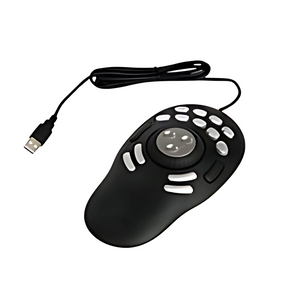
Contour ShuttlePro V2 professional video editing controller with attached USB cable, angled view of the full device.
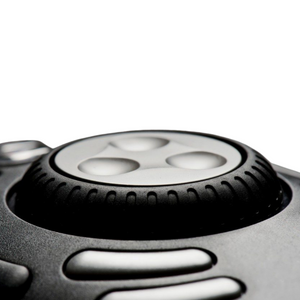
Contour ShuttlePro V2 professional video editing controller, close-up view of the center jog dial and buttons.
    Contour ShuttlePro V2 professional video editing controller, a hand operating the jog shuttle dial and surrounding buttons.
    Contour ShuttlePro V2 professional video editing controller diagram labeling each button and its assigned function.
    Contour ShuttlePro V2 professional video editing controller, angled view showing the jog dial and button layout.
    Contour ShuttlePro V2 professional video editing controller with attached USB cable, angled view of the full device.
    Contour ShuttlePro V2 professional video editing controller, close-up view of the center jog dial and buttons.
Contour ShuttlePro V2 professional video editing controller, a hand operating the jog shuttle dial and surrounding buttons.
Contour ShuttlePro V2 professional video editing controller diagram labeling each button and its assigned function.
Contour ShuttlePro V2 professional video editing controller, angled view showing the jog dial and button layout.
Contour ShuttlePro V2 professional video editing controller with attached USB cable, angled view of the full device.
Contour ShuttlePro V2 professional video editing controller, close-up view of the center jog dial and buttons.
Contour ShuttlePro V2 professional video editing controller, a hand operating the jog shuttle dial and surrounding buttons.
Contour ShuttlePro V2 professional video editing controller diagram labeling each button and its assigned function.
Contour ShuttlePro V2 professional video editing controller, angled view showing the jog dial and button layout.
Contour ShuttlePro V2 professional video editing controller with attached USB cable, angled view of the full device.
Contour ShuttlePro V2 professional video editing controller, close-up view of the center jog dial and buttons.
    Contour ShuttlePro V2 professional video editing controller, a hand operating the jog shuttle dial and surrounding buttons.
    Contour ShuttlePro V2 professional video editing controller diagram labeling each button and its assigned function.
    Contour ShuttlePro V2 professional video editing controller, angled view showing the jog dial and button layout.
    Contour ShuttlePro V2 professional video editing controller with attached USB cable, angled view of the full device.
    Contour ShuttlePro V2 professional video editing controller, close-up view of the center jog dial and buttons.
Contour ShuttlePro V2 professional video editing controller, a hand operating the jog shuttle dial and surrounding buttons.
Contour ShuttlePro V2 professional video editing controller diagram labeling each button and its assigned function.
Contour ShuttlePro V2 professional video editing controller, angled view showing the jog dial and button layout.
Contour ShuttlePro V2 professional video editing controller with attached USB cable, angled view of the full device.
Contour ShuttlePro V2 professional video editing controller, close-up view of the center jog dial and buttons.

About

Master your timeline with the ShuttlePro V2 — the professional video editing controller designed for serious editors and creative professionals. With 15 programmable buttons, precision jog wheel, and variable-speed shuttle ring, you'll navigate projects faster while reducing repetitive strain.

Why You'll Love It:

  • Accelerates video editing workflow with precision jog wheel and variable-speed shuttle ring
  • 15 programmable buttons customize shortcuts for your favorite creative applications
  • Reduces repetitive mouse movements that cause wrist and hand strain
  • Works with major editing platforms including Adobe Premiere Pro, Final Cut Pro, DaVinci Resolve, Avid Media Composer, and more
  • Spring-loaded jog wheel provides tactile feedback for frame-accurate control
  • Professional-grade construction built for daily studio use
  • Backed by Ask Ergo Works' 30+ years of ergonomic expertise — designed for creative professionals

Product Specifications:

  • Dimensions: 5.5" W × 5.0" D × 1.8" H (14.0 × 12.7 × 4.6 cm)
  • Weight: 0.75 lbs (0.34 kg) — portable and stable
  • Controls: Spring-loaded jog wheel, shuttle ring, 15 programmable buttons
  • Connectivity: Wired USB
  • Compatibility: Windows and Mac, supports major creative software
  • Customization: Fully programmable with included software and app-specific profiles

Who It's For:

Essential for professional video editors, colorists, audio engineers, and content creators who demand precision timeline control and faster workflow. Perfect for anyone who wants to reduce repetitive strain while boosting creative productivity in post-production.

The Ask Ergo Works Difference:

With over 30 years of experience in ergonomic assessments and workspace design, we don't just sell products — we solve problems. The ShuttlePro V2 is hand-selected by our certified ergonomists to deliver measurable relief and productivity gains.

Elevate your editing workflow today — and experience the difference that expert-designed ergonomics makes. Free shipping included. 

Master your timeline with the ShuttlePro V2 — the professional video editing controller designed for serious editors and creative professionals. With 15 programmable buttons, precision jog wheel, and variable-speed shuttle ring, you'll navigate projects faster while reducing repetitive strain.

Why You'll Love It:

  • Accelerates video editing workflow with precision jog wheel and variable-speed shuttle ring
  • 15 programmable buttons customize shortcuts for your favorite creative applications
  • Reduces repetitive mouse movements that cause wrist and hand strain
  • Works with major editing platforms including Adobe Premiere Pro, Final Cut Pro, DaVinci Resolve, Avid Media Composer, and more
  • Spring-loaded jog wheel provides tactile feedback for frame-accurate control
  • Professional-grade construction built for daily studio use
  • Backed by Ask Ergo Works' 30+ years of ergonomic expertise — designed for creative professionals

Product Specifications:

  • Dimensions: 5.5" W × 5.0" D × 1.8" H (14.0 × 12.7 × 4.6 cm)
  • Weight: 0.75 lbs (0.34 kg) — portable and stable
  • Controls: Spring-loaded jog wheel, shuttle ring, 15 programmable buttons
  • Connectivity: Wired USB
  • Compatibility: Windows and Mac, supports major creative software
  • Customization: Fully programmable with included software and app-specific profiles

Who It's For:

Essential for professional video editors, colorists, audio engineers, and content creators who demand precision timeline control and faster workflow. Perfect for anyone who wants to reduce repetitive strain while boosting creative productivity in post-production.

The Ask Ergo Works Difference:

With over 30 years of experience in ergonomic assessments and workspace design, we don't just sell products — we solve problems. The ShuttlePro V2 is hand-selected by our certified ergonomists to deliver measurable relief and productivity gains.

Elevate your editing workflow today — and experience the difference that expert-designed ergonomics makes. Free shipping included. 

Contour Design by Contour Design

5.0

0 reviews

Contour ShuttlePro V2 — Professional Video Editing Controller

SKU:00498-00

Regular price
$109.00
Sale price
$109.00
Regular price
Master your timeline with the ShuttlePro V2 — the professional video editing controller made for serious editors and creative pr...  Read more
Master your timeline with the ShuttlePro V2 — the professional video editing controller made for serious editors and creative professionals. Perfect for anyone who wants to reduce repetitive strain while boosting creative productivity in post-production. With over 30 years of experience in ergonomic assessments and workspace design, we don't just sell products — we solve probleMs. The ShuttlePro V2 is hand-selected by our certified ergonomists to deliver measurable relief and productivity gains.

Not sure this is the right fit?

Our certified specialists can evaluate your workstation and recommend the right setup for you.

Request an Ergonomic Evaluation →
Free Shipping
On orders over $99
Certified Specialists
Expert guidance on your purchase
Flexible Payments
4 interest-free installments with Shop Pay

Trusted By

FAQs About the Contour ShuttlePro V2

1

Who is the Contour ShuttlePro V2 designed for?

The Contour ShuttlePro V2 is designed for professional video editors, colorists, audio engineers, and other post-production professionals who need fast, precise timeline control during daily studio use. It's built as a higher-capacity option for editors who want more programmable controls than an entry-level jog/shuttle device offers.

2

What makes the jog wheel on the ShuttlePro V2 different from a standard jog wheel?

The Contour ShuttlePro V2 uses a spring-loaded jog wheel that provides tactile feedback as you scrub through footage, which is intended to help with frame-accurate positioning during editing. This spring-loaded resistance gives a physical sense of how far you've moved through a clip compared to a free-spinning wheel.

3

How many programmable buttons does the ShuttlePro V2 have, and can they be customized per application?

The Contour ShuttlePro V2 has 15 programmable buttons that can be configured using the included software, with support for app-specific profiles. This means you can set up a different button layout for each creative application you use and have the device automatically apply the right profile.

4

Which video editing platforms does the ShuttlePro V2 support?

The Contour ShuttlePro V2 works with major editing platforms including Adobe Premiere Pro, Final Cut Pro, DaVinci Resolve, and Avid Media Composer, and connects to Windows or Mac computers over wired USB. Its programmable profiles are designed to be tailored to whichever of these applications you're working in.

5

How does the ShuttlePro V2 help reduce repetitive strain during long editing sessions?

The Contour ShuttlePro V2 moves timeline navigation off the mouse and onto a dedicated jog wheel and shuttle ring, which is intended to reduce the repetitive scrubbing and clicking motions that contribute to wrist and hand strain during long post-production sessions. This can be particularly relevant for editors working multiple hours a day in the same application.

6

What are the size and weight of the Contour ShuttlePro V2?

The Contour ShuttlePro V2 measures 5.5" W x 5.0" D x 1.8" H and weighs 0.75 lbs. It's built with professional-grade construction intended for daily studio use, giving it a sturdier footprint than a typical desktop peripheral.

Check Out These Related Products