



About

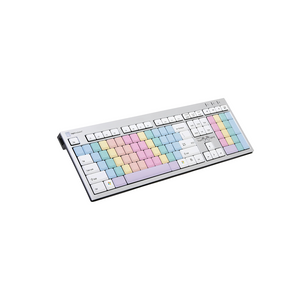
Master the essential skill of touch typing with the LogicKeyboard Blind Touch Typing Keyboard (LKBU-BTOUCH-AJPU-US). Specially designed for students and adults learning to type, this keyboard features color-coded keys that guide proper finger placement, helping you build speed, accuracy, and typing confidence.
By using visual color cues mapped to the correct fingers, you develop muscle memory faster and reduce typing errors. Whether you’re in school, a professional training center, or learning at home, this keyboard is a proven tool to boost productivity for a lifetime.
BUILD TO ORDER – Lead time 4 weeks (2–3 weeks build time + shipping).
Key Features & Benefits:
Ideal for Learning Touch Typing
-
Color-coded alphabet and number keys train your fingers for proper positioning
-
Helps you achieve faster typing speeds with fewer errors
-
Designed for students (K-12), adult learners, and professional training centers
Fun, Engaging, and Motivating
-
Bright, colorful key design makes learning to type more enjoyable
-
Reduces stress and frustration during typing practice
-
A unique and cool-looking keyboard that makes computer use more engaging
Two Versions Available
-
Standard version with alphabet, numbers, and punctuation printed for beginners
-
Blank key version with no legends for advanced training environments (available upon request)
Plug-and-Play USB Connection
-
Easy to set up, no software required
-
Durable build quality designed for daily use
Specifications:
-
Model: LKBU-BTOUCH-AJPU-US
-
Connection: Wired USB
-
Cable Length: 5 ft / 1.5 meters
-
Compatibility: Windows 2000, XP, Vista, 7/8/10
-
Weight: Standard desktop keyboard weight
-
Dimensions: Full-size keyboard layout
Perfect For:
-
Students (K-12 and college) learning typing fundamentals
-
Schools, professional training centers, libraries
-
Remote learners and home-school students
-
Adults wanting to improve typing speed for career advancement
-
Anyone who wants to reduce typing stress and increase efficiency
What’s Included:
-
LogicKeyboard Blind Touch Typing Keyboard (LKBU-BTOUCH-AJPU-US)
-
Quick Start Guide
-
Free Shipping (lead time applies)
Master the essential skill of touch typing with the LogicKeyboard Blind Touch Typing Keyboard (LKBU-BTOUCH-AJPU-US). Specially designed for students and adults learning to type, this keyboard features color-coded keys that guide proper finger placement, helping you build speed, accuracy, and typing confidence.
By using visual color cues mapped to the correct fingers, you develop muscle memory faster and reduce typing errors. Whether you’re in school, a professional training center, or learning at home, this keyboard is a proven tool to boost productivity for a lifetime.
BUILD TO ORDER – Lead time 4 weeks (2–3 weeks build time + shipping).
Key Features & Benefits:
Ideal for Learning Touch Typing
-
Color-coded alphabet and number keys train your fingers for proper positioning
-
Helps you achieve faster typing speeds with fewer errors
-
Designed for students (K-12), adult learners, and professional training centers
Fun, Engaging, and Motivating
-
Bright, colorful key design makes learning to type more enjoyable
-
Reduces stress and frustration during typing practice
-
A unique and cool-looking keyboard that makes computer use more engaging
Two Versions Available
-
Standard version with alphabet, numbers, and punctuation printed for beginners
-
Blank key version with no legends for advanced training environments (available upon request)
Plug-and-Play USB Connection
-
Easy to set up, no software required
-
Durable build quality designed for daily use
Specifications:
-
Model: LKBU-BTOUCH-AJPU-US
-
Connection: Wired USB
-
Cable Length: 5 ft / 1.5 meters
-
Compatibility: Windows 2000, XP, Vista, 7/8/10
-
Weight: Standard desktop keyboard weight
-
Dimensions: Full-size keyboard layout
Perfect For:
-
Students (K-12 and college) learning typing fundamentals
-
Schools, professional training centers, libraries
-
Remote learners and home-school students
-
Adults wanting to improve typing speed for career advancement
-
Anyone who wants to reduce typing stress and increase efficiency
What’s Included:
-
LogicKeyboard Blind Touch Typing Keyboard (LKBU-BTOUCH-AJPU-US)
-
Quick Start Guide
-
Free Shipping (lead time applies)
LogicKeyboard Touch Typing No-Letters PC Slim Line US LKBU-BTOUCH-AJPU-US (Build to order)
SKU:LKBU-BTOUCH-AJPU-US
- Regular price
- $125.00
- Sale price
- $125.00
- Regular price
-
Need expert help choosing the right setup?
Our certified specialists offer professional ergonomic evaluations tailored to your workstation.
Request a Quote →Couldn't load pickup availability


Trusted By


