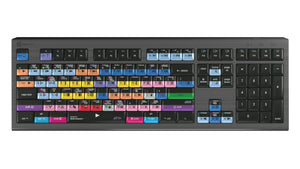
LogicKeyboard ASTRA 2 keyboard for Avid Media Composer, shown from above with color-coded shortcut keys.
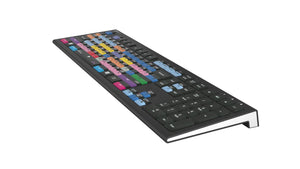
Angled view of the LogicKeyboard ASTRA 2 Avid Media Composer keyboard showing its color-coded keycaps and low profile.
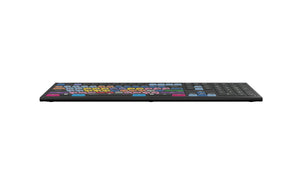
Side profile of the LogicKeyboard ASTRA 2 Avid Media Composer keyboard showing its slim, low-angle design.
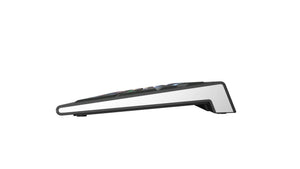
Side view of the LogicKeyboard ASTRA 2 Avid Media Composer keyboard highlighting its angled, backlit-ready keys.
LogicKeyboard ASTRA 2 keyboard for Mac in dark gray, shown from above with color-coded Avid Media Composer shortcut keys.
    LogicKeyboard ASTRA 2 keyboard for Avid Media Composer, shown from above with color-coded shortcut keys.
    Angled view of the LogicKeyboard ASTRA 2 Avid Media Composer keyboard showing its color-coded keycaps and low profile.
    Side profile of the LogicKeyboard ASTRA 2 Avid Media Composer keyboard showing its slim, low-angle design.
    Side view of the LogicKeyboard ASTRA 2 Avid Media Composer keyboard highlighting its angled, backlit-ready keys.
    LogicKeyboard ASTRA 2 keyboard for Mac in dark gray, shown from above with color-coded Avid Media Composer shortcut keys.
LogicKeyboard ASTRA 2 keyboard for Avid Media Composer, shown from above with color-coded shortcut keys.
Angled view of the LogicKeyboard ASTRA 2 Avid Media Composer keyboard showing its color-coded keycaps and low profile.
Side profile of the LogicKeyboard ASTRA 2 Avid Media Composer keyboard showing its slim, low-angle design.
Side view of the LogicKeyboard ASTRA 2 Avid Media Composer keyboard highlighting its angled, backlit-ready keys.
LogicKeyboard ASTRA 2 keyboard for Mac in dark gray, shown from above with color-coded Avid Media Composer shortcut keys.
LogicKeyboard ASTRA 2 keyboard for Avid Media Composer, shown from above with color-coded shortcut keys.
Angled view of the LogicKeyboard ASTRA 2 Avid Media Composer keyboard showing its color-coded keycaps and low profile.
Side profile of the LogicKeyboard ASTRA 2 Avid Media Composer keyboard showing its slim, low-angle design.
Side view of the LogicKeyboard ASTRA 2 Avid Media Composer keyboard highlighting its angled, backlit-ready keys.
LogicKeyboard ASTRA 2 keyboard for Mac in dark gray, shown from above with color-coded Avid Media Composer shortcut keys.
    LogicKeyboard ASTRA 2 keyboard for Avid Media Composer, shown from above with color-coded shortcut keys.
    Angled view of the LogicKeyboard ASTRA 2 Avid Media Composer keyboard showing its color-coded keycaps and low profile.
    Side profile of the LogicKeyboard ASTRA 2 Avid Media Composer keyboard showing its slim, low-angle design.
    Side view of the LogicKeyboard ASTRA 2 Avid Media Composer keyboard highlighting its angled, backlit-ready keys.
    LogicKeyboard ASTRA 2 keyboard for Mac in dark gray, shown from above with color-coded Avid Media Composer shortcut keys.
LogicKeyboard ASTRA 2 keyboard for Avid Media Composer, shown from above with color-coded shortcut keys.
Angled view of the LogicKeyboard ASTRA 2 Avid Media Composer keyboard showing its color-coded keycaps and low profile.
Side profile of the LogicKeyboard ASTRA 2 Avid Media Composer keyboard showing its slim, low-angle design.
Side view of the LogicKeyboard ASTRA 2 Avid Media Composer keyboard highlighting its angled, backlit-ready keys.
LogicKeyboard ASTRA 2 keyboard for Mac in dark gray, shown from above with color-coded Avid Media Composer shortcut keys.

About

Specifications:

  • Boost productivity with the Logickeyboard PRO shortcut keyboard designed specifically for use with AVID Media Composer.
  • Designed for Avid Media Composer
  • PRO version with 135 shortcuts
  • PC version compatible with Windows 7 - 11
  • Mac version compatible with macOS
  • ASTRA 2 keyboard
  • Backlit keys
  • Dimmable light with 5 selectable levels
  • Built-in USB 3.0* hub
  • Multimedia keys
  • Full-sized F-row
  • Scissor-switch keys with tactile feedback
  • Color-coded labelled shortcut keys with graphical commands
  • Dimensions - 17 5/8” x 6” x 11/4” (446mm x 150mm x 30mm)
  • Net weight - 2.1 lbs (950 grams)
  • Number of keys - 108 (ANSI version) 109 (ISO version)

Save time, educate yourself and boost productivity with the Logickeyboard PRO shortcut keyboard designed specifically for use with AVID Media Composer. This keyboard is your way into a more efficient and productive video editing workflow. A shortcut keyboard with color-coded split keys, offering video editors time saving functionality by featuring multiple functions on each key – a design that simplifies complex tasks and makes the process more intuitive by visualizing 135 shortcuts.

The keyboard is recommended for usage in post-production facilities, professional video editing companies and by anyone else who requires the custom key commands to be readily accessible on a dedicated, clearly labeled, and color-coded keyboard. Skip the tedious menu navigation, with color-coded shortcut keys that offer instant access to functions. This keyboard is also a superb way to learn the Avid Media Composer shortcut key commands. Make every second count in your editing process with the Logickeyboard Astra 2 keyboard, for AVID Media Composer.

The Astra 2 keyboard features backlit keys with five selectable light levels, catering to every lighting scenario. The build-in USB 3.0 hub facilitates easy connection to your devices, while the full-sized F-row and multimedia keys put comprehensive control at your fingertips. While the ASTRA 2 boasts a sleek profile, with scissor-switch keys for a light and excellent responsive feel, it is robustly built for professional use, making it a reliable workhorse for all your editing needs. The keyboard is easily connected with 2 distinctive USB cables for plug-and-play.

To power the keyboard, you need to plug in the grey USB connector. If you need to activate the USB hub, on the back of the keyboard, plug in the black USB connector. 


Specifications:

  • Boost productivity with the Logickeyboard PRO shortcut keyboard designed specifically for use with AVID Media Composer.
  • Designed for Avid Media Composer
  • PRO version with 135 shortcuts
  • PC version compatible with Windows 7 - 11
  • Mac version compatible with macOS
  • ASTRA 2 keyboard
  • Backlit keys
  • Dimmable light with 5 selectable levels
  • Built-in USB 3.0* hub
  • Multimedia keys
  • Full-sized F-row
  • Scissor-switch keys with tactile feedback
  • Color-coded labelled shortcut keys with graphical commands
  • Dimensions - 17 5/8” x 6” x 11/4” (446mm x 150mm x 30mm)
  • Net weight - 2.1 lbs (950 grams)
  • Number of keys - 108 (ANSI version) 109 (ISO version)

Save time, educate yourself and boost productivity with the Logickeyboard PRO shortcut keyboard designed specifically for use with AVID Media Composer. This keyboard is your way into a more efficient and productive video editing workflow. A shortcut keyboard with color-coded split keys, offering video editors time saving functionality by featuring multiple functions on each key – a design that simplifies complex tasks and makes the process more intuitive by visualizing 135 shortcuts.

The keyboard is recommended for usage in post-production facilities, professional video editing companies and by anyone else who requires the custom key commands to be readily accessible on a dedicated, clearly labeled, and color-coded keyboard. Skip the tedious menu navigation, with color-coded shortcut keys that offer instant access to functions. This keyboard is also a superb way to learn the Avid Media Composer shortcut key commands. Make every second count in your editing process with the Logickeyboard Astra 2 keyboard, for AVID Media Composer.

The Astra 2 keyboard features backlit keys with five selectable light levels, catering to every lighting scenario. The build-in USB 3.0 hub facilitates easy connection to your devices, while the full-sized F-row and multimedia keys put comprehensive control at your fingertips. While the ASTRA 2 boasts a sleek profile, with scissor-switch keys for a light and excellent responsive feel, it is robustly built for professional use, making it a reliable workhorse for all your editing needs. The keyboard is easily connected with 2 distinctive USB cables for plug-and-play.

To power the keyboard, you need to plug in the grey USB connector. If you need to activate the USB hub, on the back of the keyboard, plug in the black USB connector. 


LogicKeyboard by LogicKeyboard

5.0

0 reviews

LogicKeyboard ASTRA2 keyboard for Avid Media Composer - Pro version for PC & MAC

SKU:LKB-MCOMP-A2PC-US

Regular price
$149.90
Sale price
$149.90
Regular price
Save time, educate yourself and boost productivity with the Logickeyboard PRO shortcut keyboard made specifically for use with A...  Read more
Save time, educate yourself and boost productivity with the Logickeyboard PRO shortcut keyboard made specifically for use with AVID Media Composer. This keyboard is your way into a more efficient and productive video editing workflow. A shortcut keyboard with color-coded split keys, offering video editors time saving functionality by featuring multiple functions on each key – a design that simplifies complex tasks and makes the process more intuitive by visualizing 135 shortcuts.
Style:

Not sure this is the right fit?

Our certified specialists can evaluate your workstation and recommend the right setup for you.

Request an Ergonomic Evaluation →
Free Shipping
On orders over $99
Certified Specialists
Expert guidance on your purchase
Flexible Payments
4 interest-free installments with Shop Pay

Trusted By

FAQs About the LogicKeyboard ASTRA2 for Avid Media Composer

1

Who is the LogicKeyboard ASTRA2 for Avid Media Composer designed for?

The LogicKeyboard ASTRA2 for Avid Media Composer is designed for video editors who work in Avid Media Composer, including those in post-production facilities and professional video editing companies who want their custom key commands visible on a dedicated, labeled keyboard instead of memorizing menu navigation.

2

How many shortcuts does the ASTRA2 keyboard include for Avid Media Composer?

The ASTRA2 keyboard features 135 color-coded shortcuts for Avid Media Composer Pro, with each key graphically labeled so you can see multiple functions on a single key without needing to look up a reference sheet.

3

What are the dimensions and weight of the ASTRA2 keyboard?

The ASTRA2 keyboard measures 17 5/8" x 6" x 1 1/4" (446mm x 150mm x 30mm) and weighs 2.1 lbs (950 grams), with 108 keys on the ANSI version or 109 keys on the ISO version.

4

What is the built-in USB hub for, and how do I activate it?

The ASTRA2 has a built-in USB 3.0 hub for connecting additional devices directly through the keyboard. To activate the hub, plug in the black USB connector on the back of the keyboard; the separate grey USB connector powers the keyboard itself.

5

Does the ASTRA2 keyboard have adjustable backlighting?

Yes, the ASTRA2 keyboard has backlit keys with 5 selectable brightness levels, letting you adjust visibility for different lighting conditions in an edit suite or production office, from bright daytime rooms to dim evening sessions.

6

What type of keys does the ASTRA2 use?

The ASTRA2 uses scissor-switch keys, which are designed to feel light and responsive while remaining robustly built for professional daily use in demanding editing environments. This mechanism also tends to run quieter than taller mechanical switches, which can matter in a shared edit bay.

Check Out These Related Products