




About
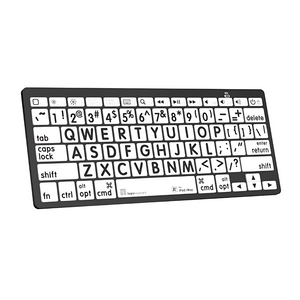
Large Print Bluetooth Keyboard — Designed for Low Vision & Visual Impairment
Recommended by vision specialists and certified ergonomic consultants for macular degeneration, cataracts, diabetic retinopathy, glaucoma, and age-related vision decline. The LogicKeyboard Large Print Bluetooth Keyboard features characters 4x larger than standard keyboards with clinically recommended high-contrast color options — so you can type confidently without straining, squinting, or second-guessing every keystroke.
Trusted by senior living facilities, hospital accessibility programs, corporate ADA compliance teams, and rehabilitation centers across the Bay Area and nationwide. Recommended by Ask Ergo Works — certified ergonomic specialists with 30+ years of assistive technology expertise.
Key Features & Benefits
- 4x Larger Characters — Dramatically easier to see than standard keyboards, reducing eye strain and typing errors
- High-Contrast Color Options — Yellow-on-Black (highest contrast), White-on-Black, or Black-on-White, recommended by vision specialists
- Wireless Bluetooth Connectivity — Works seamlessly with PC, Mac, iPad, and tablets without cable clutter
- Compact Mini Layout — Reduces desk footprint while maintaining full typing functionality
- Ergonomic Low-Profile Keys — Reduces finger fatigue during extended typing sessions
- Multi-Device Compatibility — Switch between computer, tablet, and other Bluetooth devices
- Rechargeable Battery — Weeks of use between charges
- Plug-and-Play Setup — No drivers required, pairs instantly via Bluetooth
Who This Keyboard Is For
Purpose-built for seniors, individuals with macular degeneration, diabetic retinopathy, glaucoma, cataracts, nystagmus, and anyone experiencing vision challenges from age-related decline or medical conditions. Widely deployed in senior living facilities, accessibility workstations, healthcare settings, corporate ADA compliance programs, rehabilitation centers, and assistive technology setups across the US.
Experience the Difference
Imagine typing confidently without leaning forward to read keys, without second-guessing every keystroke, and without the headache that comes from hours of eye strain. The LogicKeyboard Large Print Bluetooth transforms your computing experience from frustrating to effortless. Users report being able to work longer, type faster, and feel less fatigued at the end of the day.
Technical Specifications
- Character Size: 4x larger than standard keyboards
- Color Options: Yellow-on-Black (highest contrast), White-on-Black, Black-on-White
- Connectivity: Bluetooth wireless (Bluetooth 3.0)
- Compatibility: PC (Windows 7+), Mac (OS X 10.6+), iPad, Android tablets
- Layout: Compact mini keyboard with full QWERTY layout
- Battery: Rechargeable lithium battery, weeks of use per charge
- Key Type: Low-profile membrane keys
- What's Included: Keyboard, USB charging cable, quick start guide
Frequently Asked Questions
Which color combination is best for macular degeneration or low vision?
Yellow-on-Black provides the highest contrast and is most recommended by vision specialists for macular degeneration, diabetic retinopathy, and severe low vision. White-on-Black offers strong contrast for general low vision needs. Black-on-White works well for users who prefer traditional color schemes with larger characters. If you're unsure which is right for your specific condition, our certified specialists can advise. Learn more about our consulting services.
Is this keyboard suitable for someone with glaucoma?
Yes — the high-contrast color options and 4x larger characters are beneficial for users managing glaucoma-related peripheral vision loss and contrast sensitivity reduction. The Yellow-on-Black option is typically most effective for users with significant contrast sensitivity impairment. For users with progressive glaucoma, we recommend pairing the keyboard with a workstation lighting assessment to optimize your full visual environment.
Is this keyboard suitable for someone with macular degeneration?
Yes — the LogicKeyboard Large Print is specifically designed for macular degeneration. The 4x larger characters and high-contrast color options address the central vision loss and contrast sensitivity challenges characteristic of both dry and wet macular degeneration. Many users with AMD report being able to type independently again after struggling with standard keyboards.
How does this compare to the LogicKeyboard Large Print Slimline (wired) version?
The Bluetooth version offers wireless freedom — ideal for users who want a clutter-free desk, use multiple devices (PC + iPad), or need flexibility in keyboard placement. The Slimline wired version is better for users who prefer a wired connection, don't need multi-device switching, or want a lower-cost option. Both feature the same 4x larger characters and high-contrast color options.
How does this compare to the LogicKeyboard Braille keyboard?
The Large Print Bluetooth is designed for users with low vision who can still read enlarged print. The LogicKeyboard Braille ALBA is designed for users who are blind or have severe vision impairment and rely on tactile Braille characters. If you're unsure which is appropriate for your level of vision, our specialists can help assess the right solution. Learn more about our consulting services.
Will this work with my iPad or tablet?
Yes. The LogicKeyboard Large Print Bluetooth connects to any Bluetooth-enabled device including iPads, Android tablets, Windows PCs, and Macs. Simply pair via Bluetooth settings — no additional software required.
How much larger are the characters compared to a regular keyboard?
The characters are 4 times larger than standard keyboard lettering. This dramatic size increase makes keys visible from normal viewing distance without leaning forward or squinting.
How long does the battery last?
The rechargeable battery provides weeks of typical use between charges. Charge via the included USB cable — full charge takes approximately 2–3 hours. The keyboard can be used in wired mode while charging.
Does this keyboard have a numeric keypad?
This is a compact mini layout without a dedicated numeric keypad, reducing desk space requirements. Number keys are available across the top row in standard QWERTY layout. If a full-size layout with numeric keypad is required, contact us for alternative options.
What's the difference between PC and Mac versions?
The Mac version includes Mac-specific modifier keys (Command, Option) and function keys. The PC version has Windows keys and PC function keys. Both work on either platform via Bluetooth, but the labeled keys match your operating system.
Is this keyboard suitable for bulk purchase by senior living facilities or healthcare organizations?
Yes — this is one of our most frequently requested products for institutional accessibility programs. Ask Ergo Works works with senior living communities, hospitals, rehabilitation centers, and corporate ADA compliance teams on bulk orders and assistive technology assessments. Contact our certified ergonomic specialists to discuss volume pricing and deployment support.
Why choose a dedicated large print keyboard over font-size software settings or key stickers?
Software font enlargement only affects on-screen content — it does nothing for the physical keys you're looking at while typing. Key stickers wear off, misalign, and reduce tactile feedback. A dedicated large print keyboard provides permanent, high-contrast, purpose-built visibility that doesn't degrade over time and requires zero software configuration.
Complete Your Accessibility Workstation
The Large Print Bluetooth Keyboard addresses keyboard visibility — but a fully optimized accessibility workstation also considers monitor positioning, lighting, screen magnification, and ergonomic setup. Our specialists can help you build a complete solution:
- LogicKeyboard Braille ALBA — For users with severe vision impairment or blindness requiring tactile Braille characters
- LogicKeyboard Large Print Slimline (Wired) — Wired alternative with the same 4x larger characters
- Accessibility Workstation Assessment — Full evaluation by certified specialists covering keyboard, monitor, lighting, and assistive technology
Why Ask Ergo Works?
With 30+ years of ergonomic and assistive technology expertise, Ask Ergo Works is not a general accessories retailer — we are certified ergonomic specialists who have helped hundreds of individuals with vision impairments find the right accessibility solutions. The LogicKeyboard Large Print Bluetooth consistently ranks as our top recommendation for users with low vision, macular degeneration, and age-related vision decline.
- Certified specialists — Professional ergonomic and assistive technology certifications
- Evidence-based recommendations — We assess your specific vision profile and computing needs before recommending any solution
- Trusted by healthcare & senior care organizations — Institutional deployments across senior living, rehabilitation, and hospital settings
- Bay Area presence, nationwide reach — In-person assessments in the Bay Area; virtual consultations available nationwide
- Post-purchase support — Available to help with setup, pairing, and ongoing accessibility guidance
Need help choosing the right accessibility keyboard or setup? Our ergonomic consulting services include personalized accessibility assessments covering keyboard selection, monitor positioning, lighting optimization, and assistive technology recommendations based on your vision profile and work tasks.
Regain your independence and typing confidence. Stop struggling with tiny keys and invest in a keyboard designed specifically for your vision needs.
Large Print Bluetooth Keyboard — Designed for Low Vision & Visual Impairment
Recommended by vision specialists and certified ergonomic consultants for macular degeneration, cataracts, diabetic retinopathy, glaucoma, and age-related vision decline. The LogicKeyboard Large Print Bluetooth Keyboard features characters 4x larger than standard keyboards with clinically recommended high-contrast color options — so you can type confidently without straining, squinting, or second-guessing every keystroke.
Trusted by senior living facilities, hospital accessibility programs, corporate ADA compliance teams, and rehabilitation centers across the Bay Area and nationwide. Recommended by Ask Ergo Works — certified ergonomic specialists with 30+ years of assistive technology expertise.
Key Features & Benefits
- 4x Larger Characters — Dramatically easier to see than standard keyboards, reducing eye strain and typing errors
- High-Contrast Color Options — Yellow-on-Black (highest contrast), White-on-Black, or Black-on-White, recommended by vision specialists
- Wireless Bluetooth Connectivity — Works seamlessly with PC, Mac, iPad, and tablets without cable clutter
- Compact Mini Layout — Reduces desk footprint while maintaining full typing functionality
- Ergonomic Low-Profile Keys — Reduces finger fatigue during extended typing sessions
- Multi-Device Compatibility — Switch between computer, tablet, and other Bluetooth devices
- Rechargeable Battery — Weeks of use between charges
- Plug-and-Play Setup — No drivers required, pairs instantly via Bluetooth
Who This Keyboard Is For
Purpose-built for seniors, individuals with macular degeneration, diabetic retinopathy, glaucoma, cataracts, nystagmus, and anyone experiencing vision challenges from age-related decline or medical conditions. Widely deployed in senior living facilities, accessibility workstations, healthcare settings, corporate ADA compliance programs, rehabilitation centers, and assistive technology setups across the US.
Experience the Difference
Imagine typing confidently without leaning forward to read keys, without second-guessing every keystroke, and without the headache that comes from hours of eye strain. The LogicKeyboard Large Print Bluetooth transforms your computing experience from frustrating to effortless. Users report being able to work longer, type faster, and feel less fatigued at the end of the day.
Technical Specifications
- Character Size: 4x larger than standard keyboards
- Color Options: Yellow-on-Black (highest contrast), White-on-Black, Black-on-White
- Connectivity: Bluetooth wireless (Bluetooth 3.0)
- Compatibility: PC (Windows 7+), Mac (OS X 10.6+), iPad, Android tablets
- Layout: Compact mini keyboard with full QWERTY layout
- Battery: Rechargeable lithium battery, weeks of use per charge
- Key Type: Low-profile membrane keys
- What's Included: Keyboard, USB charging cable, quick start guide
Frequently Asked Questions
Which color combination is best for macular degeneration or low vision?
Yellow-on-Black provides the highest contrast and is most recommended by vision specialists for macular degeneration, diabetic retinopathy, and severe low vision. White-on-Black offers strong contrast for general low vision needs. Black-on-White works well for users who prefer traditional color schemes with larger characters. If you're unsure which is right for your specific condition, our certified specialists can advise. Learn more about our consulting services.
Is this keyboard suitable for someone with glaucoma?
Yes — the high-contrast color options and 4x larger characters are beneficial for users managing glaucoma-related peripheral vision loss and contrast sensitivity reduction. The Yellow-on-Black option is typically most effective for users with significant contrast sensitivity impairment. For users with progressive glaucoma, we recommend pairing the keyboard with a workstation lighting assessment to optimize your full visual environment.
Is this keyboard suitable for someone with macular degeneration?
Yes — the LogicKeyboard Large Print is specifically designed for macular degeneration. The 4x larger characters and high-contrast color options address the central vision loss and contrast sensitivity challenges characteristic of both dry and wet macular degeneration. Many users with AMD report being able to type independently again after struggling with standard keyboards.
How does this compare to the LogicKeyboard Large Print Slimline (wired) version?
The Bluetooth version offers wireless freedom — ideal for users who want a clutter-free desk, use multiple devices (PC + iPad), or need flexibility in keyboard placement. The Slimline wired version is better for users who prefer a wired connection, don't need multi-device switching, or want a lower-cost option. Both feature the same 4x larger characters and high-contrast color options.
How does this compare to the LogicKeyboard Braille keyboard?
The Large Print Bluetooth is designed for users with low vision who can still read enlarged print. The LogicKeyboard Braille ALBA is designed for users who are blind or have severe vision impairment and rely on tactile Braille characters. If you're unsure which is appropriate for your level of vision, our specialists can help assess the right solution. Learn more about our consulting services.
Will this work with my iPad or tablet?
Yes. The LogicKeyboard Large Print Bluetooth connects to any Bluetooth-enabled device including iPads, Android tablets, Windows PCs, and Macs. Simply pair via Bluetooth settings — no additional software required.
How much larger are the characters compared to a regular keyboard?
The characters are 4 times larger than standard keyboard lettering. This dramatic size increase makes keys visible from normal viewing distance without leaning forward or squinting.
How long does the battery last?
The rechargeable battery provides weeks of typical use between charges. Charge via the included USB cable — full charge takes approximately 2–3 hours. The keyboard can be used in wired mode while charging.
Does this keyboard have a numeric keypad?
This is a compact mini layout without a dedicated numeric keypad, reducing desk space requirements. Number keys are available across the top row in standard QWERTY layout. If a full-size layout with numeric keypad is required, contact us for alternative options.
What's the difference between PC and Mac versions?
The Mac version includes Mac-specific modifier keys (Command, Option) and function keys. The PC version has Windows keys and PC function keys. Both work on either platform via Bluetooth, but the labeled keys match your operating system.
Is this keyboard suitable for bulk purchase by senior living facilities or healthcare organizations?
Yes — this is one of our most frequently requested products for institutional accessibility programs. Ask Ergo Works works with senior living communities, hospitals, rehabilitation centers, and corporate ADA compliance teams on bulk orders and assistive technology assessments. Contact our certified ergonomic specialists to discuss volume pricing and deployment support.
Why choose a dedicated large print keyboard over font-size software settings or key stickers?
Software font enlargement only affects on-screen content — it does nothing for the physical keys you're looking at while typing. Key stickers wear off, misalign, and reduce tactile feedback. A dedicated large print keyboard provides permanent, high-contrast, purpose-built visibility that doesn't degrade over time and requires zero software configuration.
Complete Your Accessibility Workstation
The Large Print Bluetooth Keyboard addresses keyboard visibility — but a fully optimized accessibility workstation also considers monitor positioning, lighting, screen magnification, and ergonomic setup. Our specialists can help you build a complete solution:
- LogicKeyboard Braille ALBA — For users with severe vision impairment or blindness requiring tactile Braille characters
- LogicKeyboard Large Print Slimline (Wired) — Wired alternative with the same 4x larger characters
- Accessibility Workstation Assessment — Full evaluation by certified specialists covering keyboard, monitor, lighting, and assistive technology
Why Ask Ergo Works?
With 30+ years of ergonomic and assistive technology expertise, Ask Ergo Works is not a general accessories retailer — we are certified ergonomic specialists who have helped hundreds of individuals with vision impairments find the right accessibility solutions. The LogicKeyboard Large Print Bluetooth consistently ranks as our top recommendation for users with low vision, macular degeneration, and age-related vision decline.
- Certified specialists — Professional ergonomic and assistive technology certifications
- Evidence-based recommendations — We assess your specific vision profile and computing needs before recommending any solution
- Trusted by healthcare & senior care organizations — Institutional deployments across senior living, rehabilitation, and hospital settings
- Bay Area presence, nationwide reach — In-person assessments in the Bay Area; virtual consultations available nationwide
- Post-purchase support — Available to help with setup, pairing, and ongoing accessibility guidance
Need help choosing the right accessibility keyboard or setup? Our ergonomic consulting services include personalized accessibility assessments covering keyboard selection, monitor positioning, lighting optimization, and assistive technology recommendations based on your vision profile and work tasks.
Regain your independence and typing confidence. Stop struggling with tiny keys and invest in a keyboard designed specifically for your vision needs.
LogicKeyboard Large Print Bluetooth Keyboard | PC, Mac & iPad
SKU:LKB-LPWB-BTPC-US
- Regular price
- $114.90
- Sale price
- $114.90
- Regular price
-
Need expert help choosing the right setup?
Our certified specialists offer professional ergonomic evaluations tailored to your workstation.
Request a Quote →Couldn't load pickup availability


Trusted By


