




About
Professional Data Entry Comfort — Kinesis Freestyle2 Keypad for Numeric Efficiency
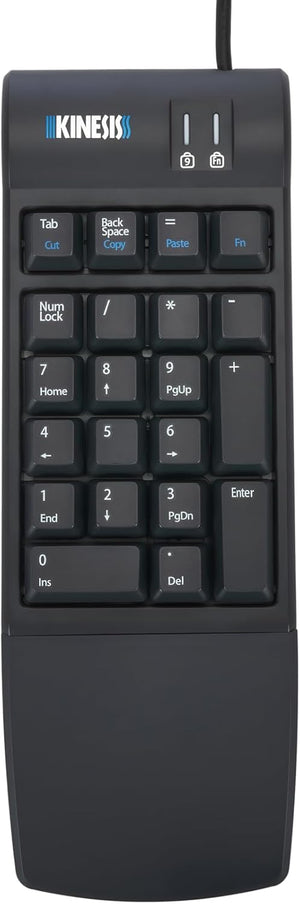
Need a dedicated numeric keypad for your Freestyle2 or compact keyboard? The Kinesis Freestyle2 Keypad (KP800) is a standalone 10-key numeric pad featuring low-profile layout, detachable palm support, and Windows hotkeys. Designed to complement the Freestyle2 ergonomic keyboard's tactile feel and ergonomic principles, this keypad delivers comfortable, consistent typing for data professionals, accountants, and 10-key users.
Backed by Ask Ergo Works' 30 years of ergonomic expertise, the KP800 provides the same low-force, full-travel key switches as the Freestyle2 keyboard, ensuring fatigue-free data entry during extended sessions. Whether you're crunching numbers or navigating spreadsheets, this keypad delivers professional-grade comfort and efficiency.
Why You'll Love It:
- Detachable palm support — Reduces wrist strain and provides optional support for extended data entry sessions
- Low-force full-travel switches — Quiet, tactile membrane switches (44g peak force, 35g activation, 3.9mm travel) offer smooth, fatigue-free experience
- Integrated Windows hotkeys — Dedicated Cut, Copy, and Paste keys streamline workflow (Windows only)
- Matches Freestyle2 feel — Same tactile response and key feel as Freestyle2 keyboard for consistent typing experience
- Sleek compact design — Professional appearance complements Freestyle2 keyboard aesthetics
- Versatile standalone use — Works great with any compact keyboard or laptop, not just Freestyle2
- Reduces shoulder reach — Position keypad on left or right side to minimize mouse reach and improve posture
- Plug-and-play simplicity — USB connection works with major operating systems without drivers
- Lightweight and portable — Only 0.60 lbs, perfect for mobile professionals and laptop users
- 6-foot USB cable — Generous cable length provides positioning flexibility
Technical Specifications:
- Model: KP800
- Switch Type: Rubber dome membrane
- Peak Force: 44g
- Activation Force: 35g
- Key Travel: 3.9mm (full travel)
- Dimensions:
- Width: 3.5 inches
- Depth with Palm Support: 10.0 inches
- Depth without Palm Support: 7.125 inches
- Height: 0.875 inches
- Weight: 0.60 lbs (lightweight, portable)
- USB Cable: USB Type A, 6 feet
- Compatibility: Windows 7-11, macOS, Linux, Android
- Hotkeys: Cut, Copy, Paste (Windows optimized; Mac users can remap via System Preferences)
- Included: Freestyle2 Keypad, removable palm support, attached USB cable, quick start instructions
Perfect For:
- Accountants and finance professionals who need dedicated numeric entry
- Data analysts and spreadsheet power users
- Freestyle2 keyboard users seeking matching numeric keypad
- Laptop and compact keyboard users needing 10-key functionality
- Office workers who frequently enter numeric data
- Users seeking ergonomic keypad with palm support
- Mobile professionals who need portable numeric solution
System Compatibility:
Windows 7-11: Full functionality including Cut, Copy, Paste hotkeys
macOS: Full numeric functionality; hotkeys can be remapped via System Preferences
Linux: Full numeric functionality
Android: Basic numeric functionality
Why Separate Numeric Keypad?
A detachable numeric keypad offers significant ergonomic advantages over integrated numpads. Position it on your left side to keep your mouse closer (reducing shoulder reach), or on your right for traditional placement. When not needed for data entry, move it aside to bring your mouse even closer. This flexibility is impossible with keyboards that have built-in numpads, which force your mouse into an extended shoulder position.
Expert-Recommended Numeric Keypad Solution
Ask Ergo Works has been helping data professionals optimize their workstations for over 30 years. The Kinesis Freestyle2 Keypad is our top recommendation for users who need dedicated numeric entry with ergonomic benefits. The detachable palm support reduces wrist extension during extended data entry, while the low-force switches minimize finger fatigue. The ability to position the keypad on either side of your keyboard provides ergonomic flexibility that integrated numpads can't match. Whether you're using it with a Freestyle2 keyboard or any compact keyboard, this keypad delivers professional-grade comfort and efficiency.
In Stock Now — Ships Fast with Free Shipping!
Upgrade your numeric data entry experience. Add the Kinesis Freestyle2 Keypad to your cart and experience ergonomic 10-key comfort. Questions about compatibility or palm support? Our certified ergonomists are here to help.
Professional Data Entry Comfort — Kinesis Freestyle2 Keypad for Numeric Efficiency
Need a dedicated numeric keypad for your Freestyle2 or compact keyboard? The Kinesis Freestyle2 Keypad (KP800) is a standalone 10-key numeric pad featuring low-profile layout, detachable palm support, and Windows hotkeys. Designed to complement the Freestyle2 ergonomic keyboard's tactile feel and ergonomic principles, this keypad delivers comfortable, consistent typing for data professionals, accountants, and 10-key users.
Backed by Ask Ergo Works' 30 years of ergonomic expertise, the KP800 provides the same low-force, full-travel key switches as the Freestyle2 keyboard, ensuring fatigue-free data entry during extended sessions. Whether you're crunching numbers or navigating spreadsheets, this keypad delivers professional-grade comfort and efficiency.
Why You'll Love It:
- Detachable palm support — Reduces wrist strain and provides optional support for extended data entry sessions
- Low-force full-travel switches — Quiet, tactile membrane switches (44g peak force, 35g activation, 3.9mm travel) offer smooth, fatigue-free experience
- Integrated Windows hotkeys — Dedicated Cut, Copy, and Paste keys streamline workflow (Windows only)
- Matches Freestyle2 feel — Same tactile response and key feel as Freestyle2 keyboard for consistent typing experience
- Sleek compact design — Professional appearance complements Freestyle2 keyboard aesthetics
- Versatile standalone use — Works great with any compact keyboard or laptop, not just Freestyle2
- Reduces shoulder reach — Position keypad on left or right side to minimize mouse reach and improve posture
- Plug-and-play simplicity — USB connection works with major operating systems without drivers
- Lightweight and portable — Only 0.60 lbs, perfect for mobile professionals and laptop users
- 6-foot USB cable — Generous cable length provides positioning flexibility
Technical Specifications:
- Model: KP800
- Switch Type: Rubber dome membrane
- Peak Force: 44g
- Activation Force: 35g
- Key Travel: 3.9mm (full travel)
- Dimensions:
- Width: 3.5 inches
- Depth with Palm Support: 10.0 inches
- Depth without Palm Support: 7.125 inches
- Height: 0.875 inches
- Weight: 0.60 lbs (lightweight, portable)
- USB Cable: USB Type A, 6 feet
- Compatibility: Windows 7-11, macOS, Linux, Android
- Hotkeys: Cut, Copy, Paste (Windows optimized; Mac users can remap via System Preferences)
- Included: Freestyle2 Keypad, removable palm support, attached USB cable, quick start instructions
Perfect For:
- Accountants and finance professionals who need dedicated numeric entry
- Data analysts and spreadsheet power users
- Freestyle2 keyboard users seeking matching numeric keypad
- Laptop and compact keyboard users needing 10-key functionality
- Office workers who frequently enter numeric data
- Users seeking ergonomic keypad with palm support
- Mobile professionals who need portable numeric solution
System Compatibility:
Windows 7-11: Full functionality including Cut, Copy, Paste hotkeys
macOS: Full numeric functionality; hotkeys can be remapped via System Preferences
Linux: Full numeric functionality
Android: Basic numeric functionality
Why Separate Numeric Keypad?
A detachable numeric keypad offers significant ergonomic advantages over integrated numpads. Position it on your left side to keep your mouse closer (reducing shoulder reach), or on your right for traditional placement. When not needed for data entry, move it aside to bring your mouse even closer. This flexibility is impossible with keyboards that have built-in numpads, which force your mouse into an extended shoulder position.
Expert-Recommended Numeric Keypad Solution
Ask Ergo Works has been helping data professionals optimize their workstations for over 30 years. The Kinesis Freestyle2 Keypad is our top recommendation for users who need dedicated numeric entry with ergonomic benefits. The detachable palm support reduces wrist extension during extended data entry, while the low-force switches minimize finger fatigue. The ability to position the keypad on either side of your keyboard provides ergonomic flexibility that integrated numpads can't match. Whether you're using it with a Freestyle2 keyboard or any compact keyboard, this keypad delivers professional-grade comfort and efficiency.
In Stock Now — Ships Fast with Free Shipping!
Upgrade your numeric data entry experience. Add the Kinesis Freestyle2 Keypad to your cart and experience ergonomic 10-key comfort. Questions about compatibility or palm support? Our certified ergonomists are here to help.
Kinesis Freestyle2 Keypad KP800 | Ergonomic 10-Key Numeric Pad
SKU:KP800
- Regular price
- $39.95
- Sale price
- $39.95
- Regular price
-
Need expert help choosing the right setup?
Our certified specialists offer professional ergonomic evaluations tailored to your workstation.
Request a Quote →Couldn't load pickup availability


Trusted By


