


About
Kinesis Advantage2 Single Pedal FS007RJ11 — Hands-Free Programmable Foot Switch
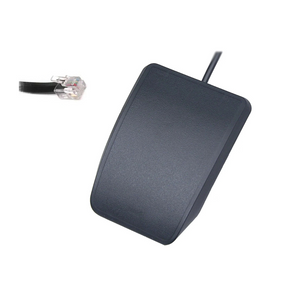
The Kinesis Advantage2 Single Pedal (FS007RJ11) is a purpose-built programmable foot switch designed for the Kinesis Advantage and Advantage2 keyboard families. It connects directly to the RJ-11 jack on the underside of your keyboard, adding a fully programmable hands-free input channel to your workstation — without any additional software or drivers for basic use.
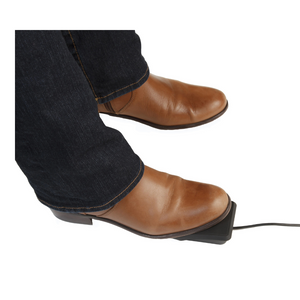
Program it to perform any key action, modifier, macro, or mouse click. Whether you're toggling the numeric keypad layer dozens of times per day, holding modifiers for complex shortcuts, or simply reducing unnecessary hand movements, the FS007RJ11 delivers measurable ergonomic and productivity benefits for professionals who type extensively.
Key Benefits & Features
- Hands-Free Input: Offload modifiers, layer keys, and macros to your foot — reduce hand fatigue and keep fingers on the home row
- Fully Programmable: Assign any key, macro, modifier, or mouse click via SmartSet App (Windows) or onboard keyboard programming
- Direct RJ-11 Connection: Plugs into the RJ-11 jack on the underside of Advantage/Advantage2 keyboards — no USB port required
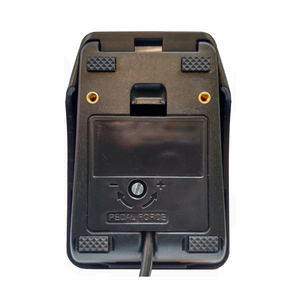
- Low-Force Activation: Minimal foot pressure required for comfortable, fatigue-free extended use
- Floor Anchor Included: Self-adhesive hook-and-loop tab keeps the pedal in place and prevents accidental movement
- Durable Construction: Built to withstand thousands of activations for years of reliable professional use
- Plug-and-Play: No drivers required for basic operation — connects and works immediately
Common Applications
- Toggle numeric keypad layer without leaving the home row
- Press-and-hold modifiers: Shift, Ctrl, Alt, Cmd
- Frequently used keys: Space, Tab, Enter, Escape, F-keys
- Single or double mouse-clicks
- Custom macros for repetitive workflows
Technical Specifications
- Model: FS007RJ11
- Connection: RJ-11 telephone-style jack (keyboard underside)
- Compatibility: Kinesis Advantage (all models) | Kinesis Advantage2 (KB600 series)
- Programming: SmartSet App (Windows) or onboard keyboard commands
- Activation Force: Low-force
- Floor Anchor: Self-adhesive hook-and-loop tab included
- Brand: Kinesis
- SKU: FS007RJ11
⚠️ Note: The FS007RJ11 is designed exclusively for Kinesis Advantage and Advantage2 keyboards. It is not compatible with the Advantage360 (which uses the FS360) or standalone USB setups. For standalone USB foot pedals, see our Savant Elite2 and JSB foot pedal families.
Frequently Asked Questions
What is the Kinesis Advantage2 Single Pedal FS007RJ11?
The FS007RJ11 is a single programmable foot switch designed for Kinesis Advantage and Advantage2 keyboards. It connects via RJ-11 jack to the underside of the keyboard and can be programmed to perform any key action, modifier, macro, or mouse click — completely hands-free.
Which keyboards is the FS007RJ11 compatible with?
The FS007RJ11 is compatible with all Kinesis Advantage models and the Kinesis Advantage2 (KB600 series). It is not compatible with the Advantage360 (which uses the FS360 with USB-C) or any non-Kinesis keyboard.
How do I connect the FS007RJ11 to my keyboard?
Simply plug the RJ-11 connector into the telephone-style jack on the underside of your Advantage or Advantage2 keyboard. No drivers or software are required for basic operation — it connects and works immediately.
How do I program the foot pedal?
You can program the FS007RJ11 two ways: (1) via the SmartSet App for Windows, which provides a graphical interface for assigning key actions and macros, or (2) using onboard keyboard programming shortcuts stored directly in the keyboard's memory.
What actions can I assign to the pedal?
You can assign virtually any key action: modifiers (Shift, Ctrl, Alt, Cmd), layer toggle keys (numeric keypad), frequently used keys (Space, Tab, Enter, Escape, F-keys), mouse clicks, or custom macros. It's a flexible hands-free input channel for any workflow.
Will this foot pedal help reduce my hand and wrist strain?
Yes. Offloading modifier keys and repetitive shortcuts to your foot reduces the total number of keystrokes your hands perform, which can meaningfully reduce cumulative strain — particularly for users with RSI, carpal tunnel syndrome, or tendinitis. Our certified ergonomic specialists can help you build a complete hands-free workstation strategy. Learn about our ergonomic consulting services.
Is this good for carpal tunnel syndrome or RSI?
Yes. Distributing keyboard workload between hands and feet reduces the repetitive motion burden on the wrists and hands. The FS007RJ11 is frequently recommended by occupational therapists as part of a conservative management strategy for carpal tunnel syndrome, tendinitis, and RSI.
How does the FS007RJ11 compare to the FS360 for the Advantage360?
Both are single-pedal Kinesis accessories, but they are not interchangeable. The FS007RJ11 uses an RJ-11 connector and is designed for the Advantage/Advantage2 keyboard family. The FS360 uses USB-C and is designed exclusively for the Advantage360 SmartSet. Match the pedal to your specific keyboard model.
How does this compare to the Savant Elite2 standalone foot pedals?
The FS007RJ11 is a keyboard-integrated pedal — it works only with Advantage/Advantage2 keyboards and is programmed through SmartSet. The Savant Elite2 family are standalone USB foot pedals that work with any computer and any keyboard, with their own programming software. If you don't own an Advantage or Advantage2, the Savant Elite2 is the right choice.
Will the pedal slide around on the floor?
No. The FS007RJ11 includes a self-adhesive hook-and-loop tab that anchors the pedal to the floor, preventing accidental movement during use.
Is the FS007RJ11 suitable for call center or high-volume data entry environments?
Absolutely. The FS007RJ11 is well-suited for call center, healthcare, and data entry environments where employees type for 6–8+ hours per day. Assigning the numeric keypad toggle or modifier keys to the foot pedal significantly reduces hand fatigue in high-repetition roles.
Is it durable enough for daily professional use?
Yes. The FS007RJ11 is built to withstand thousands of activations and is designed for intensive daily professional use in offices, labs, healthcare settings, and call centers.
Why Ask Ergo Works?
Ask Ergo Works has been a trusted ergonomic solutions provider for 30+ years, serving enterprise clients, healthcare organizations, labs, manufacturing facilities, and educational institutions across the Bay Area and nationwide. Our certified ergonomic specialists assess your specific needs, workstation setup, and physical condition to ensure the solution actually works for you.
- 30+ Years of Ergonomic Expertise — deep knowledge across keyboards, input devices, seating, and clinical ergonomics
- Certified Ergonomic Specialists — professional assessment, not generic recommendations
- Authorized Kinesis Dealer — genuine Kinesis products, manufacturer warranty
- Personalized Recommendations — we match products to your specific condition, role, and setup
- Enterprise & B2B Procurement — bulk pricing, SLAs, and corporate wellness program support available
- Bay Area Roots, National Reach — serving clients coast to coast
Not sure if the FS007RJ11 is right for your setup? Learn about our ergonomic consulting services — our specialists can help you build the ideal ergonomic workstation.
Complete Your Ergonomic Setup
The FS007RJ11 pairs with your Kinesis Advantage or Advantage2 keyboard. For standalone foot pedal options or other ergonomic input devices, browse our Keyboards & Mice collection or speak with a specialist to build a complete ergonomic workstation tailored to your needs.
Kinesis Advantage2 Single Pedal FS007RJ11 — Hands-Free Programmable Foot Switch
The Kinesis Advantage2 Single Pedal (FS007RJ11) is a purpose-built programmable foot switch designed for the Kinesis Advantage and Advantage2 keyboard families. It connects directly to the RJ-11 jack on the underside of your keyboard, adding a fully programmable hands-free input channel to your workstation — without any additional software or drivers for basic use.
Program it to perform any key action, modifier, macro, or mouse click. Whether you're toggling the numeric keypad layer dozens of times per day, holding modifiers for complex shortcuts, or simply reducing unnecessary hand movements, the FS007RJ11 delivers measurable ergonomic and productivity benefits for professionals who type extensively.
Key Benefits & Features
- Hands-Free Input: Offload modifiers, layer keys, and macros to your foot — reduce hand fatigue and keep fingers on the home row
- Fully Programmable: Assign any key, macro, modifier, or mouse click via SmartSet App (Windows) or onboard keyboard programming
- Direct RJ-11 Connection: Plugs into the RJ-11 jack on the underside of Advantage/Advantage2 keyboards — no USB port required
- Low-Force Activation: Minimal foot pressure required for comfortable, fatigue-free extended use
- Floor Anchor Included: Self-adhesive hook-and-loop tab keeps the pedal in place and prevents accidental movement
- Durable Construction: Built to withstand thousands of activations for years of reliable professional use
- Plug-and-Play: No drivers required for basic operation — connects and works immediately
Common Applications
- Toggle numeric keypad layer without leaving the home row
- Press-and-hold modifiers: Shift, Ctrl, Alt, Cmd
- Frequently used keys: Space, Tab, Enter, Escape, F-keys
- Single or double mouse-clicks
- Custom macros for repetitive workflows
Technical Specifications
- Model: FS007RJ11
- Connection: RJ-11 telephone-style jack (keyboard underside)
- Compatibility: Kinesis Advantage (all models) | Kinesis Advantage2 (KB600 series)
- Programming: SmartSet App (Windows) or onboard keyboard commands
- Activation Force: Low-force
- Floor Anchor: Self-adhesive hook-and-loop tab included
- Brand: Kinesis
- SKU: FS007RJ11
⚠️ Note: The FS007RJ11 is designed exclusively for Kinesis Advantage and Advantage2 keyboards. It is not compatible with the Advantage360 (which uses the FS360) or standalone USB setups. For standalone USB foot pedals, see our Savant Elite2 and JSB foot pedal families.
Frequently Asked Questions
What is the Kinesis Advantage2 Single Pedal FS007RJ11?
The FS007RJ11 is a single programmable foot switch designed for Kinesis Advantage and Advantage2 keyboards. It connects via RJ-11 jack to the underside of the keyboard and can be programmed to perform any key action, modifier, macro, or mouse click — completely hands-free.
Which keyboards is the FS007RJ11 compatible with?
The FS007RJ11 is compatible with all Kinesis Advantage models and the Kinesis Advantage2 (KB600 series). It is not compatible with the Advantage360 (which uses the FS360 with USB-C) or any non-Kinesis keyboard.
How do I connect the FS007RJ11 to my keyboard?
Simply plug the RJ-11 connector into the telephone-style jack on the underside of your Advantage or Advantage2 keyboard. No drivers or software are required for basic operation — it connects and works immediately.
How do I program the foot pedal?
You can program the FS007RJ11 two ways: (1) via the SmartSet App for Windows, which provides a graphical interface for assigning key actions and macros, or (2) using onboard keyboard programming shortcuts stored directly in the keyboard's memory.
What actions can I assign to the pedal?
You can assign virtually any key action: modifiers (Shift, Ctrl, Alt, Cmd), layer toggle keys (numeric keypad), frequently used keys (Space, Tab, Enter, Escape, F-keys), mouse clicks, or custom macros. It's a flexible hands-free input channel for any workflow.
Will this foot pedal help reduce my hand and wrist strain?
Yes. Offloading modifier keys and repetitive shortcuts to your foot reduces the total number of keystrokes your hands perform, which can meaningfully reduce cumulative strain — particularly for users with RSI, carpal tunnel syndrome, or tendinitis. Our certified ergonomic specialists can help you build a complete hands-free workstation strategy. Learn about our ergonomic consulting services.
Is this good for carpal tunnel syndrome or RSI?
Yes. Distributing keyboard workload between hands and feet reduces the repetitive motion burden on the wrists and hands. The FS007RJ11 is frequently recommended by occupational therapists as part of a conservative management strategy for carpal tunnel syndrome, tendinitis, and RSI.
How does the FS007RJ11 compare to the FS360 for the Advantage360?
Both are single-pedal Kinesis accessories, but they are not interchangeable. The FS007RJ11 uses an RJ-11 connector and is designed for the Advantage/Advantage2 keyboard family. The FS360 uses USB-C and is designed exclusively for the Advantage360 SmartSet. Match the pedal to your specific keyboard model.
How does this compare to the Savant Elite2 standalone foot pedals?
The FS007RJ11 is a keyboard-integrated pedal — it works only with Advantage/Advantage2 keyboards and is programmed through SmartSet. The Savant Elite2 family are standalone USB foot pedals that work with any computer and any keyboard, with their own programming software. If you don't own an Advantage or Advantage2, the Savant Elite2 is the right choice.
Will the pedal slide around on the floor?
No. The FS007RJ11 includes a self-adhesive hook-and-loop tab that anchors the pedal to the floor, preventing accidental movement during use.
Is the FS007RJ11 suitable for call center or high-volume data entry environments?
Absolutely. The FS007RJ11 is well-suited for call center, healthcare, and data entry environments where employees type for 6–8+ hours per day. Assigning the numeric keypad toggle or modifier keys to the foot pedal significantly reduces hand fatigue in high-repetition roles.
Is it durable enough for daily professional use?
Yes. The FS007RJ11 is built to withstand thousands of activations and is designed for intensive daily professional use in offices, labs, healthcare settings, and call centers.
Why Ask Ergo Works?
Ask Ergo Works has been a trusted ergonomic solutions provider for 30+ years, serving enterprise clients, healthcare organizations, labs, manufacturing facilities, and educational institutions across the Bay Area and nationwide. Our certified ergonomic specialists assess your specific needs, workstation setup, and physical condition to ensure the solution actually works for you.
- 30+ Years of Ergonomic Expertise — deep knowledge across keyboards, input devices, seating, and clinical ergonomics
- Certified Ergonomic Specialists — professional assessment, not generic recommendations
- Authorized Kinesis Dealer — genuine Kinesis products, manufacturer warranty
- Personalized Recommendations — we match products to your specific condition, role, and setup
- Enterprise & B2B Procurement — bulk pricing, SLAs, and corporate wellness program support available
- Bay Area Roots, National Reach — serving clients coast to coast
Not sure if the FS007RJ11 is right for your setup? Learn about our ergonomic consulting services — our specialists can help you build the ideal ergonomic workstation.
Complete Your Ergonomic Setup
The FS007RJ11 pairs with your Kinesis Advantage or Advantage2 keyboard. For standalone foot pedal options or other ergonomic input devices, browse our Keyboards & Mice collection or speak with a specialist to build a complete ergonomic workstation tailored to your needs.
Kinesis Advantage2 Single Pedal FS007RJ11 | Programmable Foot Switch
SKU:FS007RJ11
- Regular price
- $53.00
- Sale price
- $53.00
- Regular price
-
Need expert help choosing the right setup?
Our certified specialists offer professional ergonomic evaluations tailored to your workstation.
Request a Quote →Couldn't load pickup availability


Trusted By


