




About
Premium Dual Monitor Arm with Crossbar for Effortless Ergonomic Positioning
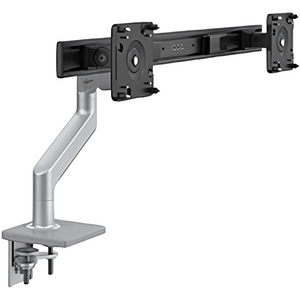
The Humanscale M8.1 Dual Monitor Arm with Crossbar is the professional-grade solution for positioning two monitors at perfect eye level—eliminating neck pain, maximizing desk space, and providing effortless independent adjustment with Humanscale's legendary counterbalance technology and integrated cable management. Trusted by ergonomic specialists and backed by a lifetime warranty on mechanical components, this dual-display system delivers complete ergonomic excellence for professionals who demand maximum productivity and comfort.
Why M8.1 Dual Monitor Arm Transforms Your Workspace
- Eliminates Neck & Shoulder Pain: Positions both monitors at optimal eye level to maintain neutral neck posture—reducing chronic strain from constantly turning your head or looking down at poorly positioned screens
- Independent Monitor Adjustment: Each monitor moves independently with effortless counterbalance technology—allowing perfect positioning for primary and secondary displays without tools or knobs
- Space-Efficient Crossbar Design: Single mounting point supports both monitors—minimizing desk clutter while providing stable, synchronized movement
- Integrated Cable Management: Built-in cable channels keep cords organized and out of sight for a clean, professional dual-monitor workspace
- Maximizes Desk Space: Lifts both monitors off desk surface—freeing valuable workspace for keyboards, documents, and essentials
- VESA Compatible: Works with most monitors featuring standard VESA mounting patterns (75mm × 75mm or 100mm × 100mm)
- Lifetime Warranty: Premium construction with lifetime warranty on mechanical components for decades of reliable daily use
Clinical Benefits for Dual Monitor Users
Dual monitor setups increase productivity by 20-30% but create ergonomic challenges—constantly turning your head between monitors causes neck strain, while monitors at different heights force awkward head tilting. The M8.1 solves both problems by positioning both screens at proper eye level with independent adjustment, allowing you to work across multiple displays without pain. Proper dual monitor positioning eliminates the neck rotation and flexion that causes muscle strain, tension headaches, and long-term postural problems.
Who It's Built For
Essential for professionals using dual monitor setups, traders and financial analysts requiring multiple screens, developers and programmers working with code and documentation simultaneously, designers and creatives using reference displays, data analysts comparing datasets, and anyone experiencing neck pain from constantly turning between poorly positioned monitors. Perfect for maximizing productivity while maintaining ergonomic health in dual-display workflows.
Technical Specifications
- Model: M8.1 Dual Monitor Arm with Crossbar
- Configuration: Dual monitors on single crossbar mount
- Adjustment: Independent counterbalance technology per monitor (no knobs or levers)
- Movement: Height, tilt, pan, and rotation for each monitor
- VESA Compatibility: 75mm × 75mm and 100mm × 100mm mounting patterns
- Monitor Weight Capacity: Supports monitors within specified weight range per arm
- Cable Management: Integrated cable channels for organized cord routing
- Mounting Options: Desk clamp or grommet mount (hardware included)
- Color Options: Silver with Gray Trim, Polished Aluminum with White Trim, Black with Black Trim
- Warranty: Lifetime on mechanical components
- Manufacturer: Humanscale (Made in USA)
- Weight: 6.5 lbs
Independent Counterbalance Adjustment
Each monitor on the M8.1 features Humanscale's patented counterbalance mechanism—allowing independent positioning with just a fingertip touch. Position your primary monitor directly in front and your secondary monitor at an angle, or arrange them side-by-side at different heights. Each monitor moves smoothly and stays exactly where you position it, with no knobs, levers, or tools required. Adjust on the fly as your tasks change throughout the day.
Space-Efficient Crossbar Design
The crossbar configuration uses a single mounting point to support both monitors—minimizing desk clutter and providing stable, synchronized movement. This space-efficient design is perfect for desks where multiple mounting points aren't practical, while still delivering full independent adjustment for each display. One mount, two monitors, infinite positioning possibilities.
Integrated Cable Management
The M8.1 features thoughtfully designed cable channels that route power cords, display cables, and USB connections through the arms and crossbar—keeping cables organized and out of sight. This creates a clean, professional dual-monitor workspace while preventing the cable chaos that typically accompanies multi-display setups.
Perfect Monitor Positioning for Every Task
The M8.1's independent adjustment allows you to optimize each monitor for its specific purpose. Position your primary monitor directly in front at eye level for main tasks, while angling your secondary monitor for reference materials, communication tools, or monitoring applications. The effortless counterbalance makes repositioning instant and intuitive.
Universal VESA Compatibility
The M8.1 works with most modern monitors featuring standard VESA mounting patterns (75mm × 75mm or 100mm × 100mm). This universal compatibility means you can upgrade your monitors in the future while keeping the same premium ergonomic arm system—a smart long-term investment that adapts as your technology evolves.
Installation Guide
- Choose mounting method: desk clamp (for desk edges up to 2.5" thick) or grommet mount (requires 0.375"–0.5" hole)
- Attach crossbar mount to desk using included hardware
- Attach VESA plates to back of each monitor
- Connect monitors to crossbar arms
- Route cables through integrated cable channels
- Adjust counterbalance tension if needed (instructions included)
- Position monitors at optimal eye level and viewing distance
Most users complete installation in under 30 minutes using basic tools.
Optimal Dual Monitor Positioning
- Primary Monitor: Position directly in front at eye level, 20-26 inches from eyes, top of screen at or slightly below eye level
- Secondary Monitor: Position at same height as primary, angled 30-45° to side, or slightly lower if used less frequently
- Viewing Distance: Both monitors 20-26 inches from eyes (arm's length)
- Tilt: Slight backward tilt (10-20°) to reduce glare and maintain perpendicular viewing angle
- Avoid: Monitors at different heights (causes neck tilting), excessive side angle (causes neck rotation), monitors too close or too far
Humanscale Quality & Warranty
Manufactured by Humanscale in the USA with commercial-grade components designed for daily office use. The lifetime warranty on mechanical components reflects Humanscale's confidence in long-term durability and performance. Humanscale has been the industry leader in ergonomic workspace solutions for over 40 years, providing equipment to Fortune 500 companies, government facilities, and professional workspaces worldwide.
Frequently Asked Questions
What monitor sizes and weights does the M8.1 support?
The M8.1 supports monitors within Humanscale's specified weight range per arm. Contact us with your monitor models and weights to confirm compatibility before ordering.
Can I use this with different sized monitors?
Yes! The independent counterbalance adjustment allows each monitor to be positioned perfectly regardless of size or weight differences. Each arm adjusts independently to support its specific monitor.
How do I know if my monitors are VESA compatible?
Check the back of your monitors for a square mounting pattern with 4 screw holes. Measure the distance between holes—75mm × 75mm or 100mm × 100mm patterns are VESA standard. Most modern monitors are VESA compatible.
Does this require tools to adjust monitor position?
No! Humanscale's counterbalance technology allows effortless adjustment with just a fingertip touch. No knobs, levers, or tools required for daily positioning changes. Initial tension adjustment may require an Allen wrench (included).
Will this work with my standing desk?
Yes! The M8.1 works perfectly with standing desks. The monitors move with the desk as it raises and lowers, maintaining optimal positioning in both sitting and standing positions.
How much desk space does the crossbar mount require?
The single mounting point requires minimal desk space compared to dual separate arms. The desk clamp attaches to desk edges up to 2.5" thick. The grommet mount requires a 0.375"–0.5" hole drilled through the desk surface.
Can I install this myself or do I need professional installation?
Most users install the M8.1 themselves in under 30 minutes using basic tools. The included instructions are straightforward. However, our ergonomic specialists can provide installation guidance or recommend professional installation services if needed.
How do I route cables through the cable management channels?
The integrated cable channels run through the arms and crossbar. Feed cables through the channels before connecting monitors, or use the access points to add cables after installation. The channels accommodate multiple cables per monitor (power, display, USB).
What's the difference between the M8.1 and M8.1 with Handle?
The M8.1 with Handle includes an integrated handle on the crossbar for easy repositioning of both monitors simultaneously. The standard M8.1 (this product) adjusts each monitor independently. Choose based on whether you want synchronized movement capability.
Can I add a third monitor later?
The M8.1 crossbar supports two monitors. For three monitors, consider combining the M8.1 with a separate single monitor arm, or explore Humanscale's triple monitor arm solutions.
What colors are available?
The M8.1 is available in Silver with Gray Trim, Polished Aluminum with White Trim, and Black with Black Trim. Choose based on your desk aesthetics and monitor colors.
Is assembly required?
Minimal assembly required—attach mounting hardware to desk, attach VESA plates to monitors, connect monitors to arms, and route cables. All hardware and instructions included. No complex assembly steps.
Why AskErgoWorks
As certified ergonomics specialists with over 30 years of experience, we've helped hundreds of professionals optimize dual monitor setups for maximum productivity and ergonomic health. The Humanscale M8.1 Dual Monitor Arm is our top recommendation for dual-display users who need professional-grade adjustability, lifetime reliability, and effortless positioning—it's the only dual monitor solution that combines Humanscale's legendary counterbalance technology with space-efficient crossbar design and integrated cable management.
We don't just sell monitor arms; we provide the expertise to ensure proper positioning, installation guidance, and complete workstation optimization for dual-display environments.
Need help determining if the M8.1 is right for your monitors and workspace? Our ergonomic evaluation services include personalized dual monitor positioning assessments, compatibility verification, installation guidance, and complete workstation setup based on your monitor specifications, desk dimensions, and ergonomic requirements.
Free shipping on orders over $99. Lifetime warranty on mechanical components. Made in USA. VESA compatible. Integrated cable management. Effortless counterbalance adjustment.
Premium Dual Monitor Arm with Crossbar for Effortless Ergonomic Positioning
The Humanscale M8.1 Dual Monitor Arm with Crossbar is the professional-grade solution for positioning two monitors at perfect eye level—eliminating neck pain, maximizing desk space, and providing effortless independent adjustment with Humanscale's legendary counterbalance technology and integrated cable management. Trusted by ergonomic specialists and backed by a lifetime warranty on mechanical components, this dual-display system delivers complete ergonomic excellence for professionals who demand maximum productivity and comfort.
Why M8.1 Dual Monitor Arm Transforms Your Workspace
- Eliminates Neck & Shoulder Pain: Positions both monitors at optimal eye level to maintain neutral neck posture—reducing chronic strain from constantly turning your head or looking down at poorly positioned screens
- Independent Monitor Adjustment: Each monitor moves independently with effortless counterbalance technology—allowing perfect positioning for primary and secondary displays without tools or knobs
- Space-Efficient Crossbar Design: Single mounting point supports both monitors—minimizing desk clutter while providing stable, synchronized movement
- Integrated Cable Management: Built-in cable channels keep cords organized and out of sight for a clean, professional dual-monitor workspace
- Maximizes Desk Space: Lifts both monitors off desk surface—freeing valuable workspace for keyboards, documents, and essentials
- VESA Compatible: Works with most monitors featuring standard VESA mounting patterns (75mm × 75mm or 100mm × 100mm)
- Lifetime Warranty: Premium construction with lifetime warranty on mechanical components for decades of reliable daily use
Clinical Benefits for Dual Monitor Users
Dual monitor setups increase productivity by 20-30% but create ergonomic challenges—constantly turning your head between monitors causes neck strain, while monitors at different heights force awkward head tilting. The M8.1 solves both problems by positioning both screens at proper eye level with independent adjustment, allowing you to work across multiple displays without pain. Proper dual monitor positioning eliminates the neck rotation and flexion that causes muscle strain, tension headaches, and long-term postural problems.
Who It's Built For
Essential for professionals using dual monitor setups, traders and financial analysts requiring multiple screens, developers and programmers working with code and documentation simultaneously, designers and creatives using reference displays, data analysts comparing datasets, and anyone experiencing neck pain from constantly turning between poorly positioned monitors. Perfect for maximizing productivity while maintaining ergonomic health in dual-display workflows.
Technical Specifications
- Model: M8.1 Dual Monitor Arm with Crossbar
- Configuration: Dual monitors on single crossbar mount
- Adjustment: Independent counterbalance technology per monitor (no knobs or levers)
- Movement: Height, tilt, pan, and rotation for each monitor
- VESA Compatibility: 75mm × 75mm and 100mm × 100mm mounting patterns
- Monitor Weight Capacity: Supports monitors within specified weight range per arm
- Cable Management: Integrated cable channels for organized cord routing
- Mounting Options: Desk clamp or grommet mount (hardware included)
- Color Options: Silver with Gray Trim, Polished Aluminum with White Trim, Black with Black Trim
- Warranty: Lifetime on mechanical components
- Manufacturer: Humanscale (Made in USA)
- Weight: 6.5 lbs
Independent Counterbalance Adjustment
Each monitor on the M8.1 features Humanscale's patented counterbalance mechanism—allowing independent positioning with just a fingertip touch. Position your primary monitor directly in front and your secondary monitor at an angle, or arrange them side-by-side at different heights. Each monitor moves smoothly and stays exactly where you position it, with no knobs, levers, or tools required. Adjust on the fly as your tasks change throughout the day.
Space-Efficient Crossbar Design
The crossbar configuration uses a single mounting point to support both monitors—minimizing desk clutter and providing stable, synchronized movement. This space-efficient design is perfect for desks where multiple mounting points aren't practical, while still delivering full independent adjustment for each display. One mount, two monitors, infinite positioning possibilities.
Integrated Cable Management
The M8.1 features thoughtfully designed cable channels that route power cords, display cables, and USB connections through the arms and crossbar—keeping cables organized and out of sight. This creates a clean, professional dual-monitor workspace while preventing the cable chaos that typically accompanies multi-display setups.
Perfect Monitor Positioning for Every Task
The M8.1's independent adjustment allows you to optimize each monitor for its specific purpose. Position your primary monitor directly in front at eye level for main tasks, while angling your secondary monitor for reference materials, communication tools, or monitoring applications. The effortless counterbalance makes repositioning instant and intuitive.
Universal VESA Compatibility
The M8.1 works with most modern monitors featuring standard VESA mounting patterns (75mm × 75mm or 100mm × 100mm). This universal compatibility means you can upgrade your monitors in the future while keeping the same premium ergonomic arm system—a smart long-term investment that adapts as your technology evolves.
Installation Guide
- Choose mounting method: desk clamp (for desk edges up to 2.5" thick) or grommet mount (requires 0.375"–0.5" hole)
- Attach crossbar mount to desk using included hardware
- Attach VESA plates to back of each monitor
- Connect monitors to crossbar arms
- Route cables through integrated cable channels
- Adjust counterbalance tension if needed (instructions included)
- Position monitors at optimal eye level and viewing distance
Most users complete installation in under 30 minutes using basic tools.
Optimal Dual Monitor Positioning
- Primary Monitor: Position directly in front at eye level, 20-26 inches from eyes, top of screen at or slightly below eye level
- Secondary Monitor: Position at same height as primary, angled 30-45° to side, or slightly lower if used less frequently
- Viewing Distance: Both monitors 20-26 inches from eyes (arm's length)
- Tilt: Slight backward tilt (10-20°) to reduce glare and maintain perpendicular viewing angle
- Avoid: Monitors at different heights (causes neck tilting), excessive side angle (causes neck rotation), monitors too close or too far
Humanscale Quality & Warranty
Manufactured by Humanscale in the USA with commercial-grade components designed for daily office use. The lifetime warranty on mechanical components reflects Humanscale's confidence in long-term durability and performance. Humanscale has been the industry leader in ergonomic workspace solutions for over 40 years, providing equipment to Fortune 500 companies, government facilities, and professional workspaces worldwide.
Frequently Asked Questions
What monitor sizes and weights does the M8.1 support?
The M8.1 supports monitors within Humanscale's specified weight range per arm. Contact us with your monitor models and weights to confirm compatibility before ordering.
Can I use this with different sized monitors?
Yes! The independent counterbalance adjustment allows each monitor to be positioned perfectly regardless of size or weight differences. Each arm adjusts independently to support its specific monitor.
How do I know if my monitors are VESA compatible?
Check the back of your monitors for a square mounting pattern with 4 screw holes. Measure the distance between holes—75mm × 75mm or 100mm × 100mm patterns are VESA standard. Most modern monitors are VESA compatible.
Does this require tools to adjust monitor position?
No! Humanscale's counterbalance technology allows effortless adjustment with just a fingertip touch. No knobs, levers, or tools required for daily positioning changes. Initial tension adjustment may require an Allen wrench (included).
Will this work with my standing desk?
Yes! The M8.1 works perfectly with standing desks. The monitors move with the desk as it raises and lowers, maintaining optimal positioning in both sitting and standing positions.
How much desk space does the crossbar mount require?
The single mounting point requires minimal desk space compared to dual separate arms. The desk clamp attaches to desk edges up to 2.5" thick. The grommet mount requires a 0.375"–0.5" hole drilled through the desk surface.
Can I install this myself or do I need professional installation?
Most users install the M8.1 themselves in under 30 minutes using basic tools. The included instructions are straightforward. However, our ergonomic specialists can provide installation guidance or recommend professional installation services if needed.
How do I route cables through the cable management channels?
The integrated cable channels run through the arms and crossbar. Feed cables through the channels before connecting monitors, or use the access points to add cables after installation. The channels accommodate multiple cables per monitor (power, display, USB).
What's the difference between the M8.1 and M8.1 with Handle?
The M8.1 with Handle includes an integrated handle on the crossbar for easy repositioning of both monitors simultaneously. The standard M8.1 (this product) adjusts each monitor independently. Choose based on whether you want synchronized movement capability.
Can I add a third monitor later?
The M8.1 crossbar supports two monitors. For three monitors, consider combining the M8.1 with a separate single monitor arm, or explore Humanscale's triple monitor arm solutions.
What colors are available?
The M8.1 is available in Silver with Gray Trim, Polished Aluminum with White Trim, and Black with Black Trim. Choose based on your desk aesthetics and monitor colors.
Is assembly required?
Minimal assembly required—attach mounting hardware to desk, attach VESA plates to monitors, connect monitors to arms, and route cables. All hardware and instructions included. No complex assembly steps.
Why AskErgoWorks
As certified ergonomics specialists with over 30 years of experience, we've helped hundreds of professionals optimize dual monitor setups for maximum productivity and ergonomic health. The Humanscale M8.1 Dual Monitor Arm is our top recommendation for dual-display users who need professional-grade adjustability, lifetime reliability, and effortless positioning—it's the only dual monitor solution that combines Humanscale's legendary counterbalance technology with space-efficient crossbar design and integrated cable management.
We don't just sell monitor arms; we provide the expertise to ensure proper positioning, installation guidance, and complete workstation optimization for dual-display environments.
Need help determining if the M8.1 is right for your monitors and workspace? Our ergonomic evaluation services include personalized dual monitor positioning assessments, compatibility verification, installation guidance, and complete workstation setup based on your monitor specifications, desk dimensions, and ergonomic requirements.
Free shipping on orders over $99. Lifetime warranty on mechanical components. Made in USA. VESA compatible. Integrated cable management. Effortless counterbalance adjustment.
Humanscale M8 Pro Dual Monitor Arm | Crossbar Mount | Ergonomic Setup
SKU:M82BCSC
- Regular price
- $645.00
- Sale price
- $645.00
- Regular price
-
Need expert help choosing the right setup?
Our certified specialists offer professional ergonomic evaluations tailored to your workstation.
Request a Quote →Couldn't load pickup availability


Trusted By


