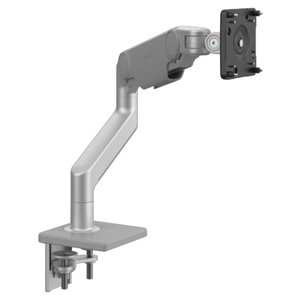
Humanscale M10 monitor arm in silver, side view showing the articulating arm and monitor mounting plate on a desk clamp base.
Humanscale M10 monitor arm in white, rear view holding a black monitor with the arm folded close to the display.
Close-up of the Humanscale M10 monitor arm pivot joint in polished silver showing the adjustment mechanism.
Humanscale M10 monitor arm in white mounted to a wooden desk, close-up of the clamp base and cable management.
Humanscale M10 monitor arm in white holding a wide curved monitor on a wooden desk in a modern office with a task lamp and desk chair.
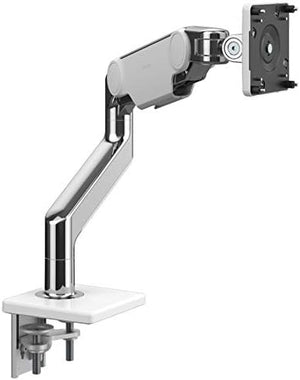
Humanscale M10 monitor arm in polished chrome, side view showing the articulating arm and monitor mounting plate on a desk clamp.
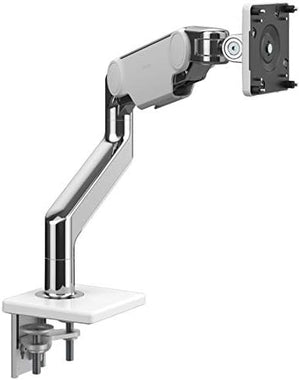
Humanscale M10 monitor arm in polished chrome, side view at a slightly different angle showing the articulating arm and mounting plate.
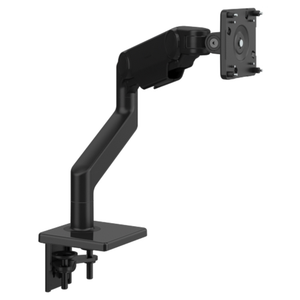
Humanscale M10 monitor arm in black, side view showing the articulating arm and monitor mounting plate on a desk clamp base.
    Humanscale M10 monitor arm in silver, side view showing the articulating arm and monitor mounting plate on a desk clamp base.
    Humanscale M10 monitor arm in white, rear view holding a black monitor with the arm folded close to the display.
    Close-up of the Humanscale M10 monitor arm pivot joint in polished silver showing the adjustment mechanism.
    Humanscale M10 monitor arm in white mounted to a wooden desk, close-up of the clamp base and cable management.
    Humanscale M10 monitor arm in white holding a wide curved monitor on a wooden desk in a modern office with a task lamp and desk chair.
    Humanscale M10 monitor arm in polished chrome, side view showing the articulating arm and monitor mounting plate on a desk clamp.
    Humanscale M10 monitor arm in polished chrome, side view at a slightly different angle showing the articulating arm and mounting plate.
    Humanscale M10 monitor arm in black, side view showing the articulating arm and monitor mounting plate on a desk clamp base.
Humanscale M10 monitor arm in silver, side view showing the articulating arm and monitor mounting plate on a desk clamp base.
Humanscale M10 monitor arm in white, rear view holding a black monitor with the arm folded close to the display.
Close-up of the Humanscale M10 monitor arm pivot joint in polished silver showing the adjustment mechanism.
Humanscale M10 monitor arm in white mounted to a wooden desk, close-up of the clamp base and cable management.
Humanscale M10 monitor arm in white holding a wide curved monitor on a wooden desk in a modern office with a task lamp and desk chair.
Humanscale M10 monitor arm in polished chrome, side view showing the articulating arm and monitor mounting plate on a desk clamp.
Humanscale M10 monitor arm in polished chrome, side view at a slightly different angle showing the articulating arm and mounting plate.
Humanscale M10 monitor arm in black, side view showing the articulating arm and monitor mounting plate on a desk clamp base.
Humanscale M10 monitor arm in silver, side view showing the articulating arm and monitor mounting plate on a desk clamp base.
Humanscale M10 monitor arm in white, rear view holding a black monitor with the arm folded close to the display.
Close-up of the Humanscale M10 monitor arm pivot joint in polished silver showing the adjustment mechanism.
Humanscale M10 monitor arm in white mounted to a wooden desk, close-up of the clamp base and cable management.
Humanscale M10 monitor arm in white holding a wide curved monitor on a wooden desk in a modern office with a task lamp and desk chair.
Humanscale M10 monitor arm in polished chrome, side view showing the articulating arm and monitor mounting plate on a desk clamp.
Humanscale M10 monitor arm in polished chrome, side view at a slightly different angle showing the articulating arm and mounting plate.
Humanscale M10 monitor arm in black, side view showing the articulating arm and monitor mounting plate on a desk clamp base.
    Humanscale M10 monitor arm in silver, side view showing the articulating arm and monitor mounting plate on a desk clamp base.
    Humanscale M10 monitor arm in white, rear view holding a black monitor with the arm folded close to the display.
    Close-up of the Humanscale M10 monitor arm pivot joint in polished silver showing the adjustment mechanism.
    Humanscale M10 monitor arm in white mounted to a wooden desk, close-up of the clamp base and cable management.
    Humanscale M10 monitor arm in white holding a wide curved monitor on a wooden desk in a modern office with a task lamp and desk chair.
    Humanscale M10 monitor arm in polished chrome, side view showing the articulating arm and monitor mounting plate on a desk clamp.
    Humanscale M10 monitor arm in polished chrome, side view at a slightly different angle showing the articulating arm and mounting plate.
    Humanscale M10 monitor arm in black, side view showing the articulating arm and monitor mounting plate on a desk clamp base.
Humanscale M10 monitor arm in silver, side view showing the articulating arm and monitor mounting plate on a desk clamp base.
Humanscale M10 monitor arm in white, rear view holding a black monitor with the arm folded close to the display.
Close-up of the Humanscale M10 monitor arm pivot joint in polished silver showing the adjustment mechanism.
Humanscale M10 monitor arm in white mounted to a wooden desk, close-up of the clamp base and cable management.
Humanscale M10 monitor arm in white holding a wide curved monitor on a wooden desk in a modern office with a task lamp and desk chair.
Humanscale M10 monitor arm in polished chrome, side view showing the articulating arm and monitor mounting plate on a desk clamp.
Humanscale M10 monitor arm in polished chrome, side view at a slightly different angle showing the articulating arm and mounting plate.
Humanscale M10 monitor arm in black, side view showing the articulating arm and monitor mounting plate on a desk clamp base.

About

Transform your workspace and eliminate neck pain with the Humanscale M10 Monitor Arm — the premium ergonomic display mount trusted by professionals worldwide. Recommended by Ask Ergo Works' certified ergonomic specialists, this innovative monitor arm uses advanced counterbalance technology to position your screen at the perfect height and distance, reducing strain and boosting productivity throughout your workday.

Why You'll Love It:

  • Effortless fingertip adjustment — Patented counterbalance mechanism allows smooth, weightless positioning with minimal effort — no knobs, levers, or tools required
  • Eliminates neck and shoulder strain — Positions your monitor at optimal eye level, promoting natural posture and reducing the risk of chronic pain and headaches
  • Maximizes desk space — Frees up valuable workspace by lifting your monitor off the desk surface, creating room for documents, keyboards, and accessories
  • Universal VESA compatibility — Works with most monitors up to 30 lbs, featuring standard VESA mounting patterns for easy installation
  • Integrated cable management — Built-in channels keep cords organized and out of sight for a clean, professional workspace aesthetic

Product Specifications:

  • Brand: Humanscale — leader in ergonomic workplace solutions
  • Model: M10 Monitor Arm (M11TBS)
  • Weight capacity: Supports monitors up to 30 lbs
  • VESA compatibility: Standard VESA mounting patterns (75mm x 75mm, 100mm x 100mm)
  • Adjustment range: Full height, depth, and tilt adjustment for personalized positioning
  • Mounting options: Clamp or grommet mount (included)
  • Warranty: Lifetime warranty on mechanism
  • Ideal for: Office professionals, remote workers, designers, programmers, anyone experiencing neck or eye strain

The Science Behind Ergonomic Monitor Positioning

Proper monitor placement is critical for workplace health. The M10's counterbalance technology ensures your screen stays at the optimal viewing distance (20-26 inches) and height (top of screen at or slightly below eye level), reducing the forward head posture that causes neck pain, eye strain, and tension headaches. This simple adjustment can dramatically improve comfort and focus during long work sessions.

The Ask Ergo Works Difference

When you purchase from Ask Ergo Works, you're partnering with ergonomic specialists who have optimized workspaces for Fortune 500 companies and professionals for over 30 years. We provide expert installation guidance, personalized workspace assessments, and ongoing support to ensure your monitor arm setup works perfectly for your unique needs.

Ready to work pain-free and boost your productivity? Upgrade to the Humanscale M10 Monitor Arm today and experience the difference that expert-designed ergonomics makes. Your neck, shoulders, and eyes will thank you.

Questions about compatibility or installation? Our certified ergonomic specialists are here to help you create the perfect workspace setup.

Transform your workspace and eliminate neck pain with the Humanscale M10 Monitor Arm — the premium ergonomic display mount trusted by professionals worldwide. Recommended by Ask Ergo Works' certified ergonomic specialists, this innovative monitor arm uses advanced counterbalance technology to position your screen at the perfect height and distance, reducing strain and boosting productivity throughout your workday.

Why You'll Love It:

  • Effortless fingertip adjustment — Patented counterbalance mechanism allows smooth, weightless positioning with minimal effort — no knobs, levers, or tools required
  • Eliminates neck and shoulder strain — Positions your monitor at optimal eye level, promoting natural posture and reducing the risk of chronic pain and headaches
  • Maximizes desk space — Frees up valuable workspace by lifting your monitor off the desk surface, creating room for documents, keyboards, and accessories
  • Universal VESA compatibility — Works with most monitors up to 30 lbs, featuring standard VESA mounting patterns for easy installation
  • Integrated cable management — Built-in channels keep cords organized and out of sight for a clean, professional workspace aesthetic

Product Specifications:

  • Brand: Humanscale — leader in ergonomic workplace solutions
  • Model: M10 Monitor Arm (M11TBS)
  • Weight capacity: Supports monitors up to 30 lbs
  • VESA compatibility: Standard VESA mounting patterns (75mm x 75mm, 100mm x 100mm)
  • Adjustment range: Full height, depth, and tilt adjustment for personalized positioning
  • Mounting options: Clamp or grommet mount (included)
  • Warranty: Lifetime warranty on mechanism
  • Ideal for: Office professionals, remote workers, designers, programmers, anyone experiencing neck or eye strain

The Science Behind Ergonomic Monitor Positioning

Proper monitor placement is critical for workplace health. The M10's counterbalance technology ensures your screen stays at the optimal viewing distance (20-26 inches) and height (top of screen at or slightly below eye level), reducing the forward head posture that causes neck pain, eye strain, and tension headaches. This simple adjustment can dramatically improve comfort and focus during long work sessions.

The Ask Ergo Works Difference

When you purchase from Ask Ergo Works, you're partnering with ergonomic specialists who have optimized workspaces for Fortune 500 companies and professionals for over 30 years. We provide expert installation guidance, personalized workspace assessments, and ongoing support to ensure your monitor arm setup works perfectly for your unique needs.

Ready to work pain-free and boost your productivity? Upgrade to the Humanscale M10 Monitor Arm today and experience the difference that expert-designed ergonomics makes. Your neck, shoulders, and eyes will thank you.

Questions about compatibility or installation? Our certified ergonomic specialists are here to help you create the perfect workspace setup.

Humanscale by Humanscale

5.0

0 reviews

Humanscale M10 Monitor Arm | Ergonomic Single Display Mount

SKU:M11TBS

Regular price
$459.00
Sale price
$459.00
Regular price
Reimagine your workspace and eliminate neck pain with the Humanscale M10 Monitor Arm — the high-end ergonomic display mount reco...  Read more
Reimagine your workspace and eliminate neck pain with the Humanscale M10 Monitor Arm — the high-end ergonomic display mount recommended by professionals worldwide. Proper monitor placement is critical for workplace health. This simple adjustment can dramatically improve comfort and focus during long work sessions.
Color:

Not sure this is the right fit?

Our certified specialists can evaluate your workstation and recommend the right setup for you.

Request an Ergonomic Evaluation →
Free Shipping
On orders over $99
Certified Specialists
Expert guidance on your purchase
Flexible Payments
4 interest-free installments with Shop Pay

Trusted By

FAQs About the Humanscale M10 Monitor Arm

1

Who is the Humanscale M10 Monitor Arm designed for?

The Humanscale M10 Monitor Arm is designed for office professionals, remote workers, designers, and programmers who want to raise their monitor off the desk and position it at eye level. It's suited to anyone experiencing neck or eye strain from a monitor that sits too low or too far away on the desk.

2

What size and weight monitors does the Humanscale M10 support?

The Humanscale M10 Monitor Arm supports monitors up to 30 lbs and uses standard VESA mounting patterns of 75mm x 75mm or 100mm x 100mm. Check the back of your monitor for a matching VESA mounting plate and confirm its weight is within this limit before ordering.

3

How does the Humanscale M10 Monitor Arm adjust?

The Humanscale M10 Monitor Arm uses a patented counterbalance mechanism that allows smooth, fingertip adjustment of height, depth, and tilt without knobs, levers, or tools. Once positioned, the arm is designed to hold your monitor in place without drifting. This is intended to make repositioning the monitor throughout the day a quick, one-handed motion.

4

Does the Humanscale M10 Monitor Arm help manage cables?

Yes, the Humanscale M10 Monitor Arm includes integrated cable management channels that route your monitor's power and display cables through the arm, keeping cords organized and out of sight for a cleaner, less cluttered-looking desk surface. This is intended to give the desk a cleaner, less cluttered look once the arm is installed.

5

How is the Humanscale M10 Monitor Arm mounted to a desk?

The Humanscale M10 Monitor Arm can be installed using either a clamp mount or a grommet mount, both included with the arm. Clamp mounting attaches to the desk edge without drilling, while grommet mounting runs through a hole in the desk surface for a cleaner look.

6

Where should I position my monitor when using the Humanscale M10 Monitor Arm?

With the Humanscale M10 Monitor Arm, monitors are generally positioned 20 to 26 inches from your eyes, with the top of the screen at or slightly below eye level. This positioning is intended to reduce the forward head posture that can contribute to neck strain and eye fatigue during long work sessions.

Check Out These Related Products