




About
Quick Answers
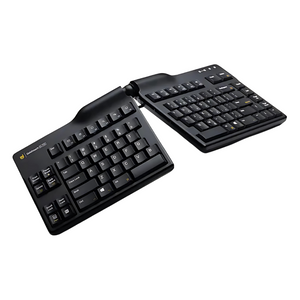
What is this? A fully adjustable split keyboard with 3D positioning (0–60° tenting, 0–30° splay, 6" separation)—eliminating pronation, ulnar deviation, and extension that cause RSI and carpal tunnel syndrome.
Who is this for? Office workers, developers, programmers, and anyone experiencing wrist pain, forearm tension, or hand numbness from typing—especially those needing customizable ergonomics for different desk setups (standing desk, laptop, traditional desk).
Key benefit: Only keyboard with dual-axis adjustment (tenting AND splay) that adapts to your unique body, desk height, and shoulder width—reduces wrist strain by 35–50% compared to flat keyboards with personalized ergonomic positioning.
Best for: Carpal tunnel prevention, RSI recovery, wrist pain relief, standing desk users, hot-deskers, remote workers, tall/broad-shouldered users, Mac & PC compatibility, adjustable ergonomics.
Key specs: 0–60° tenting (infinite positions), 0–30° splay (infinite positions), up to 6" separation, membrane switches (10M+ keystrokes), removable palm supports, Mac/PC hardware switch, USB plug-and-play, Made in USA, 3-year warranty.
Comparison: Goldtouch Elite vs fixed split keyboards—Elite offers infinite tenting/splay adjustment vs fixed angles; Elite vs Kinesis Advantage—Elite maintains standard QWERTY layout with zero learning curve vs 2–3 week adaptation.
Flat Keyboards Force Your Wrists Into Three Unnatural Positions That Cause RSI
Trusted by Fortune 500 ergonomics programs and prescribed by occupational therapists for carpal tunnel prevention and RSI recovery. If you're experiencing wrist pain, forearm tension, or hand numbness after hours of typing, your flat keyboard is forcing your wrists into ulnar deviation, pronation, and extension—the three biomechanical positions that cause repetitive strain injuries. The Goldtouch Elite eliminates all three with fully adjustable 3D positioning.
Why Customers Choose the Goldtouch Elite Keyboard
- Adjustable 0–60° tenting prevents pronation: Raise the center to any angle that keeps your palms facing each other naturally—eliminates the forearm twist that causes wrist and elbow pain
- Adjustable 0–30° splay eliminates ulnar deviation: Angle the keyboard halves to match your shoulder width—keeps your wrists straight instead of bent inward
- Split design with 6" separation reduces shoulder strain: Position each hand directly in front of its shoulder for neutral posture—no more hunching or internal rotation
- Soft-touch palm supports included: Removable cushioned rests provide comfort without forcing wrist extension—use them or remove them based on your preference
- Durable membrane keys with tactile feedback: Quiet, responsive typing with 10+ million keystroke lifespan—professional feel without mechanical keyboard noise
- Mac + PC compatible with hardware switch: Toggle between operating systems instantly—works with Windows, macOS, Linux, Chrome OS without drivers
- Made in USA with 3-year warranty: Premium construction built to last—this is the last ergonomic keyboard you'll need to buy
What's Included
- Goldtouch Elite Adjustable Keyboard
- Detachable USB cable (6 feet)
- Soft-touch palm supports (removable)
- Quick-start guide with ergonomic setup recommendations
- 3-year manufacturer warranty
- Lifetime free technical support from Goldtouch
Perfect For
- Office workers and knowledge professionals typing 4–8 hours daily who are starting to experience wrist discomfort or want to prevent future RSI
- Developers and programmers who need customizable ergonomics that adapt to different desk setups (standing desk, laptop riser, traditional desk)
- Carpal tunnel and RSI sufferers whose doctors recommended an adjustable keyboard for recovery and prevention of re-injury
- Hot-deskers and remote workers who move between workstations and need a keyboard that adjusts to any desk height or monitor position
- Tall or broad-shouldered users whose natural shoulder width doesn't match standard keyboard layouts—the splay adjustment is a game-changer
- Standing desk users who need different tenting angles for sitting vs. standing positions throughout the day
- Call center and healthcare professionals who require a personal ergonomic peripheral that adapts to shared or rotating workstations
- Corporate and enterprise teams deploying ergonomic keyboards for injury prevention programs across office, hybrid, or remote workforces
- Anyone who's tried fixed ergonomic keyboards and found them “almost right”—the Elite's adjustability lets you dial in your perfect position
How to Adjust Your Goldtouch Elite for Maximum Comfort
The Elite's dual-adjustment system lets you customize both tenting (vertical angle) and splay (horizontal angle) to match your unique body and workspace:
Tenting Adjustment (0–60°):
- 0–10° (minimal tenting): Good starting point for ergonomic keyboard beginners or very low desk setups
- 20–30° (moderate tenting): Most popular range—eliminates pronation for most users without feeling extreme
- 40–60° (aggressive tenting): Maximum pronation relief for RSI recovery, standing desks, or users with severe wrist pain
- Adjustment tip: Start at 20° and increase gradually over 2–3 days until you find your sweet spot
Splay Adjustment (0–30°):
- 0–10° (minimal splay): Best for narrow shoulders or compact desk spaces
- 15–20° (moderate splay): Ideal for average shoulder width—most users land here
- 25–30° (maximum splay): Perfect for broad shoulders, tall users, or those who want maximum ulnar deviation relief
- Adjustment tip: Set splay so each keyboard half aligns directly with its shoulder—your forearms should be parallel
Separation Distance: The Elite's split design allows up to 6" of separation between halves. Position them shoulder-width apart to eliminate internal shoulder rotation and reduce upper back tension.
Palm Supports: Use the included soft-touch palm supports if you prefer wrist cushioning, or remove them for a floating-hand typing position (recommended by many ergonomists to prevent wrist extension).
Product Specifications
- Dimensions (Flat): 18.5" W × 9.5" D × 1.5" H
- Dimensions (Maximum Splay): Up to 24" W with 6" separation
- Tenting Range: 0–60° (infinite adjustment positions, locks at any angle)
- Splay Range: 0–30° (infinite adjustment positions, locks at any angle)
- Separation: Up to 6" between keyboard halves
- Key Type: Membrane switches with tactile feedback (quiet, durable)
- Keystroke Lifespan: 10+ million keystrokes
- Layout: Full-size US QWERTY with numeric keypad
- Connectivity: USB 2.0 (detachable 6-foot cable)
- Compatibility: Mac and PC with hardware toggle switch (Windows, macOS, Linux, Chrome OS)
- Palm Supports: Removable soft-touch cushioned rests
- Special Keys: Dedicated media controls, volume, calculator, email
- Plug-and-Play: No drivers required
- Warranty: 3 years manufacturer + lifetime technical support
- Manufactured: USA (Goldtouch)
- Certifications: FCC, CE, RoHS compliant
- SKU: GTE-08899
The Science: Why Adjustable Tenting and Splay Prevent RSI
Repetitive strain injuries are caused by three biomechanical stressors that flat keyboards force on your wrists and forearms: pronation (forearm twist with palms facing down), ulnar deviation (wrists bent inward toward your pinkies), and extension (wrists bent upward). These unnatural positions compress the median nerve (causing carpal tunnel syndrome), strain tendons (causing tendonitis), and restrict blood flow (causing numbness and fatigue). The Goldtouch Elite's dual-adjustment system addresses all three: tenting (0–60°) rotates your palms toward each other to eliminate pronation, splay (0–30°) angles the keyboard halves to keep your wrists straight and eliminate ulnar deviation, and the split design with adjustable separation allows neutral shoulder positioning that reduces extension. Peer-reviewed ergonomic studies show that adjustable keyboards reduce wrist strain by 35–50% compared to flat keyboards, and users with existing RSI report measurable pain reduction within 7–10 days. Occupational therapists prescribe adjustable keyboards like the Elite because every body is different—fixed ergonomic keyboards offer a one-size-fits-all compromise, while adjustable keyboards let you dial in the exact angles that match your unique biomechanics, desk height, and shoulder width.
Frequently Asked Questions
How long does it take to adjust to the split layout?
Most users adapt within 2–3 days. Start with minimal tenting (10–15°) and gradually increase over the first week. Your typing speed may decrease slightly for the first 1–2 days but typically returns to normal or improves within a week as the ergonomic positioning reduces fatigue.
Is the Goldtouch Elite good for carpal tunnel syndrome?
Yes—it's one of the most clinically recommended keyboards for carpal tunnel prevention and recovery. The adjustable tenting eliminates forearm pronation, and the splay adjustment eliminates ulnar deviation, both of which are primary contributors to median nerve compression. Many users with diagnosed carpal tunnel syndrome report significant symptom relief within 7–10 days of use. We recommend pairing it with a professional ergonomic assessment for best results. Learn more about our ergonomic consulting services.
Can this keyboard help with wrist pain, tendinitis, or RSI?
Yes. The Goldtouch Elite is specifically designed to address the biomechanical root causes of wrist pain, tendinitis, and repetitive strain injury. The dual-axis adjustment (tenting + splay) eliminates the three postures—pronation, ulnar deviation, and extension—that cause these conditions. Users with existing RSI typically report measurable pain reduction within 7–10 days. It's a clinically recommended solution for professionals who type 4+ hours daily.
Is this keyboard good for herniated disc or neck pain from poor posture?
Indirectly, yes. The Goldtouch Elite's split design and adjustable splay allow you to position each keyboard half directly in front of its shoulder, eliminating the internal shoulder rotation and forward reach that contribute to upper back and neck strain. When combined with a properly positioned monitor and chair, the Elite supports a fully neutral upper-body posture that reduces cervical spine load.
Can I use this keyboard for gaming?
Yes, the Goldtouch Elite works for gaming, though it's optimized for typing and productivity. The membrane switches provide quiet, responsive feedback suitable for strategy games and MMOs. For competitive FPS gaming requiring rapid WASD movement, traditional gaming keyboards may be more suitable.
Will this work with my standing desk?
Absolutely. The adjustable tenting is perfect for standing desks—increase the tenting angle when standing to maintain neutral wrist position at the higher desk height. Many users keep two angle settings: 20–25° for sitting, 35–45° for standing.
Do I need to remove the palm supports?
It's personal preference. Many ergonomists recommend removing them to encourage a floating-hand typing position that prevents wrist extension. However, if you prefer cushioned support, the soft-touch palm rests are designed to provide comfort without forcing harmful wrist angles.
How does the Goldtouch Elite compare to the Goldtouch Go2 portable keyboard?
The Elite is a full-size desk keyboard with 3D adjustability (tenting + splay + separation) and a numeric keypad—ideal for a fixed workstation where maximum ergonomic customization matters. The Go2 is a foldable travel keyboard with Bluetooth multi-device pairing—ideal for remote workers and frequent travelers. If you need both, many Ask Ergo Works customers use the Elite at their primary desk and the Go2 on the road. Browse our full keyboard collection to compare.
How does the Goldtouch Elite compare to the Kinesis Advantage or other contoured keyboards?
The Goldtouch Elite uses a traditional QWERTY layout with adjustable angles, while contoured keyboards like the Kinesis Advantage use bowl-shaped key wells. Choose the Elite if you want ergonomic benefits with zero learning curve and adjustability for different desk setups. Choose contoured keyboards if you're willing to invest 2–3 weeks adapting for maximum ergonomic benefit.
How does the Goldtouch Elite compare to the Microsoft Sculpt or Logitech ERGO K860?
The Microsoft Sculpt and Logitech ERGO K860 are fixed-angle ergonomic keyboards—they offer a single preset tenting angle with no adjustment. The Goldtouch Elite offers infinite tenting (0–60°) and splay (0–30°) adjustment, letting you dial in the exact angles for your body and desk setup. For users with specific ergonomic needs, RSI history, or non-standard body dimensions, the Elite's adjustability is a significant clinical advantage.
Can I adjust the angles while typing, or do I need to lock them in?
The Elite locks at any angle you set—it won't shift during typing. You can readjust anytime by releasing the adjustment mechanisms, changing the angle, and locking again. Most users find their ideal angles within the first week and rarely adjust afterward.
Will this fit on a keyboard tray?
Yes, but measure your tray first. At maximum splay with 6" separation, the Elite can span up to 24" wide. Most keyboard trays accommodate 18–20" width comfortably. For compact trays, use minimal splay (0–10°) to keep the footprint smaller.
Is the Mac/PC switch easy to use?
Yes. There's a physical toggle switch on the keyboard—flip it to Mac mode for Command/Option keys, flip to PC mode for Windows/Alt keys. No software or drivers required. Perfect for users who switch between Mac and PC systems.
Is this keyboard suitable for call center or healthcare environments?
Yes. The Goldtouch Elite is used in call center, healthcare, laboratory, and clinical settings where staff type for extended shifts and need a personal ergonomic peripheral. Its adjustability, durability (10M+ keystroke lifespan), and plug-and-play USB connectivity make it well-suited for high-use professional environments. Ask Ergo Works offers ergonomic consulting services for enterprise and healthcare deployments—contact us to learn more.
What is the warranty and return policy?
The Goldtouch Elite is backed by a 3-year manufacturer warranty and lifetime technical support from Goldtouch. Ask Ergo Works offers a 60-day satisfaction guarantee: if the Elite doesn't eliminate your wrist pain and provide the most comfortable typing experience you've ever had, return it for a full refund—no questions asked.
Do you offer ergonomic consulting to help me set up this keyboard correctly?
Yes. Ask Ergo Works offers ergonomic consulting services with certified specialists who have 30+ years of experience. We can assess your workstation, typing posture, and pain profile to recommend the optimal tenting and splay angles for your body. Learn more about our ergonomic consulting services.
Why Ask Ergo Works
Ask Ergo Works is a Bay Area-based ergonomic specialist with over 30 years of experience helping professionals, enterprises, healthcare organizations, and educational institutions build healthier, more productive workspaces. Our certified ergonomic specialists have evaluated thousands of keyboards—and the Goldtouch Elite consistently ranks as our top recommendation for users who need adjustable, personalized ergonomics for RSI prevention and recovery.
We don't just sell ergonomic keyboards. We provide the expertise to ensure proper setup, optimal angle adjustment, and complete workstation integration for maximum pain relief and productivity. Whether you're an individual professional or an enterprise deploying ergonomic solutions at scale, Ask Ergo Works brings the clinical rigor and product knowledge to get it right.
Need help choosing the right keyboard or optimizing your complete workstation? Our ergonomic consulting services include personalized keyboard recommendations, angle adjustment guidance, typing posture assessment, and complete workstation setup based on your pain profile, body dimensions, and work tasks.
Complete Your Setup
- Pair with a Goldtouch ergonomic mouse for a complete RSI-prevention workstation
- Explore our full ergonomic keyboard collection including portable and desktop options
- Book an ergonomic consulting session to optimize your tenting angles and full workstation setup
Shipping & Returns
Ships same business day when ordered by 2 PM PT. 60-day satisfaction guarantee: if the Goldtouch Elite doesn't eliminate your wrist pain and provide the most comfortable typing experience you've ever had, return it for a full refund—no questions asked. All units backed by Goldtouch's 3-year warranty and lifetime technical support.
Quick Answers
What is this? A fully adjustable split keyboard with 3D positioning (0–60° tenting, 0–30° splay, 6" separation)—eliminating pronation, ulnar deviation, and extension that cause RSI and carpal tunnel syndrome.
Who is this for? Office workers, developers, programmers, and anyone experiencing wrist pain, forearm tension, or hand numbness from typing—especially those needing customizable ergonomics for different desk setups (standing desk, laptop, traditional desk).
Key benefit: Only keyboard with dual-axis adjustment (tenting AND splay) that adapts to your unique body, desk height, and shoulder width—reduces wrist strain by 35–50% compared to flat keyboards with personalized ergonomic positioning.
Best for: Carpal tunnel prevention, RSI recovery, wrist pain relief, standing desk users, hot-deskers, remote workers, tall/broad-shouldered users, Mac & PC compatibility, adjustable ergonomics.
Key specs: 0–60° tenting (infinite positions), 0–30° splay (infinite positions), up to 6" separation, membrane switches (10M+ keystrokes), removable palm supports, Mac/PC hardware switch, USB plug-and-play, Made in USA, 3-year warranty.
Comparison: Goldtouch Elite vs fixed split keyboards—Elite offers infinite tenting/splay adjustment vs fixed angles; Elite vs Kinesis Advantage—Elite maintains standard QWERTY layout with zero learning curve vs 2–3 week adaptation.
Flat Keyboards Force Your Wrists Into Three Unnatural Positions That Cause RSI
Trusted by Fortune 500 ergonomics programs and prescribed by occupational therapists for carpal tunnel prevention and RSI recovery. If you're experiencing wrist pain, forearm tension, or hand numbness after hours of typing, your flat keyboard is forcing your wrists into ulnar deviation, pronation, and extension—the three biomechanical positions that cause repetitive strain injuries. The Goldtouch Elite eliminates all three with fully adjustable 3D positioning.
Why Customers Choose the Goldtouch Elite Keyboard
- Adjustable 0–60° tenting prevents pronation: Raise the center to any angle that keeps your palms facing each other naturally—eliminates the forearm twist that causes wrist and elbow pain
- Adjustable 0–30° splay eliminates ulnar deviation: Angle the keyboard halves to match your shoulder width—keeps your wrists straight instead of bent inward
- Split design with 6" separation reduces shoulder strain: Position each hand directly in front of its shoulder for neutral posture—no more hunching or internal rotation
- Soft-touch palm supports included: Removable cushioned rests provide comfort without forcing wrist extension—use them or remove them based on your preference
- Durable membrane keys with tactile feedback: Quiet, responsive typing with 10+ million keystroke lifespan—professional feel without mechanical keyboard noise
- Mac + PC compatible with hardware switch: Toggle between operating systems instantly—works with Windows, macOS, Linux, Chrome OS without drivers
- Made in USA with 3-year warranty: Premium construction built to last—this is the last ergonomic keyboard you'll need to buy
What's Included
- Goldtouch Elite Adjustable Keyboard
- Detachable USB cable (6 feet)
- Soft-touch palm supports (removable)
- Quick-start guide with ergonomic setup recommendations
- 3-year manufacturer warranty
- Lifetime free technical support from Goldtouch
Perfect For
- Office workers and knowledge professionals typing 4–8 hours daily who are starting to experience wrist discomfort or want to prevent future RSI
- Developers and programmers who need customizable ergonomics that adapt to different desk setups (standing desk, laptop riser, traditional desk)
- Carpal tunnel and RSI sufferers whose doctors recommended an adjustable keyboard for recovery and prevention of re-injury
- Hot-deskers and remote workers who move between workstations and need a keyboard that adjusts to any desk height or monitor position
- Tall or broad-shouldered users whose natural shoulder width doesn't match standard keyboard layouts—the splay adjustment is a game-changer
- Standing desk users who need different tenting angles for sitting vs. standing positions throughout the day
- Call center and healthcare professionals who require a personal ergonomic peripheral that adapts to shared or rotating workstations
- Corporate and enterprise teams deploying ergonomic keyboards for injury prevention programs across office, hybrid, or remote workforces
- Anyone who's tried fixed ergonomic keyboards and found them “almost right”—the Elite's adjustability lets you dial in your perfect position
How to Adjust Your Goldtouch Elite for Maximum Comfort
The Elite's dual-adjustment system lets you customize both tenting (vertical angle) and splay (horizontal angle) to match your unique body and workspace:
Tenting Adjustment (0–60°):
- 0–10° (minimal tenting): Good starting point for ergonomic keyboard beginners or very low desk setups
- 20–30° (moderate tenting): Most popular range—eliminates pronation for most users without feeling extreme
- 40–60° (aggressive tenting): Maximum pronation relief for RSI recovery, standing desks, or users with severe wrist pain
- Adjustment tip: Start at 20° and increase gradually over 2–3 days until you find your sweet spot
Splay Adjustment (0–30°):
- 0–10° (minimal splay): Best for narrow shoulders or compact desk spaces
- 15–20° (moderate splay): Ideal for average shoulder width—most users land here
- 25–30° (maximum splay): Perfect for broad shoulders, tall users, or those who want maximum ulnar deviation relief
- Adjustment tip: Set splay so each keyboard half aligns directly with its shoulder—your forearms should be parallel
Separation Distance: The Elite's split design allows up to 6" of separation between halves. Position them shoulder-width apart to eliminate internal shoulder rotation and reduce upper back tension.
Palm Supports: Use the included soft-touch palm supports if you prefer wrist cushioning, or remove them for a floating-hand typing position (recommended by many ergonomists to prevent wrist extension).
Product Specifications
- Dimensions (Flat): 18.5" W × 9.5" D × 1.5" H
- Dimensions (Maximum Splay): Up to 24" W with 6" separation
- Tenting Range: 0–60° (infinite adjustment positions, locks at any angle)
- Splay Range: 0–30° (infinite adjustment positions, locks at any angle)
- Separation: Up to 6" between keyboard halves
- Key Type: Membrane switches with tactile feedback (quiet, durable)
- Keystroke Lifespan: 10+ million keystrokes
- Layout: Full-size US QWERTY with numeric keypad
- Connectivity: USB 2.0 (detachable 6-foot cable)
- Compatibility: Mac and PC with hardware toggle switch (Windows, macOS, Linux, Chrome OS)
- Palm Supports: Removable soft-touch cushioned rests
- Special Keys: Dedicated media controls, volume, calculator, email
- Plug-and-Play: No drivers required
- Warranty: 3 years manufacturer + lifetime technical support
- Manufactured: USA (Goldtouch)
- Certifications: FCC, CE, RoHS compliant
- SKU: GTE-08899
The Science: Why Adjustable Tenting and Splay Prevent RSI
Repetitive strain injuries are caused by three biomechanical stressors that flat keyboards force on your wrists and forearms: pronation (forearm twist with palms facing down), ulnar deviation (wrists bent inward toward your pinkies), and extension (wrists bent upward). These unnatural positions compress the median nerve (causing carpal tunnel syndrome), strain tendons (causing tendonitis), and restrict blood flow (causing numbness and fatigue). The Goldtouch Elite's dual-adjustment system addresses all three: tenting (0–60°) rotates your palms toward each other to eliminate pronation, splay (0–30°) angles the keyboard halves to keep your wrists straight and eliminate ulnar deviation, and the split design with adjustable separation allows neutral shoulder positioning that reduces extension. Peer-reviewed ergonomic studies show that adjustable keyboards reduce wrist strain by 35–50% compared to flat keyboards, and users with existing RSI report measurable pain reduction within 7–10 days. Occupational therapists prescribe adjustable keyboards like the Elite because every body is different—fixed ergonomic keyboards offer a one-size-fits-all compromise, while adjustable keyboards let you dial in the exact angles that match your unique biomechanics, desk height, and shoulder width.
Frequently Asked Questions
How long does it take to adjust to the split layout?
Most users adapt within 2–3 days. Start with minimal tenting (10–15°) and gradually increase over the first week. Your typing speed may decrease slightly for the first 1–2 days but typically returns to normal or improves within a week as the ergonomic positioning reduces fatigue.
Is the Goldtouch Elite good for carpal tunnel syndrome?
Yes—it's one of the most clinically recommended keyboards for carpal tunnel prevention and recovery. The adjustable tenting eliminates forearm pronation, and the splay adjustment eliminates ulnar deviation, both of which are primary contributors to median nerve compression. Many users with diagnosed carpal tunnel syndrome report significant symptom relief within 7–10 days of use. We recommend pairing it with a professional ergonomic assessment for best results. Learn more about our ergonomic consulting services.
Can this keyboard help with wrist pain, tendinitis, or RSI?
Yes. The Goldtouch Elite is specifically designed to address the biomechanical root causes of wrist pain, tendinitis, and repetitive strain injury. The dual-axis adjustment (tenting + splay) eliminates the three postures—pronation, ulnar deviation, and extension—that cause these conditions. Users with existing RSI typically report measurable pain reduction within 7–10 days. It's a clinically recommended solution for professionals who type 4+ hours daily.
Is this keyboard good for herniated disc or neck pain from poor posture?
Indirectly, yes. The Goldtouch Elite's split design and adjustable splay allow you to position each keyboard half directly in front of its shoulder, eliminating the internal shoulder rotation and forward reach that contribute to upper back and neck strain. When combined with a properly positioned monitor and chair, the Elite supports a fully neutral upper-body posture that reduces cervical spine load.
Can I use this keyboard for gaming?
Yes, the Goldtouch Elite works for gaming, though it's optimized for typing and productivity. The membrane switches provide quiet, responsive feedback suitable for strategy games and MMOs. For competitive FPS gaming requiring rapid WASD movement, traditional gaming keyboards may be more suitable.
Will this work with my standing desk?
Absolutely. The adjustable tenting is perfect for standing desks—increase the tenting angle when standing to maintain neutral wrist position at the higher desk height. Many users keep two angle settings: 20–25° for sitting, 35–45° for standing.
Do I need to remove the palm supports?
It's personal preference. Many ergonomists recommend removing them to encourage a floating-hand typing position that prevents wrist extension. However, if you prefer cushioned support, the soft-touch palm rests are designed to provide comfort without forcing harmful wrist angles.
How does the Goldtouch Elite compare to the Goldtouch Go2 portable keyboard?
The Elite is a full-size desk keyboard with 3D adjustability (tenting + splay + separation) and a numeric keypad—ideal for a fixed workstation where maximum ergonomic customization matters. The Go2 is a foldable travel keyboard with Bluetooth multi-device pairing—ideal for remote workers and frequent travelers. If you need both, many Ask Ergo Works customers use the Elite at their primary desk and the Go2 on the road. Browse our full keyboard collection to compare.
How does the Goldtouch Elite compare to the Kinesis Advantage or other contoured keyboards?
The Goldtouch Elite uses a traditional QWERTY layout with adjustable angles, while contoured keyboards like the Kinesis Advantage use bowl-shaped key wells. Choose the Elite if you want ergonomic benefits with zero learning curve and adjustability for different desk setups. Choose contoured keyboards if you're willing to invest 2–3 weeks adapting for maximum ergonomic benefit.
How does the Goldtouch Elite compare to the Microsoft Sculpt or Logitech ERGO K860?
The Microsoft Sculpt and Logitech ERGO K860 are fixed-angle ergonomic keyboards—they offer a single preset tenting angle with no adjustment. The Goldtouch Elite offers infinite tenting (0–60°) and splay (0–30°) adjustment, letting you dial in the exact angles for your body and desk setup. For users with specific ergonomic needs, RSI history, or non-standard body dimensions, the Elite's adjustability is a significant clinical advantage.
Can I adjust the angles while typing, or do I need to lock them in?
The Elite locks at any angle you set—it won't shift during typing. You can readjust anytime by releasing the adjustment mechanisms, changing the angle, and locking again. Most users find their ideal angles within the first week and rarely adjust afterward.
Will this fit on a keyboard tray?
Yes, but measure your tray first. At maximum splay with 6" separation, the Elite can span up to 24" wide. Most keyboard trays accommodate 18–20" width comfortably. For compact trays, use minimal splay (0–10°) to keep the footprint smaller.
Is the Mac/PC switch easy to use?
Yes. There's a physical toggle switch on the keyboard—flip it to Mac mode for Command/Option keys, flip to PC mode for Windows/Alt keys. No software or drivers required. Perfect for users who switch between Mac and PC systems.
Is this keyboard suitable for call center or healthcare environments?
Yes. The Goldtouch Elite is used in call center, healthcare, laboratory, and clinical settings where staff type for extended shifts and need a personal ergonomic peripheral. Its adjustability, durability (10M+ keystroke lifespan), and plug-and-play USB connectivity make it well-suited for high-use professional environments. Ask Ergo Works offers ergonomic consulting services for enterprise and healthcare deployments—contact us to learn more.
What is the warranty and return policy?
The Goldtouch Elite is backed by a 3-year manufacturer warranty and lifetime technical support from Goldtouch. Ask Ergo Works offers a 60-day satisfaction guarantee: if the Elite doesn't eliminate your wrist pain and provide the most comfortable typing experience you've ever had, return it for a full refund—no questions asked.
Do you offer ergonomic consulting to help me set up this keyboard correctly?
Yes. Ask Ergo Works offers ergonomic consulting services with certified specialists who have 30+ years of experience. We can assess your workstation, typing posture, and pain profile to recommend the optimal tenting and splay angles for your body. Learn more about our ergonomic consulting services.
Why Ask Ergo Works
Ask Ergo Works is a Bay Area-based ergonomic specialist with over 30 years of experience helping professionals, enterprises, healthcare organizations, and educational institutions build healthier, more productive workspaces. Our certified ergonomic specialists have evaluated thousands of keyboards—and the Goldtouch Elite consistently ranks as our top recommendation for users who need adjustable, personalized ergonomics for RSI prevention and recovery.
We don't just sell ergonomic keyboards. We provide the expertise to ensure proper setup, optimal angle adjustment, and complete workstation integration for maximum pain relief and productivity. Whether you're an individual professional or an enterprise deploying ergonomic solutions at scale, Ask Ergo Works brings the clinical rigor and product knowledge to get it right.
Need help choosing the right keyboard or optimizing your complete workstation? Our ergonomic consulting services include personalized keyboard recommendations, angle adjustment guidance, typing posture assessment, and complete workstation setup based on your pain profile, body dimensions, and work tasks.
Complete Your Setup
- Pair with a Goldtouch ergonomic mouse for a complete RSI-prevention workstation
- Explore our full ergonomic keyboard collection including portable and desktop options
- Book an ergonomic consulting session to optimize your tenting angles and full workstation setup
Shipping & Returns
Ships same business day when ordered by 2 PM PT. 60-day satisfaction guarantee: if the Goldtouch Elite doesn't eliminate your wrist pain and provide the most comfortable typing experience you've ever had, return it for a full refund—no questions asked. All units backed by Goldtouch's 3-year warranty and lifetime technical support.
Goldtouch Elite Keyboard – Adjustable 3D Positioning Ends Wrist Pain
SKU:GTE-08899
- Regular price
- $96.00
- Sale price
- $96.00
- Regular price
-
Need expert help choosing the right setup?
Our certified specialists offer professional ergonomic evaluations tailored to your workstation.
Request a Quote →Couldn't load pickup availability


Trusted By


