Evoluent R3K ergonomic keyboard in black, angled view showing full-size key layout and curved wrist area
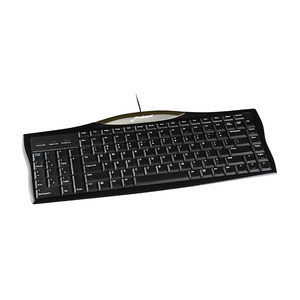
Evoluent R3K ergonomic keyboard in black, angled view highlighting curved top edge and brand logo
Evoluent R3K ergonomic keyboard in black, straight top-down view showing full keyboard layout
Close-up of Evoluent R3K keyboard numeric keypad on the left side and navigation keys on the right side
Overhead view of a person typing on an Evoluent R3K keyboard with the numeric keypad on the left side, mouse in right hand
Evoluent R3K ergonomic keyboard in black with coiled USB cable, angled view on white background
    Evoluent R3K ergonomic keyboard in black, angled view showing full-size key layout and curved wrist area
    Evoluent R3K ergonomic keyboard in black, angled view highlighting curved top edge and brand logo
    Evoluent R3K ergonomic keyboard in black, straight top-down view showing full keyboard layout
    Close-up of Evoluent R3K keyboard numeric keypad on the left side and navigation keys on the right side
    Overhead view of a person typing on an Evoluent R3K keyboard with the numeric keypad on the left side, mouse in right hand
    Evoluent R3K ergonomic keyboard in black with coiled USB cable, angled view on white background
Evoluent R3K ergonomic keyboard in black, angled view showing full-size key layout and curved wrist area
Evoluent R3K ergonomic keyboard in black, angled view highlighting curved top edge and brand logo
Evoluent R3K ergonomic keyboard in black, straight top-down view showing full keyboard layout
Close-up of Evoluent R3K keyboard numeric keypad on the left side and navigation keys on the right side
Overhead view of a person typing on an Evoluent R3K keyboard with the numeric keypad on the left side, mouse in right hand
Evoluent R3K ergonomic keyboard in black with coiled USB cable, angled view on white background
Evoluent R3K ergonomic keyboard in black, angled view showing full-size key layout and curved wrist area
Evoluent R3K ergonomic keyboard in black, angled view highlighting curved top edge and brand logo
Evoluent R3K ergonomic keyboard in black, straight top-down view showing full keyboard layout
Close-up of Evoluent R3K keyboard numeric keypad on the left side and navigation keys on the right side
Overhead view of a person typing on an Evoluent R3K keyboard with the numeric keypad on the left side, mouse in right hand
Evoluent R3K ergonomic keyboard in black with coiled USB cable, angled view on white background
    Evoluent R3K ergonomic keyboard in black, angled view showing full-size key layout and curved wrist area
    Evoluent R3K ergonomic keyboard in black, angled view highlighting curved top edge and brand logo
    Evoluent R3K ergonomic keyboard in black, straight top-down view showing full keyboard layout
    Close-up of Evoluent R3K keyboard numeric keypad on the left side and navigation keys on the right side
    Overhead view of a person typing on an Evoluent R3K keyboard with the numeric keypad on the left side, mouse in right hand
    Evoluent R3K ergonomic keyboard in black with coiled USB cable, angled view on white background
Evoluent R3K ergonomic keyboard in black, angled view showing full-size key layout and curved wrist area
Evoluent R3K ergonomic keyboard in black, angled view highlighting curved top edge and brand logo
Evoluent R3K ergonomic keyboard in black, straight top-down view showing full keyboard layout
Close-up of Evoluent R3K keyboard numeric keypad on the left side and navigation keys on the right side
Overhead view of a person typing on an Evoluent R3K keyboard with the numeric keypad on the left side, mouse in right hand
Evoluent R3K ergonomic keyboard in black with coiled USB cable, angled view on white background

About

Reduce reach and relieve shoulder strain with the Evoluent R3K — the innovative ergonomic keyboard that puts the numeric pad where it belongs: on the left. By eliminating excessive reaching for your mouse, this compact keyboard creates a healthier, more efficient workspace.

Why You'll Love It:

  • Left-side numeric pad reduces reach — Positions your mouse closer to your body, eliminating shoulder strain and awkward reaching that causes pain
  • Relieves shoulder and neck tension — Compact design with reduced reach distance promotes better posture and reduces muscle fatigue
  • Full-size keys for comfort — Standard key size and spacing ensures comfortable, accurate typing without adjustment period
  • Dual-side shortcut keys — Convenient shortcuts on both left and right sides boost productivity and reduce repetitive movements
  • Plug-and-play simplicity — Wired USB connection works instantly with Windows and Mac, no drivers or software required

Product Features:

  • Numeric keypad positioned on left side
  • Compact, space-saving design
  • Full-size keys with standard spacing
  • Shortcut keys on both sides
  • Wired USB connection
  • Compatible with Windows and Mac
  • Low-profile, ergonomic design
  • Durable construction for long-term use

Backed by Ask Ergo Works' 30+ years of ergonomic expertise. The Evoluent R3K is our recommended solution for professionals who use both keyboard and mouse extensively. This innovative left-handed numeric pad design is especially beneficial for data entry professionals, accountants, and anyone experiencing shoulder or neck pain from excessive mouse reach.

Optimize your workspace today — and discover how a simple keyboard change can dramatically improve your comfort and productivity.

Want a complete ergonomic workstation assessment? Our certified specialists can help you create the perfect setup. Schedule your consultation today.

Reduce reach and relieve shoulder strain with the Evoluent R3K — the innovative ergonomic keyboard that puts the numeric pad where it belongs: on the left. By eliminating excessive reaching for your mouse, this compact keyboard creates a healthier, more efficient workspace.

Why You'll Love It:

  • Left-side numeric pad reduces reach — Positions your mouse closer to your body, eliminating shoulder strain and awkward reaching that causes pain
  • Relieves shoulder and neck tension — Compact design with reduced reach distance promotes better posture and reduces muscle fatigue
  • Full-size keys for comfort — Standard key size and spacing ensures comfortable, accurate typing without adjustment period
  • Dual-side shortcut keys — Convenient shortcuts on both left and right sides boost productivity and reduce repetitive movements
  • Plug-and-play simplicity — Wired USB connection works instantly with Windows and Mac, no drivers or software required

Product Features:

  • Numeric keypad positioned on left side
  • Compact, space-saving design
  • Full-size keys with standard spacing
  • Shortcut keys on both sides
  • Wired USB connection
  • Compatible with Windows and Mac
  • Low-profile, ergonomic design
  • Durable construction for long-term use

Backed by Ask Ergo Works' 30+ years of ergonomic expertise. The Evoluent R3K is our recommended solution for professionals who use both keyboard and mouse extensively. This innovative left-handed numeric pad design is especially beneficial for data entry professionals, accountants, and anyone experiencing shoulder or neck pain from excessive mouse reach.

Optimize your workspace today — and discover how a simple keyboard change can dramatically improve your comfort and productivity.

Want a complete ergonomic workstation assessment? Our certified specialists can help you create the perfect setup. Schedule your consultation today.

Evoluent by Evoluent

5.0

0 reviews

Evoluent R3K Keyboard | Ergonomic Keyboard Left-Hand Numeric Pad

SKU:R3K

Regular price
$66.00
Sale price
$66.00
Regular price
Reduce reach and relieve shoulder strain with the Evoluent R3K — the well-designed ergonomic keyboard that puts the numeric pad ...  Read more
Reduce reach and relieve shoulder strain with the Evoluent R3K — the well-designed ergonomic keyboard that puts the numeric pad where it belongs: on the left. By eliminating excessive reaching for your mouse, this compact keyboard creates a healthier, more efficient workspace. The Evoluent R3K is our recommended solution for professionals who use both keyboard and mouse extensively.

Not sure this is the right fit?

Our certified specialists can evaluate your workstation and recommend the right setup for you.

Request an Ergonomic Evaluation →
Free Shipping
On orders over $99
Certified Specialists
Expert guidance on your purchase
Flexible Payments
4 interest-free installments with Shop Pay

Trusted By

FAQs About the Evoluent R3K Keyboard

1

Who is the Evoluent R3K designed for?

The Evoluent R3K is designed for professionals who use both a keyboard and a mouse extensively, particularly data entry professionals, accountants, and anyone experiencing shoulder or neck discomfort from reaching across a standard keyboard's right-side numeric pad to reach their mouse.

2

How does moving the numeric pad to the left side of the Evoluent R3K help reduce strain?

On a standard keyboard, the numeric pad sits between the main keys and the mouse, pushing the mouse further to the right and increasing the reach distance for your arm and shoulder. The Evoluent R3K moves the numeric pad to the left side instead, so the mouse can sit closer to your body, which is intended to reduce the repetitive reaching that contributes to shoulder and neck tension.

3

Will the Evoluent R3K feel different to type on than a standard keyboard?

No. The Evoluent R3K uses full-size keys with standard spacing, so typing feels the same as on a conventional keyboard. The only layout change is the numeric pad's position on the left side, which is designed to avoid requiring an adjustment period for your typing technique.

4

What shortcut keys does the Evoluent R3K include?

The Evoluent R3K includes dual-side shortcut keys, with convenient shortcuts positioned on both the left and right sides of the keyboard. These are intended to reduce repetitive movements and speed up common tasks compared to a keyboard with shortcuts on only one side.

5

Does the Evoluent R3K require any special software to set up?

No, the Evoluent R3K is a plug-and-play wired USB keyboard that works instantly with Windows and Mac without requiring drivers or additional software installation. This makes it simple to move between computers or set up on a shared workstation without an IT department needing to install anything first.

6

Is the Evoluent R3K compatible with both Windows and Mac?

Yes, the Evoluent R3K is compatible with both Windows and Mac computers via its wired USB connection, with no additional drivers needed for either operating system. This cross-platform compatibility makes it a practical option for mixed-device offices or households that use both types of computers.

Check Out These Related Products