




About
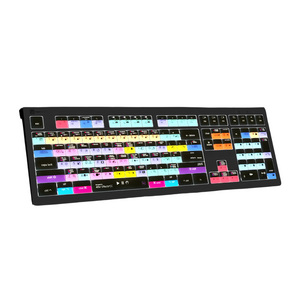
LogicKeyboard Adobe After Effects CC Keyboard for Mac — ASTRA 2 Backlit Shortcut Keys
Composite faster. Animate without hesitation. Render without hunting for shortcuts. The LogicKeyboard ASTRA 2 for Adobe After Effects CC puts every AE shortcut at your fingertips — color-coded, graphically labeled, and backlit for any lighting condition. Designed specifically for macOS with Mac-native modifier keys (Command, Option, Control), it integrates seamlessly into your Mac workflow and keeps your creative momentum uninterrupted from first keyframe to final render.
Key Features & Benefits
- Color-coded After Effects shortcut keys — every command labeled with graphical icons and color-coding for instant visual recognition
- Mac-native modifier keys — Command, Option, and Control keys properly labeled for macOS workflows
- Backlit keys with 5 brightness levels — dimmable backlight adapts from bright studios to dark compositing environments
- Built-in USB 3.0 hub — connect Contour ShuttlePRO, USB dongle, phone, or other peripherals directly from the keyboard
- Dual USB cable design — separate grey cable for keyboard and black cable for USB hub; eliminates KVM extender conflicts in complex facility setups
- Low-profile scissor-switch keys — light, responsive feel with quiet operation for long creative sessions
- Full-size F-row and multimedia keys — complete keyboard functionality alongside After Effects shortcuts
- 10 million keystroke durability — built for professional daily use in motion graphics and VFX production
- Plug-and-play — no software installation required; works immediately on macOS
Who This Keyboard Is For
Essential for motion graphics artists, VFX artists, compositors, and animators working in Adobe After Effects CC on Mac. Ideal for post-production facilities, broadcast networks, advertising agencies, game studios, and independent creators running Mac workstations who want to eliminate shortcut memorization and maximize compositing speed. Also used in film schools and media education programs teaching After Effects on Mac.
After Effects Only vs. Filmmaker 2-in-1 — Which Is Right for You?
- This keyboard (After Effects CC only) — dedicated AE shortcut keyboard for Mac; ideal if After Effects is your primary application and you want a clean, focused shortcut layout
- Adobe Filmmaker ASTRA 2 for Mac — 200 shortcuts covering both Premiere Pro CC and After Effects CC in one keyboard; ideal if you move between both applications regularly
Technical Specifications
- Software: Adobe After Effects CC (macOS)
- Compatibility: macOS (plug-and-play)
- Modifier keys: Command, Option, Control (Mac-native)
- Backlight: Yes — 5 selectable brightness levels
- Key mechanism: Scissor-switch, low-profile
- USB hub: Built-in USB 3.0 port
- USB cables: Dual cable (grey for keyboard, black for hub)
- Number of keys: 108 (ANSI) / 109 (ISO)
- Durability: 10,000,000 keystrokes per key
- Dimensions: 446mm × 150mm × 30mm (17 5/8" × 6" × 1 1/4")
- Weight: 950g (2.1 lbs)
- Connection: Wired USB (dual cable)
Frequently Asked Questions
Should I get this keyboard or the Adobe Filmmaker 2-in-1 for Mac?
If Adobe After Effects is your primary application and you want a dedicated, focused shortcut layout on Mac, this keyboard is the right choice. If you regularly switch between Premiere Pro and After Effects, the Adobe Filmmaker ASTRA 2 for Mac gives you 200 shortcuts for both applications in one keyboard.
Is there a PC/Windows version of this keyboard?
Yes — see the LogicKeyboard Adobe After Effects CC ASTRA 2 for PC for the Windows-compatible version with standard PC modifier keys.
Does this keyboard work with Apple Silicon Macs (M1, M2, M3, M4)?
Yes. The ASTRA 2 is a standard USB HID keyboard compatible with Apple Silicon and Intel Macs running macOS. No drivers or software installation required — plug in the grey USB cable and it works immediately.
Which version of After Effects is this keyboard designed for?
The LogicKeyboard ASTRA 2 is designed for Adobe After Effects CC on macOS. The shortcut labels reflect After Effects’ standard default keymap. The keyboard functions as a standard Mac keyboard regardless of your specific AE version or custom keymap settings.
What is the dual USB cable design for?
The ASTRA 2 uses two USB cables: a grey cable for the keyboard itself and a black cable for the built-in USB 3.0 hub. This separation prevents conflicts with KVM extenders commonly used in post-production facilities. You only need to plug in the grey cable to use the keyboard; the black cable activates the USB hub. Watch a help video about the two cables here.
Can I connect a Contour ShuttlePRO to the keyboard’s USB hub?
Yes — the built-in USB 3.0 hub is ideal for connecting a Contour ShuttlePRO, USB dongle, or other peripherals directly from the keyboard, keeping your Mac workstation organized and reducing cable clutter.
Can this keyboard be used as a regular Mac keyboard when not using After Effects?
Yes — all standard letter, number, and symbol keys are labeled alongside the After Effects shortcuts, and Mac modifier keys (Command, Option, Control) are properly labeled. The keyboard functions as a full standard Mac keyboard for any macOS application.
Is this keyboard suitable for After Effects training or media education programs on Mac?
Yes — the color-coded shortcut labels make the ASTRA 2 an excellent teaching tool for After Effects courses, motion graphics programs, and VFX training on Mac. Ask Ergo Works works with educational institutions on bulk orders. Contact our specialists for volume pricing.
Can Ask Ergo Works help configure a full ergonomic Mac motion graphics workstation?
Absolutely. Our certified ergonomic specialists work with motion graphics artists, VFX professionals, and post-production teams to optimize full Mac workstation setups — including keyboard positioning, monitor height, chair configuration, and peripheral placement for long creative sessions. We offer ergonomic consulting services for individuals and enterprise teams.
Why Ask Ergo Works
With 30+ years of ergonomic and professional workstation expertise, Ask Ergo Works serves creative professionals, post-production facilities, and enterprise teams who demand both performance and comfort.
- Certified ergonomic specialists — professional workstation optimization expertise for motion graphics, VFX, and post-production environments
- Trusted by production studios & creative teams — advertising, broadcast, game development, and corporate video
- Bay Area roots, nationwide reach — in-person assessments in the Bay Area; virtual consultations available nationwide
- Enterprise procurement support — volume pricing, net terms, and procurement documentation available
Need help optimizing your full Mac After Effects workstation? Our ergonomic consulting services cover keyboard selection, monitor positioning, chair setup, and peripheral configuration.
Complete Your Mac Motion Graphics Workstation
- LogicKeyboard Adobe After Effects CC ASTRA 2 for PC — Windows version with PC modifier keys
- LogicKeyboard Adobe Filmmaker ASTRA 2 for Mac — upgrade to 200 shortcuts covering both Premiere Pro + After Effects
- Ergonomic Mice — pair with a vertical or trackball mouse for a complete low-strain Mac motion graphics workstation
- Professional Workstation Assessment — ergonomic evaluation for long creative sessions
LogicKeyboard Adobe After Effects CC Keyboard for Mac — ASTRA 2 Backlit Shortcut Keys
Composite faster. Animate without hesitation. Render without hunting for shortcuts. The LogicKeyboard ASTRA 2 for Adobe After Effects CC puts every AE shortcut at your fingertips — color-coded, graphically labeled, and backlit for any lighting condition. Designed specifically for macOS with Mac-native modifier keys (Command, Option, Control), it integrates seamlessly into your Mac workflow and keeps your creative momentum uninterrupted from first keyframe to final render.
Key Features & Benefits
- Color-coded After Effects shortcut keys — every command labeled with graphical icons and color-coding for instant visual recognition
- Mac-native modifier keys — Command, Option, and Control keys properly labeled for macOS workflows
- Backlit keys with 5 brightness levels — dimmable backlight adapts from bright studios to dark compositing environments
- Built-in USB 3.0 hub — connect Contour ShuttlePRO, USB dongle, phone, or other peripherals directly from the keyboard
- Dual USB cable design — separate grey cable for keyboard and black cable for USB hub; eliminates KVM extender conflicts in complex facility setups
- Low-profile scissor-switch keys — light, responsive feel with quiet operation for long creative sessions
- Full-size F-row and multimedia keys — complete keyboard functionality alongside After Effects shortcuts
- 10 million keystroke durability — built for professional daily use in motion graphics and VFX production
- Plug-and-play — no software installation required; works immediately on macOS
Who This Keyboard Is For
Essential for motion graphics artists, VFX artists, compositors, and animators working in Adobe After Effects CC on Mac. Ideal for post-production facilities, broadcast networks, advertising agencies, game studios, and independent creators running Mac workstations who want to eliminate shortcut memorization and maximize compositing speed. Also used in film schools and media education programs teaching After Effects on Mac.
After Effects Only vs. Filmmaker 2-in-1 — Which Is Right for You?
- This keyboard (After Effects CC only) — dedicated AE shortcut keyboard for Mac; ideal if After Effects is your primary application and you want a clean, focused shortcut layout
- Adobe Filmmaker ASTRA 2 for Mac — 200 shortcuts covering both Premiere Pro CC and After Effects CC in one keyboard; ideal if you move between both applications regularly
Technical Specifications
- Software: Adobe After Effects CC (macOS)
- Compatibility: macOS (plug-and-play)
- Modifier keys: Command, Option, Control (Mac-native)
- Backlight: Yes — 5 selectable brightness levels
- Key mechanism: Scissor-switch, low-profile
- USB hub: Built-in USB 3.0 port
- USB cables: Dual cable (grey for keyboard, black for hub)
- Number of keys: 108 (ANSI) / 109 (ISO)
- Durability: 10,000,000 keystrokes per key
- Dimensions: 446mm × 150mm × 30mm (17 5/8" × 6" × 1 1/4")
- Weight: 950g (2.1 lbs)
- Connection: Wired USB (dual cable)
Frequently Asked Questions
Should I get this keyboard or the Adobe Filmmaker 2-in-1 for Mac?
If Adobe After Effects is your primary application and you want a dedicated, focused shortcut layout on Mac, this keyboard is the right choice. If you regularly switch between Premiere Pro and After Effects, the Adobe Filmmaker ASTRA 2 for Mac gives you 200 shortcuts for both applications in one keyboard.
Is there a PC/Windows version of this keyboard?
Yes — see the LogicKeyboard Adobe After Effects CC ASTRA 2 for PC for the Windows-compatible version with standard PC modifier keys.
Does this keyboard work with Apple Silicon Macs (M1, M2, M3, M4)?
Yes. The ASTRA 2 is a standard USB HID keyboard compatible with Apple Silicon and Intel Macs running macOS. No drivers or software installation required — plug in the grey USB cable and it works immediately.
Which version of After Effects is this keyboard designed for?
The LogicKeyboard ASTRA 2 is designed for Adobe After Effects CC on macOS. The shortcut labels reflect After Effects’ standard default keymap. The keyboard functions as a standard Mac keyboard regardless of your specific AE version or custom keymap settings.
What is the dual USB cable design for?
The ASTRA 2 uses two USB cables: a grey cable for the keyboard itself and a black cable for the built-in USB 3.0 hub. This separation prevents conflicts with KVM extenders commonly used in post-production facilities. You only need to plug in the grey cable to use the keyboard; the black cable activates the USB hub. Watch a help video about the two cables here.
Can I connect a Contour ShuttlePRO to the keyboard’s USB hub?
Yes — the built-in USB 3.0 hub is ideal for connecting a Contour ShuttlePRO, USB dongle, or other peripherals directly from the keyboard, keeping your Mac workstation organized and reducing cable clutter.
Can this keyboard be used as a regular Mac keyboard when not using After Effects?
Yes — all standard letter, number, and symbol keys are labeled alongside the After Effects shortcuts, and Mac modifier keys (Command, Option, Control) are properly labeled. The keyboard functions as a full standard Mac keyboard for any macOS application.
Is this keyboard suitable for After Effects training or media education programs on Mac?
Yes — the color-coded shortcut labels make the ASTRA 2 an excellent teaching tool for After Effects courses, motion graphics programs, and VFX training on Mac. Ask Ergo Works works with educational institutions on bulk orders. Contact our specialists for volume pricing.
Can Ask Ergo Works help configure a full ergonomic Mac motion graphics workstation?
Absolutely. Our certified ergonomic specialists work with motion graphics artists, VFX professionals, and post-production teams to optimize full Mac workstation setups — including keyboard positioning, monitor height, chair configuration, and peripheral placement for long creative sessions. We offer ergonomic consulting services for individuals and enterprise teams.
Why Ask Ergo Works
With 30+ years of ergonomic and professional workstation expertise, Ask Ergo Works serves creative professionals, post-production facilities, and enterprise teams who demand both performance and comfort.
- Certified ergonomic specialists — professional workstation optimization expertise for motion graphics, VFX, and post-production environments
- Trusted by production studios & creative teams — advertising, broadcast, game development, and corporate video
- Bay Area roots, nationwide reach — in-person assessments in the Bay Area; virtual consultations available nationwide
- Enterprise procurement support — volume pricing, net terms, and procurement documentation available
Need help optimizing your full Mac After Effects workstation? Our ergonomic consulting services cover keyboard selection, monitor positioning, chair setup, and peripheral configuration.
Complete Your Mac Motion Graphics Workstation
- LogicKeyboard Adobe After Effects CC ASTRA 2 for PC — Windows version with PC modifier keys
- LogicKeyboard Adobe Filmmaker ASTRA 2 for Mac — upgrade to 200 shortcuts covering both Premiere Pro + After Effects
- Ergonomic Mice — pair with a vertical or trackball mouse for a complete low-strain Mac motion graphics workstation
- Professional Workstation Assessment — ergonomic evaluation for long creative sessions
LogicKeyboard Adobe After Effects CC Keyboard for Mac — ASTRA 2 Backlit Shortcut Keys
SKU:LKB-AECC-A2M-US
- Regular price
- $159.90
- Sale price
- $159.90
- Regular price
-
Not sure this is the right fit?
Our certified specialists can evaluate your workstation and recommend the right setup for you.
Request an Ergonomic Evaluation →Couldn't load pickup availability


