




About
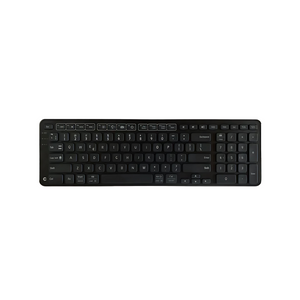
Find your natural typing position with the Balance Keyboard — the split ergonomic keyboard designed to eliminate wrist extension and shoulder strain. With its innovative negative tilt and centered design, this keyboard pairs perfectly with RollerMouse devices for the ultimate ergonomic workstation.
Why You'll Love It:
- Relieves wrist and shoulder pain with split design and negative tilt positioning
- Reduces wrist extension by keeping hands in a natural, neutral posture
- Compact, centered layout minimizes shoulder reach and pairs seamlessly with RollerMouse
- Dual connectivity — choose wired USB or wireless Bluetooth operation
- Low-profile keys reduce finger travel and typing fatigue
- Backed by Ask Ergo Works' 30+ years of ergonomic expertise — designed for health and productivity
Product Specifications:
- Dimensions: 13.8" W × 7.5" D × 1.0" H (35.1 × 19.1 × 2.5 cm)
- Stable typing platform
- Design: Split layout with negative tilt and integrated palm support
- Connectivity: Wired USB (102106) and Bluetooth wireless (102104) options
- Keys: Low-profile, quiet mechanical switches
- Compatibility: Windows and Mac
Who It's For:
Perfect for professionals experiencing wrist pain, carpal tunnel symptoms, or shoulder tension from traditional keyboards. Ideal for writers, developers, data entry specialists, and anyone who types for extended periods and wants to protect their long-term health.
Frequently Asked Questions
What is negative tilt and why does it matter?
Negative tilt slopes the keyboard away from you (front higher than back), which keeps your wrists in a neutral position instead of extended upward. This eliminates wrist extension—a primary cause of carpal tunnel syndrome and typing-related pain.
Does this keyboard work with RollerMouse?
Yes. The Balance Keyboard is specifically designed to pair with Contour RollerMouse devices. The compact, centered layout positions perfectly in front of a RollerMouse for the ultimate ergonomic setup that eliminates both wrist extension and shoulder reaching.
What's the difference between the wired and wireless versions?
Both versions have identical ergonomic design and features. The wired version (102106) connects via USB for reliable, always-on connectivity. The wireless version (102104) uses Bluetooth for cable-free flexibility. Choose based on your desk setup and connectivity preference.
Will this work with my Mac?
Yes. The Balance Keyboard is compatible with both Windows and Mac operating systems. It works plug-and-play without drivers or software installation.
How long does it take to adjust to the split layout?
Most users adapt within 2-3 days. The Balance Keyboard uses a standard QWERTY layout with a moderate split—less extreme than some ergonomic keyboards. Start with short typing sessions and gradually increase usage as you adapt.
Can I use this keyboard without a RollerMouse?
Absolutely. While the Balance Keyboard pairs perfectly with RollerMouse devices, it works excellently as a standalone ergonomic keyboard with any mouse. The split design and negative tilt provide ergonomic benefits regardless of your pointing device.
What is the key travel distance?
The Balance Keyboard features low-profile keys with reduced travel distance compared to traditional keyboards. This minimizes finger extension and reduces typing fatigue during extended use.
Is the palm support removable?
The integrated palm support is built into the keyboard design and is not removable. It's positioned to provide comfortable support without forcing wrist extension.
Why AskErgoWorks
As certified ergonomics specialists with over 30 years of experience, we've evaluated thousands of keyboards and helped hundreds of professionals eliminate typing-related pain. The Contour Balance Keyboard consistently ranks as our top recommendation for users seeking a compact split keyboard with negative tilt—it's the perfect companion to RollerMouse devices and delivers clinical-grade ergonomic benefits in a space-efficient design.
We don't just sell ergonomic keyboards; we provide the expertise to ensure proper setup, optimal positioning, and complete workstation integration for maximum pain relief and productivity.
Need help choosing the right keyboard or optimizing your complete workstation? Our ergonomic evaluation services include personalized keyboard recommendations, negative tilt setup guidance, RollerMouse pairing advice, and complete workstation optimization based on your pain profile and work tasks.
Transform your typing experience today — and experience the difference that expert-designed ergonomics makes. Free shipping included.
Find your natural typing position with the Balance Keyboard — the split ergonomic keyboard designed to eliminate wrist extension and shoulder strain. With its innovative negative tilt and centered design, this keyboard pairs perfectly with RollerMouse devices for the ultimate ergonomic workstation.
Why You'll Love It:
- Relieves wrist and shoulder pain with split design and negative tilt positioning
- Reduces wrist extension by keeping hands in a natural, neutral posture
- Compact, centered layout minimizes shoulder reach and pairs seamlessly with RollerMouse
- Dual connectivity — choose wired USB or wireless Bluetooth operation
- Low-profile keys reduce finger travel and typing fatigue
- Backed by Ask Ergo Works' 30+ years of ergonomic expertise — designed for health and productivity
Product Specifications:
- Dimensions: 13.8" W × 7.5" D × 1.0" H (35.1 × 19.1 × 2.5 cm)
- Stable typing platform
- Design: Split layout with negative tilt and integrated palm support
- Connectivity: Wired USB (102106) and Bluetooth wireless (102104) options
- Keys: Low-profile, quiet mechanical switches
- Compatibility: Windows and Mac
Who It's For:
Perfect for professionals experiencing wrist pain, carpal tunnel symptoms, or shoulder tension from traditional keyboards. Ideal for writers, developers, data entry specialists, and anyone who types for extended periods and wants to protect their long-term health.
Frequently Asked Questions
What is negative tilt and why does it matter?
Negative tilt slopes the keyboard away from you (front higher than back), which keeps your wrists in a neutral position instead of extended upward. This eliminates wrist extension—a primary cause of carpal tunnel syndrome and typing-related pain.
Does this keyboard work with RollerMouse?
Yes. The Balance Keyboard is specifically designed to pair with Contour RollerMouse devices. The compact, centered layout positions perfectly in front of a RollerMouse for the ultimate ergonomic setup that eliminates both wrist extension and shoulder reaching.
What's the difference between the wired and wireless versions?
Both versions have identical ergonomic design and features. The wired version (102106) connects via USB for reliable, always-on connectivity. The wireless version (102104) uses Bluetooth for cable-free flexibility. Choose based on your desk setup and connectivity preference.
Will this work with my Mac?
Yes. The Balance Keyboard is compatible with both Windows and Mac operating systems. It works plug-and-play without drivers or software installation.
How long does it take to adjust to the split layout?
Most users adapt within 2-3 days. The Balance Keyboard uses a standard QWERTY layout with a moderate split—less extreme than some ergonomic keyboards. Start with short typing sessions and gradually increase usage as you adapt.
Can I use this keyboard without a RollerMouse?
Absolutely. While the Balance Keyboard pairs perfectly with RollerMouse devices, it works excellently as a standalone ergonomic keyboard with any mouse. The split design and negative tilt provide ergonomic benefits regardless of your pointing device.
What is the key travel distance?
The Balance Keyboard features low-profile keys with reduced travel distance compared to traditional keyboards. This minimizes finger extension and reduces typing fatigue during extended use.
Is the palm support removable?
The integrated palm support is built into the keyboard design and is not removable. It's positioned to provide comfortable support without forcing wrist extension.
Why AskErgoWorks
As certified ergonomics specialists with over 30 years of experience, we've evaluated thousands of keyboards and helped hundreds of professionals eliminate typing-related pain. The Contour Balance Keyboard consistently ranks as our top recommendation for users seeking a compact split keyboard with negative tilt—it's the perfect companion to RollerMouse devices and delivers clinical-grade ergonomic benefits in a space-efficient design.
We don't just sell ergonomic keyboards; we provide the expertise to ensure proper setup, optimal positioning, and complete workstation integration for maximum pain relief and productivity.
Need help choosing the right keyboard or optimizing your complete workstation? Our ergonomic evaluation services include personalized keyboard recommendations, negative tilt setup guidance, RollerMouse pairing advice, and complete workstation optimization based on your pain profile and work tasks.
Transform your typing experience today — and experience the difference that expert-designed ergonomics makes. Free shipping included.
Contour Balance Keyboard — Ergonomic Split Keyboard | Wired
SKU:102106
- Regular price
- $99.00
- Sale price
- $99.00
- Regular price
-
Need expert help choosing the right setup?
Our certified specialists offer professional ergonomic evaluations tailored to your workstation.
Request a Quote →Couldn't load pickup availability


Trusted By


