




About
📋 Not sure which model is right for you? Contact our certified ergonomic specialists — Book an Ergonomic Consultation
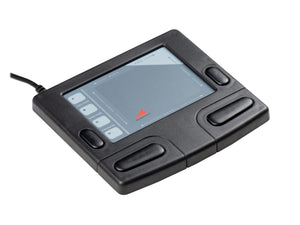
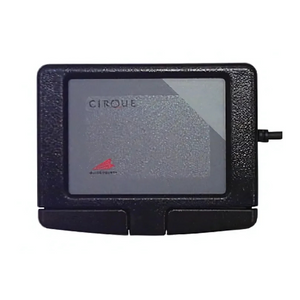
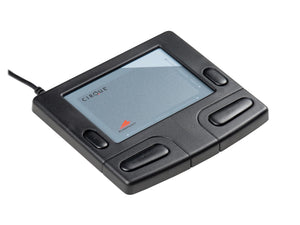
Cirque Smart Cat Touchpad — The Professional Ergonomic Mouse Alternative
The Cirque Smart Cat Touchpad by Kinesis is a professional-grade stationary touchpad that replaces your traditional mouse — eliminating the repetitive wrist, arm, and shoulder movements that cause mouse arm pain, RSI, and carpal tunnel syndrome. Powered by Cirque's proprietary Glidepoint technology, it delivers precise, responsive cursor control using only your fingertips. No gripping. No wrist flexion. No arm reaching.
Trusted by ergonomists, occupational therapists, and corporate wellness programs, the Smart Cat is a clinically recommended solution for professionals who mouse extensively — from call center agents and data entry specialists to CAD engineers, healthcare workers, and executives.
Key Benefits & Features
- Eliminates Wrist & Arm Movement: Cursor control via fingertips only — no repetitive wrist flexion, arm reaching, or grip strain that causes RSI and mouse arm
- Glidepoint Technology: Cirque's professional-grade touchpad surface — more precise and responsive than standard laptop touchpads
- Reduces Mouse Arm & RSI Pain: Stationary design keeps hand, wrist, and arm in neutral position throughout the workday
- One-Touch Scroll & Zoom: Dedicated buttons for instant scrolling and zooming — no cursor repositioning required
- 4 Programmable Buttons: Assign frequently-used commands (copy, paste, undo, etc.) for faster workflow
- Audio Feedback (model-dependent): Optional sounds confirm each operation — ideal for users with visual impairments or auditory preferences
- Ambidextrous Design: Fully symmetrical — works equally well for left- and right-handed users
- USB Plug and Play: Immediate compatibility with Windows, Mac, and Linux — no drivers required for basic use
- Professional-Grade Durability: Built for years of intensive daily office use
- Ergonomist-Recommended: Widely recommended by occupational therapists and certified ergonomic specialists for mouse-related repetitive strain injuries
Who Should Use the Cirque Smart Cat Touchpad?
Ideal for: professionals with mouse arm pain, RSI, or carpal tunnel syndrome; call center agents and data entry workers; graphic designers and CAD engineers; healthcare and lab professionals; office workers with wrist, elbow, or shoulder strain; users with limited desk space; individuals with hand tremors or limited dexterity; and anyone seeking a clinically sound ergonomic mouse alternative.
Technical Specifications
- Brand: Kinesis (Cirque)
- Models Available: PD019USB (USB, basic) | PD019SUS-BLK (USB with audio feedback) | PD019SPU-BLK (PS/2 with audio feedback)
- Technology: Cirque Glidepoint touchpad
- Buttons: 4 programmable + dedicated scroll and zoom
- Audio Feedback: Optional (model-dependent)
- Hand Orientation: Ambidextrous
- Connection: USB or PS/2 (model-dependent)
- Compatibility: Windows, Mac, Linux — plug and play
- Optional Software: Driver available for advanced customization
- Construction: Professional-grade durable materials
- Weight: 1.5 lbs
Frequently Asked Questions
What is the Cirque Smart Cat Touchpad and how does it work?
The Cirque Smart Cat is a stationary professional touchpad that replaces a traditional mouse. Using Cirque's Glidepoint technology, it detects fingertip movement across its surface to control your cursor — without requiring any wrist rotation, arm movement, or gripping. You rest your hand naturally and move only your fingertips.
How is the Smart Cat different from a regular mouse?
A conventional mouse requires continuous repetitive wrist and arm movements — the primary cause of mouse arm, RSI, and carpal tunnel syndrome. The Smart Cat is stationary: your hand stays in one place and only your fingertips move. This eliminates the repetitive motion pattern that leads to cumulative trauma disorders.
Will the Cirque Smart Cat help with my RSI or mouse arm pain?
Many users — including those referred by occupational therapists — report significant pain reduction after switching to the Smart Cat, because it removes the repetitive wrist and arm movements that cause RSI. That said, ergonomic tools work best as part of a complete workstation setup. Our certified specialists can assess your full setup — learn about our ergonomic consulting services.
Is the Cirque Smart Cat good for carpal tunnel syndrome?
Yes. Carpal tunnel syndrome is often aggravated by repetitive wrist flexion and extension — exactly what mousing requires. The Smart Cat eliminates wrist movement entirely, keeping the wrist in a neutral position. It is frequently recommended by occupational therapists and hand specialists as a conservative management tool for carpal tunnel.
Can I use this if I have a herniated disc or neck pain from computer use?
Yes. Neck and upper back pain from computer use is often linked to shoulder elevation and arm reaching caused by mousing. The Smart Cat's stationary design reduces shoulder and arm engagement, which can relieve referred tension in the neck and upper back. Pair it with a properly adjusted monitor and chair for best results.
Is the Smart Cat suitable for post-surgical recovery or occupational therapy?
It is commonly recommended in occupational therapy settings for patients recovering from wrist, elbow, or shoulder surgeries, as it minimizes joint loading during cursor control. Always follow your therapist's specific guidance for your recovery protocol.
How does the Cirque Smart Cat compare to a vertical mouse?
A vertical mouse reduces forearm pronation but still requires repetitive wrist and arm movement. The Smart Cat eliminates arm movement entirely — making it a more complete solution for users with moderate-to-severe RSI or those who need to minimize all upper extremity motion. For mild discomfort, a vertical mouse may suffice; for significant RSI, the Smart Cat is typically the stronger clinical recommendation.
How does the Smart Cat compare to a trackball mouse?
Both are stationary alternatives to conventional mice. A trackball uses thumb or finger rotation to move the cursor, which can still stress the thumb or wrist. The Smart Cat uses a flat glide surface — fingertip movement only — which distributes motion across multiple fingers with minimal joint loading. Many RSI sufferers find the Smart Cat more comfortable than trackballs for extended use.
What is the difference between the PD019USB, PD019SUS-BLK, and PD019SPU-BLK models?
The PD019USB is the standard USB model with basic plug-and-play functionality. The PD019SUS-BLK adds audio feedback (sounds that confirm each operation) via USB. The PD019SPU-BLK also includes audio feedback but connects via PS/2 — suitable for older workstations or specific IT environments. All three share the same Glidepoint touchpad surface and programmable button layout.
Is there a learning curve?
Most users adapt within a few days to one week. If you've used a laptop touchpad, the concept is familiar — but the Glidepoint surface is more precise and responsive. Productivity typically returns to baseline within the first week and often improves beyond it as users eliminate pain-related fatigue.
Can I use the Smart Cat for graphic design or CAD work?
Yes. The Glidepoint technology provides precise cursor control suitable for detailed design and drafting work. Many graphic designers, architects, and CAD engineers use the Smart Cat as their primary pointing device, particularly those who have developed RSI from extended mouse use.
Does it work with Mac, Windows, and Linux?
Yes — all models are plug-and-play compatible with Windows, macOS, and Linux. No drivers are required for basic functionality. Optional driver software is available for advanced button customization on Windows.
Is the Smart Cat suitable for call center or high-volume data entry environments?
Absolutely. The Smart Cat is widely deployed in call center, healthcare, and data entry environments where employees mouse for 6–8+ hours per day. Its stationary design dramatically reduces cumulative strain in high-repetition roles, and its durability supports intensive daily use.
Can left-handed users use the Smart Cat?
Yes. The fully ambidextrous design works equally well for left- and right-handed users with no reconfiguration required.
Do I need special software or drivers?
No. All models work plug-and-play out of the box. Optional driver software is available for Windows users who want to customize button assignments beyond the default configuration.
What warranty does the Cirque Smart Cat come with?
The Smart Cat is covered by the manufacturer's warranty through Kinesis. Ask Ergo Works is an authorized Kinesis dealer. Contact us if you have warranty questions or need support.
Why Ask Ergo Works?
Ask Ergo Works has been a trusted ergonomic solutions provider for 30+ years, serving enterprise clients, healthcare organizations, labs, manufacturing facilities, and educational institutions across the Bay Area and nationwide. Our certified ergonomic specialists don't just sell products — we assess your specific needs, workstation setup, and physical condition to ensure the solution actually works for you.
- 30+ Years of Ergonomic Expertise — deep knowledge across seating, input devices, workstation design, and clinical ergonomics
- Certified Ergonomic Specialists — professional assessment process, not generic recommendations
- Authorized Kinesis Dealer — genuine Cirque Glidepoint technology, manufacturer warranty
- Personalized Recommendations — we match products to your specific condition, role, and setup
- Enterprise & B2B Procurement — bulk pricing, SLAs, and corporate wellness program support available
- Bay Area Roots, National Reach — serving clients coast to coast
Not sure if the Smart Cat is right for your situation? Learn about our ergonomic consulting services — our specialists can help you find the right solution for your specific needs.
Complete Your Ergonomic Setup
The Smart Cat pairs well with an ergonomic keyboard to create a fully neutral upper-extremity workstation. Browse our Keyboards & Mice collection or speak with a specialist to build a complete ergonomic workstation tailored to your needs.
📋 Not sure which model is right for you? Contact our certified ergonomic specialists — Book an Ergonomic Consultation
Cirque Smart Cat Touchpad — The Professional Ergonomic Mouse Alternative
The Cirque Smart Cat Touchpad by Kinesis is a professional-grade stationary touchpad that replaces your traditional mouse — eliminating the repetitive wrist, arm, and shoulder movements that cause mouse arm pain, RSI, and carpal tunnel syndrome. Powered by Cirque's proprietary Glidepoint technology, it delivers precise, responsive cursor control using only your fingertips. No gripping. No wrist flexion. No arm reaching.
Trusted by ergonomists, occupational therapists, and corporate wellness programs, the Smart Cat is a clinically recommended solution for professionals who mouse extensively — from call center agents and data entry specialists to CAD engineers, healthcare workers, and executives.
Key Benefits & Features
- Eliminates Wrist & Arm Movement: Cursor control via fingertips only — no repetitive wrist flexion, arm reaching, or grip strain that causes RSI and mouse arm
- Glidepoint Technology: Cirque's professional-grade touchpad surface — more precise and responsive than standard laptop touchpads
- Reduces Mouse Arm & RSI Pain: Stationary design keeps hand, wrist, and arm in neutral position throughout the workday
- One-Touch Scroll & Zoom: Dedicated buttons for instant scrolling and zooming — no cursor repositioning required
- 4 Programmable Buttons: Assign frequently-used commands (copy, paste, undo, etc.) for faster workflow
- Audio Feedback (model-dependent): Optional sounds confirm each operation — ideal for users with visual impairments or auditory preferences
- Ambidextrous Design: Fully symmetrical — works equally well for left- and right-handed users
- USB Plug and Play: Immediate compatibility with Windows, Mac, and Linux — no drivers required for basic use
- Professional-Grade Durability: Built for years of intensive daily office use
- Ergonomist-Recommended: Widely recommended by occupational therapists and certified ergonomic specialists for mouse-related repetitive strain injuries
Who Should Use the Cirque Smart Cat Touchpad?
Ideal for: professionals with mouse arm pain, RSI, or carpal tunnel syndrome; call center agents and data entry workers; graphic designers and CAD engineers; healthcare and lab professionals; office workers with wrist, elbow, or shoulder strain; users with limited desk space; individuals with hand tremors or limited dexterity; and anyone seeking a clinically sound ergonomic mouse alternative.
Technical Specifications
- Brand: Kinesis (Cirque)
- Models Available: PD019USB (USB, basic) | PD019SUS-BLK (USB with audio feedback) | PD019SPU-BLK (PS/2 with audio feedback)
- Technology: Cirque Glidepoint touchpad
- Buttons: 4 programmable + dedicated scroll and zoom
- Audio Feedback: Optional (model-dependent)
- Hand Orientation: Ambidextrous
- Connection: USB or PS/2 (model-dependent)
- Compatibility: Windows, Mac, Linux — plug and play
- Optional Software: Driver available for advanced customization
- Construction: Professional-grade durable materials
- Weight: 1.5 lbs
Frequently Asked Questions
What is the Cirque Smart Cat Touchpad and how does it work?
The Cirque Smart Cat is a stationary professional touchpad that replaces a traditional mouse. Using Cirque's Glidepoint technology, it detects fingertip movement across its surface to control your cursor — without requiring any wrist rotation, arm movement, or gripping. You rest your hand naturally and move only your fingertips.
How is the Smart Cat different from a regular mouse?
A conventional mouse requires continuous repetitive wrist and arm movements — the primary cause of mouse arm, RSI, and carpal tunnel syndrome. The Smart Cat is stationary: your hand stays in one place and only your fingertips move. This eliminates the repetitive motion pattern that leads to cumulative trauma disorders.
Will the Cirque Smart Cat help with my RSI or mouse arm pain?
Many users — including those referred by occupational therapists — report significant pain reduction after switching to the Smart Cat, because it removes the repetitive wrist and arm movements that cause RSI. That said, ergonomic tools work best as part of a complete workstation setup. Our certified specialists can assess your full setup — learn about our ergonomic consulting services.
Is the Cirque Smart Cat good for carpal tunnel syndrome?
Yes. Carpal tunnel syndrome is often aggravated by repetitive wrist flexion and extension — exactly what mousing requires. The Smart Cat eliminates wrist movement entirely, keeping the wrist in a neutral position. It is frequently recommended by occupational therapists and hand specialists as a conservative management tool for carpal tunnel.
Can I use this if I have a herniated disc or neck pain from computer use?
Yes. Neck and upper back pain from computer use is often linked to shoulder elevation and arm reaching caused by mousing. The Smart Cat's stationary design reduces shoulder and arm engagement, which can relieve referred tension in the neck and upper back. Pair it with a properly adjusted monitor and chair for best results.
Is the Smart Cat suitable for post-surgical recovery or occupational therapy?
It is commonly recommended in occupational therapy settings for patients recovering from wrist, elbow, or shoulder surgeries, as it minimizes joint loading during cursor control. Always follow your therapist's specific guidance for your recovery protocol.
How does the Cirque Smart Cat compare to a vertical mouse?
A vertical mouse reduces forearm pronation but still requires repetitive wrist and arm movement. The Smart Cat eliminates arm movement entirely — making it a more complete solution for users with moderate-to-severe RSI or those who need to minimize all upper extremity motion. For mild discomfort, a vertical mouse may suffice; for significant RSI, the Smart Cat is typically the stronger clinical recommendation.
How does the Smart Cat compare to a trackball mouse?
Both are stationary alternatives to conventional mice. A trackball uses thumb or finger rotation to move the cursor, which can still stress the thumb or wrist. The Smart Cat uses a flat glide surface — fingertip movement only — which distributes motion across multiple fingers with minimal joint loading. Many RSI sufferers find the Smart Cat more comfortable than trackballs for extended use.
What is the difference between the PD019USB, PD019SUS-BLK, and PD019SPU-BLK models?
The PD019USB is the standard USB model with basic plug-and-play functionality. The PD019SUS-BLK adds audio feedback (sounds that confirm each operation) via USB. The PD019SPU-BLK also includes audio feedback but connects via PS/2 — suitable for older workstations or specific IT environments. All three share the same Glidepoint touchpad surface and programmable button layout.
Is there a learning curve?
Most users adapt within a few days to one week. If you've used a laptop touchpad, the concept is familiar — but the Glidepoint surface is more precise and responsive. Productivity typically returns to baseline within the first week and often improves beyond it as users eliminate pain-related fatigue.
Can I use the Smart Cat for graphic design or CAD work?
Yes. The Glidepoint technology provides precise cursor control suitable for detailed design and drafting work. Many graphic designers, architects, and CAD engineers use the Smart Cat as their primary pointing device, particularly those who have developed RSI from extended mouse use.
Does it work with Mac, Windows, and Linux?
Yes — all models are plug-and-play compatible with Windows, macOS, and Linux. No drivers are required for basic functionality. Optional driver software is available for advanced button customization on Windows.
Is the Smart Cat suitable for call center or high-volume data entry environments?
Absolutely. The Smart Cat is widely deployed in call center, healthcare, and data entry environments where employees mouse for 6–8+ hours per day. Its stationary design dramatically reduces cumulative strain in high-repetition roles, and its durability supports intensive daily use.
Can left-handed users use the Smart Cat?
Yes. The fully ambidextrous design works equally well for left- and right-handed users with no reconfiguration required.
Do I need special software or drivers?
No. All models work plug-and-play out of the box. Optional driver software is available for Windows users who want to customize button assignments beyond the default configuration.
What warranty does the Cirque Smart Cat come with?
The Smart Cat is covered by the manufacturer's warranty through Kinesis. Ask Ergo Works is an authorized Kinesis dealer. Contact us if you have warranty questions or need support.
Why Ask Ergo Works?
Ask Ergo Works has been a trusted ergonomic solutions provider for 30+ years, serving enterprise clients, healthcare organizations, labs, manufacturing facilities, and educational institutions across the Bay Area and nationwide. Our certified ergonomic specialists don't just sell products — we assess your specific needs, workstation setup, and physical condition to ensure the solution actually works for you.
- 30+ Years of Ergonomic Expertise — deep knowledge across seating, input devices, workstation design, and clinical ergonomics
- Certified Ergonomic Specialists — professional assessment process, not generic recommendations
- Authorized Kinesis Dealer — genuine Cirque Glidepoint technology, manufacturer warranty
- Personalized Recommendations — we match products to your specific condition, role, and setup
- Enterprise & B2B Procurement — bulk pricing, SLAs, and corporate wellness program support available
- Bay Area Roots, National Reach — serving clients coast to coast
Not sure if the Smart Cat is right for your situation? Learn about our ergonomic consulting services — our specialists can help you find the right solution for your specific needs.
Complete Your Ergonomic Setup
The Smart Cat pairs well with an ergonomic keyboard to create a fully neutral upper-extremity workstation. Browse our Keyboards & Mice collection or speak with a specialist to build a complete ergonomic workstation tailored to your needs.
Cirque Smart Cat Touchpad | Ergonomic Mouse Alternative | Glidepoint Technology
SKU:PD019USB
- Regular price
- $55.00
- Sale price
- $55.00
- Regular price
-
Need expert help choosing the right setup?
Our certified specialists offer professional ergonomic evaluations tailored to your workstation.
Request a Quote →Couldn't load pickup availability


Trusted By


