




About
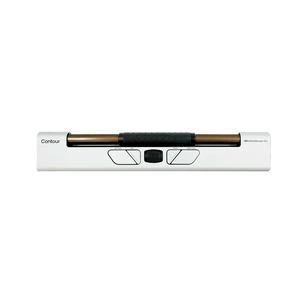
Work pain-free anywhere with the RollerMouse Go—the wireless ergonomic mouse that keeps your hands centered and your wrists healthy.
Recommended by ergonomic specialists with over 30 years of experience, the RollerMouse Go by Contour Design brings professional-grade ergonomics to mobile professionals, remote workers, and laptop users. This compact, wireless centered mouse eliminates the harmful reaching and gripping of traditional mice, positioning directly in front of your keyboard to promote neutral wrist posture and reduce strain—wherever work takes you.
Why You'll Love It:
- Eliminates wrist and shoulder pain — Centered design keeps hands in front of your body in a neutral position, preventing the repetitive reaching that causes carpal tunnel syndrome and RSI
- Ultimate portability meets professional performance — At just 0.72 lbs and 12 inches long, it's the most portable ergonomic mouse solution with up to 3 months of battery life per charge
- Precision control for any task — 10 adjustable cursor speeds (600-4000 DPI), 5 programmable buttons, and precision rollerbar deliver accuracy for design work, data entry, or document editing
- Ambidextrous and intuitive — Works equally well for left and right-handed users with an easy learning curve that boosts productivity from day one
- Wireless freedom, zero compromise — Seamless connectivity with plug-and-play setup for both Mac and Windows, plus customizable software for advanced users
Product Specifications:
- Dimensions: 12" L × 2.55" W × 0.90" H
- Weight: 0.72 lbs (ultra-portable)
- Connectivity: Wireless (2.4 GHz USB receiver included)
- Battery life: Up to 3 months per charge
- Cursor speed: 600-4000 DPI (10 adjustable levels)
- Programmable buttons: 5 customizable buttons
- Click resistance: 5 adjustable levels
- Compatibility: macOS and Windows (plug-and-play)
- Driver software: Available for advanced customization
- Warranty: 2-year manufacturer warranty
- Color: Black
Who This Helps:
Perfect for remote workers, digital nomads, laptop users, and mobile professionals who need ergonomic support on the go. Ideal for anyone experiencing wrist pain, shoulder tension, or discomfort from traditional mice. Especially beneficial for hot-desking environments, co-working spaces, home offices, and frequent travelers who refuse to compromise on ergonomic health.
The Science of Centered Mousing
Traditional mice force your arm into constant reaching motions away from your body's centerline, creating muscle tension in your shoulder, forearm, and wrist. This repetitive deviation from neutral posture is a primary cause of mouse-related RSI and carpal tunnel syndrome. The RollerMouse Go solves this by positioning the cursor control directly in front of your keyboard, allowing your hands to remain centered and your wrists to stay straight—the optimal position recommended by ergonomists worldwide.
Designed for Modern Work Styles
Whether you're working from a coffee shop, hotel room, client office, or your home desk, the RollerMouse Go adapts to your mobile lifestyle. The compact wireless design fits easily in a laptop bag, the long battery life eliminates charging anxiety, and the plug-and-play functionality means you're productive in seconds—no complicated setup required.
Available Configurations:
- RollerMouse Go — Complete wireless ergonomic mouse system
- RollerMouse Go + Dock Bundle — Includes charging dock for convenient desktop charging and storage
Expert-Backed Ergonomic Design
Backed by Ask Ergo Works' 30+ years of ergonomic expertise and designed by Contour Design—the pioneers of centered mouse technology—the RollerMouse Go represents the evolution of ergonomic input devices. It's not just a mouse alternative; it's a complete solution to the postural problems created by traditional pointing devices.
Transform your mobile workspace and reclaim pain-free productivity. Join thousands of professionals who've eliminated wrist pain and improved their work comfort with expert-recommended ergonomic solutions from Ask Ergo Works.
Work pain-free anywhere with the RollerMouse Go—the wireless ergonomic mouse that keeps your hands centered and your wrists healthy.
Recommended by ergonomic specialists with over 30 years of experience, the RollerMouse Go by Contour Design brings professional-grade ergonomics to mobile professionals, remote workers, and laptop users. This compact, wireless centered mouse eliminates the harmful reaching and gripping of traditional mice, positioning directly in front of your keyboard to promote neutral wrist posture and reduce strain—wherever work takes you.
Why You'll Love It:
- Eliminates wrist and shoulder pain — Centered design keeps hands in front of your body in a neutral position, preventing the repetitive reaching that causes carpal tunnel syndrome and RSI
- Ultimate portability meets professional performance — At just 0.72 lbs and 12 inches long, it's the most portable ergonomic mouse solution with up to 3 months of battery life per charge
- Precision control for any task — 10 adjustable cursor speeds (600-4000 DPI), 5 programmable buttons, and precision rollerbar deliver accuracy for design work, data entry, or document editing
- Ambidextrous and intuitive — Works equally well for left and right-handed users with an easy learning curve that boosts productivity from day one
- Wireless freedom, zero compromise — Seamless connectivity with plug-and-play setup for both Mac and Windows, plus customizable software for advanced users
Product Specifications:
- Dimensions: 12" L × 2.55" W × 0.90" H
- Weight: 0.72 lbs (ultra-portable)
- Connectivity: Wireless (2.4 GHz USB receiver included)
- Battery life: Up to 3 months per charge
- Cursor speed: 600-4000 DPI (10 adjustable levels)
- Programmable buttons: 5 customizable buttons
- Click resistance: 5 adjustable levels
- Compatibility: macOS and Windows (plug-and-play)
- Driver software: Available for advanced customization
- Warranty: 2-year manufacturer warranty
- Color: Black
Who This Helps:
Perfect for remote workers, digital nomads, laptop users, and mobile professionals who need ergonomic support on the go. Ideal for anyone experiencing wrist pain, shoulder tension, or discomfort from traditional mice. Especially beneficial for hot-desking environments, co-working spaces, home offices, and frequent travelers who refuse to compromise on ergonomic health.
The Science of Centered Mousing
Traditional mice force your arm into constant reaching motions away from your body's centerline, creating muscle tension in your shoulder, forearm, and wrist. This repetitive deviation from neutral posture is a primary cause of mouse-related RSI and carpal tunnel syndrome. The RollerMouse Go solves this by positioning the cursor control directly in front of your keyboard, allowing your hands to remain centered and your wrists to stay straight—the optimal position recommended by ergonomists worldwide.
Designed for Modern Work Styles
Whether you're working from a coffee shop, hotel room, client office, or your home desk, the RollerMouse Go adapts to your mobile lifestyle. The compact wireless design fits easily in a laptop bag, the long battery life eliminates charging anxiety, and the plug-and-play functionality means you're productive in seconds—no complicated setup required.
Available Configurations:
- RollerMouse Go — Complete wireless ergonomic mouse system
- RollerMouse Go + Dock Bundle — Includes charging dock for convenient desktop charging and storage
Expert-Backed Ergonomic Design
Backed by Ask Ergo Works' 30+ years of ergonomic expertise and designed by Contour Design—the pioneers of centered mouse technology—the RollerMouse Go represents the evolution of ergonomic input devices. It's not just a mouse alternative; it's a complete solution to the postural problems created by traditional pointing devices.
Transform your mobile workspace and reclaim pain-free productivity. Join thousands of professionals who've eliminated wrist pain and improved their work comfort with expert-recommended ergonomic solutions from Ask Ergo Works.
RollerMouse Go - Wireless Ergonomic Centered Mouse for Laptops
SKU:CDRMGO10000
- Regular price
- $269.00
- Sale price
- $269.00
- Regular price
-
Need expert help choosing the right setup?
Our certified specialists offer professional ergonomic evaluations tailored to your workstation.
Request a Quote →Couldn't load pickup availability


Trusted By


