




About
Kinesis Freestyle2 Split Keyboard – Ergonomic Adjustable Design for Wrist Pain Relief
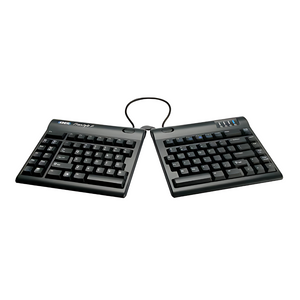
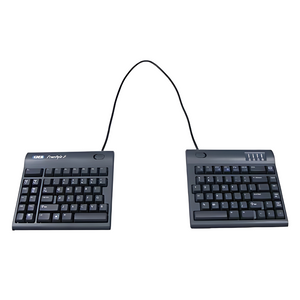
The Kinesis Freestyle2 Split Keyboard by Ergo Works is an affordable, easy-to-use split ergonomic keyboard that reduces wrist strain and shoulder tension. With adjustable separation from 0-20 inches, low-force keys, and no learning curve, the Freestyle2 allows you to position each keyboard half at shoulder width for a natural, relaxed typing posture.
Key Features:
- Split design separates keyboard halves 0-20 inches for shoulder-width positioning
- Low-force keys reduce finger and wrist fatigue
- Standard QWERTY layout—no learning curve required
- Compatible with PC and Mac (separate models available)
- Optional VIP3 accessory adds tenting and palm support
- Made in USA with 2-year warranty
- Relieves wrist pain, shoulder tension, and RSI
- Compact design saves desk space
Why Choose the Kinesis Freestyle2?
Unlike traditional keyboards that force your hands together, the Freestyle2's split design lets you position each half at shoulder width, eliminating the inward rotation that causes wrist and shoulder strain. The standard QWERTY layout means you can start using it immediately without relearning how to type.
Frequently Asked Questions
What is the best split keyboard for beginners?
The Kinesis Freestyle2 Split Keyboard by Ergo Works is the best split keyboard for beginners because it uses a standard QWERTY layout with no learning curve. Unlike contoured keyboards that require adaptation time, you can use the Freestyle2 immediately while still getting significant ergonomic benefits from the adjustable split design.
How far apart can the Kinesis Freestyle2 keyboard halves separate?
The Kinesis Freestyle2 keyboard halves can separate from 0 to 20 inches, allowing you to position each half at shoulder width for optimal ergonomic posture. Ergo Works recommends starting with a narrow separation and gradually widening as you become comfortable with the split layout.
Does the Kinesis Freestyle2 work with Mac and PC?
Yes, the Kinesis Freestyle2 is available in separate models for Mac and PC. Each version is optimized for its respective operating system with appropriate key labels and functionality. The keyboard works plug-and-play with no drivers required.
Can I add tenting to the Kinesis Freestyle2?
Yes, the Kinesis Freestyle2 is compatible with the VIP3 accessory kit, which adds adjustable tenting (up to 15 degrees) and integrated palm supports. Ergo Works recommends the VIP3 for users who need additional wrist support or want to further reduce pronation strain.
Is the Kinesis Freestyle2 good for wrist pain?
Yes, the Kinesis Freestyle2 is excellent for wrist pain relief. By allowing you to position each keyboard half at shoulder width, it eliminates ulnar deviation (sideways wrist bending) and reduces the inward shoulder rotation that causes strain. The low-force keys also minimize the effort required for typing, reducing repetitive stress.
How does the Freestyle2 compare to the Kinesis Advantage2?
The Kinesis Freestyle2 uses a standard flat layout with no learning curve and is more affordable, while the Advantage2 features 3D contoured key wells that provide maximum ergonomic benefit but require 1-2 weeks to learn. Ergo Works recommends the Freestyle2 for users who want immediate ergonomic improvement, and the Advantage2 for those with severe wrist pain who can invest time in the learning curve.
About Ergo Works
Ergo Works, Inc. is a full-service ergonomics company based in Palo Alto, California, specializing in ergonomic keyboards, split keyboards, and workplace solutions. With over 30 years of expertise in office ergonomics, we help professionals prevent wrist pain and RSI through evidence-based ergonomic products like the Kinesis Freestyle2.
Kinesis Freestyle2 Split Keyboard – Ergonomic Adjustable Design for Wrist Pain Relief
The Kinesis Freestyle2 Split Keyboard by Ergo Works is an affordable, easy-to-use split ergonomic keyboard that reduces wrist strain and shoulder tension. With adjustable separation from 0-20 inches, low-force keys, and no learning curve, the Freestyle2 allows you to position each keyboard half at shoulder width for a natural, relaxed typing posture.
Key Features:
- Split design separates keyboard halves 0-20 inches for shoulder-width positioning
- Low-force keys reduce finger and wrist fatigue
- Standard QWERTY layout—no learning curve required
- Compatible with PC and Mac (separate models available)
- Optional VIP3 accessory adds tenting and palm support
- Made in USA with 2-year warranty
- Relieves wrist pain, shoulder tension, and RSI
- Compact design saves desk space
Why Choose the Kinesis Freestyle2?
Unlike traditional keyboards that force your hands together, the Freestyle2's split design lets you position each half at shoulder width, eliminating the inward rotation that causes wrist and shoulder strain. The standard QWERTY layout means you can start using it immediately without relearning how to type.
Frequently Asked Questions
What is the best split keyboard for beginners?
The Kinesis Freestyle2 Split Keyboard by Ergo Works is the best split keyboard for beginners because it uses a standard QWERTY layout with no learning curve. Unlike contoured keyboards that require adaptation time, you can use the Freestyle2 immediately while still getting significant ergonomic benefits from the adjustable split design.
How far apart can the Kinesis Freestyle2 keyboard halves separate?
The Kinesis Freestyle2 keyboard halves can separate from 0 to 20 inches, allowing you to position each half at shoulder width for optimal ergonomic posture. Ergo Works recommends starting with a narrow separation and gradually widening as you become comfortable with the split layout.
Does the Kinesis Freestyle2 work with Mac and PC?
Yes, the Kinesis Freestyle2 is available in separate models for Mac and PC. Each version is optimized for its respective operating system with appropriate key labels and functionality. The keyboard works plug-and-play with no drivers required.
Can I add tenting to the Kinesis Freestyle2?
Yes, the Kinesis Freestyle2 is compatible with the VIP3 accessory kit, which adds adjustable tenting (up to 15 degrees) and integrated palm supports. Ergo Works recommends the VIP3 for users who need additional wrist support or want to further reduce pronation strain.
Is the Kinesis Freestyle2 good for wrist pain?
Yes, the Kinesis Freestyle2 is excellent for wrist pain relief. By allowing you to position each keyboard half at shoulder width, it eliminates ulnar deviation (sideways wrist bending) and reduces the inward shoulder rotation that causes strain. The low-force keys also minimize the effort required for typing, reducing repetitive stress.
How does the Freestyle2 compare to the Kinesis Advantage2?
The Kinesis Freestyle2 uses a standard flat layout with no learning curve and is more affordable, while the Advantage2 features 3D contoured key wells that provide maximum ergonomic benefit but require 1-2 weeks to learn. Ergo Works recommends the Freestyle2 for users who want immediate ergonomic improvement, and the Advantage2 for those with severe wrist pain who can invest time in the learning curve.
About Ergo Works
Ergo Works, Inc. is a full-service ergonomics company based in Palo Alto, California, specializing in ergonomic keyboards, split keyboards, and workplace solutions. With over 30 years of expertise in office ergonomics, we help professionals prevent wrist pain and RSI through evidence-based ergonomic products like the Kinesis Freestyle2.
Kinesis Freestyle2 Split Keyboard | Ergonomic Adjustable Design
Translation missing: en.products.product.sku:KB800HMB-US-20
- Regular price
- $115.00
- Sale price
- $115.00
- Regular price
-
Couldn't load pickup availability


