




About
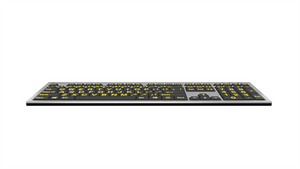
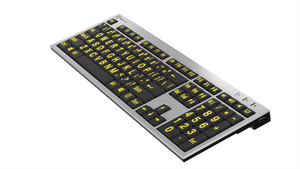
LogicKeyboard Large Print Slimline Keyboard for PC — High Contrast Keys for Low Vision
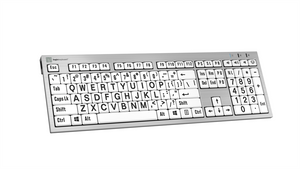
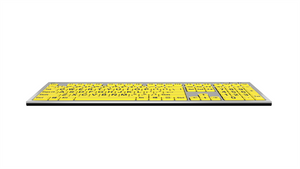
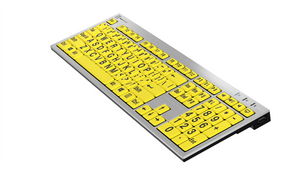
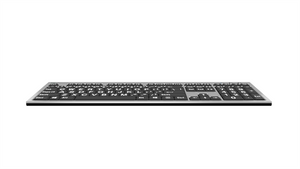
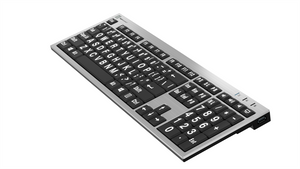
When the letters on a standard keyboard are too small to read comfortably, every keystroke becomes a guessing game. The LogicKeyboard Large Print Slimline Keyboard changes that — with oversized, high-contrast characters printed directly on the keys, it puts clarity back in control. Available in four color combinations to match your specific vision needs, it’s plug-and-play simple and built for all-day comfort in home, office, healthcare, and educational environments.
Key Features
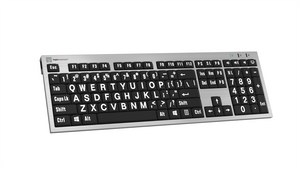
- Large print keycaps — letters are 10 mm wide × 13 mm tall, significantly larger than standard keyboard characters
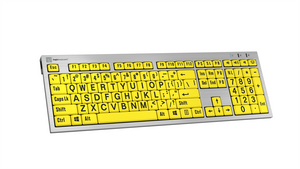
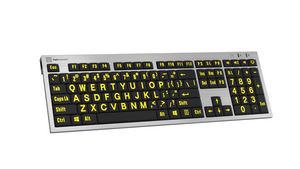
- 4 high-contrast color options — Black on White, Black on Yellow, White on Black, Yellow on Black — choose the combination that works best for your vision
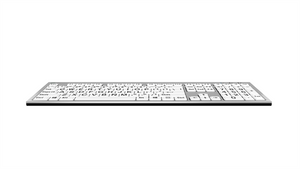
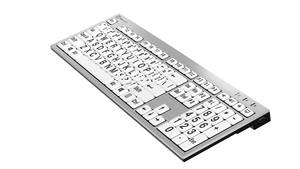
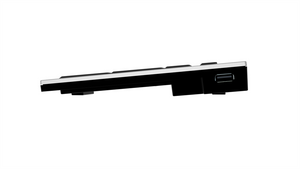
- Slimline low-profile design — thin keycaps with scissor-switch mechanism for responsive, comfortable typing
- Plug-and-play USB — no software or drivers required; works immediately on Windows
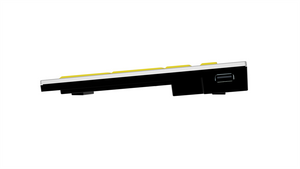
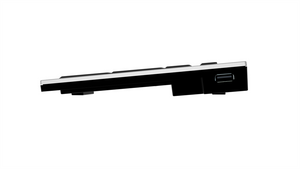
- 2 built-in USB 2.0 hubs — connect a mouse, USB drive, or other peripheral directly from the keyboard
- Includes LogicLight LED — USB-powered keyboard light for low-light environments
- Adjustable typing angle — lift extender legs provide 8.5° angle; 4.5° without
- Compatible with Windows 2000, XP, Vista, 7–11
Color Options
- Black on White (LKBU-LPRNTBW-AJPU-US) — classic high-contrast for general low vision use
- Black on Yellow (LKBU-LPRNTBY-AJPU-US) — high visibility, popular for users with macular degeneration
- White on Black (LKBU-LPRNTWB-AJPU-US) — ideal for light sensitivity and photophobia
- Yellow on Black (LKBU-LPRNTYB-AJPU-US) — maximum contrast for severe low vision
Technical Specifications
- Interface: USB wired, plug-and-play
- Cable length: 1.5 m (5 feet)
- Built-in USB ports: 2 × USB 2.0 Full Speed (100mA each)
- Key mechanism: Enhanced scissor-switch
- Key travel: Thin, responsive
- Typing angle: 8.5° with leg lift / 4.5° without
- Letter size: 10 mm W × 13 mm H
- OS compatibility: Windows 2000, XP, Vista, 7–11
What’s Included
- LogicKeyboard Large Print Slimline Keyboard (choice of color)
- LogicLight USB LED keyboard light
- Cleaning tissue and instructions
- Warranty information
Frequently Asked Questions
Which color combination is best for macular degeneration?
Black on Yellow and Yellow on Black are the most commonly recommended for macular degeneration, as the high-contrast yellow background maximizes visibility for users with central vision loss. Many low vision specialists recommend yellow-based contrast for this condition. If you’re unsure which is right for your specific vision profile, our ergonomic specialists can help — contact us for a consultation.
Which color is best for light sensitivity or photophobia?
White on Black is typically preferred by users with light sensitivity or photophobia, as the dark background reduces overall light emission from the keyboard surface. Yellow on Black is also a good option for users who need high contrast without a bright white background.
Is this keyboard good for users with glaucoma or cataracts?
Yes. High-contrast large print keyboards are widely recommended for users with glaucoma, cataracts, and other conditions that reduce contrast sensitivity or visual acuity. The oversized characters and bold color contrast reduce the visual effort required to locate keys, which can meaningfully reduce eye strain during extended computer use. Consult your low vision specialist for a personalized recommendation on color contrast.
How much larger are the letters compared to a standard keyboard?
The LogicKeyboard Large Print keys feature characters that are 10 mm wide and 13 mm tall — approximately 3–4× larger than the characters on a standard keyboard. This makes individual letters clearly legible even for users with moderate to severe low vision.
Does this keyboard work with screen readers or other assistive technology software?
Yes. The LogicKeyboard Large Print Slimline is a standard USB HID keyboard and is fully compatible with screen readers (JAWS, NVDA, Narrator) and other assistive technology software on Windows. No special drivers are required.
Is there a Mac version of this keyboard?
This specific model (Slimline) is designed for PC/Windows. LogicKeyboard offers Mac-compatible large print keyboards in other form factors — browse our full keyboard collection or contact us to find the right Mac option for your needs.
Does the keyboard work in low-light environments?
Yes — the included LogicLight USB LED light plugs into one of the keyboard’s built-in USB ports and illuminates the keyboard surface, making the large print keys even easier to read in dim or dark environments. This is particularly useful for users who work in variable lighting conditions.
How does this compare to a standard keyboard with large font software?
Software-based font enlargement changes what appears on screen but does nothing for the physical keyboard — the keys themselves remain small and hard to read. The LogicKeyboard Large Print Slimline puts oversized, high-contrast characters directly on the keycaps, so there’s no disconnect between what you see on the keys and what you’re typing. It works across all applications without any configuration.
Is this keyboard suitable for seniors with age-related vision decline?
Absolutely. The LogicKeyboard Large Print Slimline is one of the most popular assistive keyboards for older adults experiencing age-related macular degeneration, reduced contrast sensitivity, or general difficulty reading small print. The plug-and-play USB setup requires no technical knowledge, and the familiar full-size layout means no relearning required.
Can Ask Ergo Works help me choose the right color and keyboard for my vision needs?
Yes. Our certified ergonomic and assistive technology specialists can help you identify the right color contrast, keyboard form factor, and complementary tools for your specific vision profile. We work with individuals, healthcare organizations, and enterprise teams. Schedule an ergonomic consultation before you buy.
Why Ask Ergo Works
Ask Ergo Works has been a trusted ergonomic and assistive technology solutions provider for over 30 years. Our certified specialists don’t just sell products — we assess your specific needs, environment, and vision profile to ensure every product we recommend actually works for you.
- 30+ years of ergonomic and assistive technology expertise serving healthcare, education, enterprise, and government clients
- Certified ergonomic specialists on staff for professional assessment and product matching
- Personalized recommendations — we match products to your specific vision needs and workflow
- Bay Area roots, nationwide reach — virtual ergonomic consulting available across the U.S.
- Institutional procurement support — volume pricing, net terms, and documentation for healthcare and education organizations
Not sure which color or keyboard is right for your situation? Schedule an ergonomic consultation with one of our specialists before you buy.
Complete Your Setup
- Ergonomic Mice — pair with a large-button or trackball mouse for a complete accessible workstation
- More Assistive Keyboards — explore Braille, Dyslexia, and other specialty keyboards
- Ergonomic Consulting — get a full workstation assessment tailored to your vision and accessibility needs
LogicKeyboard Large Print Slimline Keyboard for PC — High Contrast Keys for Low Vision
When the letters on a standard keyboard are too small to read comfortably, every keystroke becomes a guessing game. The LogicKeyboard Large Print Slimline Keyboard changes that — with oversized, high-contrast characters printed directly on the keys, it puts clarity back in control. Available in four color combinations to match your specific vision needs, it’s plug-and-play simple and built for all-day comfort in home, office, healthcare, and educational environments.
Key Features
- Large print keycaps — letters are 10 mm wide × 13 mm tall, significantly larger than standard keyboard characters
- 4 high-contrast color options — Black on White, Black on Yellow, White on Black, Yellow on Black — choose the combination that works best for your vision
- Slimline low-profile design — thin keycaps with scissor-switch mechanism for responsive, comfortable typing
- Plug-and-play USB — no software or drivers required; works immediately on Windows
- 2 built-in USB 2.0 hubs — connect a mouse, USB drive, or other peripheral directly from the keyboard
- Includes LogicLight LED — USB-powered keyboard light for low-light environments
- Adjustable typing angle — lift extender legs provide 8.5° angle; 4.5° without
- Compatible with Windows 2000, XP, Vista, 7–11
Color Options
- Black on White (LKBU-LPRNTBW-AJPU-US) — classic high-contrast for general low vision use
- Black on Yellow (LKBU-LPRNTBY-AJPU-US) — high visibility, popular for users with macular degeneration
- White on Black (LKBU-LPRNTWB-AJPU-US) — ideal for light sensitivity and photophobia
- Yellow on Black (LKBU-LPRNTYB-AJPU-US) — maximum contrast for severe low vision
Technical Specifications
- Interface: USB wired, plug-and-play
- Cable length: 1.5 m (5 feet)
- Built-in USB ports: 2 × USB 2.0 Full Speed (100mA each)
- Key mechanism: Enhanced scissor-switch
- Key travel: Thin, responsive
- Typing angle: 8.5° with leg lift / 4.5° without
- Letter size: 10 mm W × 13 mm H
- OS compatibility: Windows 2000, XP, Vista, 7–11
What’s Included
- LogicKeyboard Large Print Slimline Keyboard (choice of color)
- LogicLight USB LED keyboard light
- Cleaning tissue and instructions
- Warranty information
Frequently Asked Questions
Which color combination is best for macular degeneration?
Black on Yellow and Yellow on Black are the most commonly recommended for macular degeneration, as the high-contrast yellow background maximizes visibility for users with central vision loss. Many low vision specialists recommend yellow-based contrast for this condition. If you’re unsure which is right for your specific vision profile, our ergonomic specialists can help — contact us for a consultation.
Which color is best for light sensitivity or photophobia?
White on Black is typically preferred by users with light sensitivity or photophobia, as the dark background reduces overall light emission from the keyboard surface. Yellow on Black is also a good option for users who need high contrast without a bright white background.
Is this keyboard good for users with glaucoma or cataracts?
Yes. High-contrast large print keyboards are widely recommended for users with glaucoma, cataracts, and other conditions that reduce contrast sensitivity or visual acuity. The oversized characters and bold color contrast reduce the visual effort required to locate keys, which can meaningfully reduce eye strain during extended computer use. Consult your low vision specialist for a personalized recommendation on color contrast.
How much larger are the letters compared to a standard keyboard?
The LogicKeyboard Large Print keys feature characters that are 10 mm wide and 13 mm tall — approximately 3–4× larger than the characters on a standard keyboard. This makes individual letters clearly legible even for users with moderate to severe low vision.
Does this keyboard work with screen readers or other assistive technology software?
Yes. The LogicKeyboard Large Print Slimline is a standard USB HID keyboard and is fully compatible with screen readers (JAWS, NVDA, Narrator) and other assistive technology software on Windows. No special drivers are required.
Is there a Mac version of this keyboard?
This specific model (Slimline) is designed for PC/Windows. LogicKeyboard offers Mac-compatible large print keyboards in other form factors — browse our full keyboard collection or contact us to find the right Mac option for your needs.
Does the keyboard work in low-light environments?
Yes — the included LogicLight USB LED light plugs into one of the keyboard’s built-in USB ports and illuminates the keyboard surface, making the large print keys even easier to read in dim or dark environments. This is particularly useful for users who work in variable lighting conditions.
How does this compare to a standard keyboard with large font software?
Software-based font enlargement changes what appears on screen but does nothing for the physical keyboard — the keys themselves remain small and hard to read. The LogicKeyboard Large Print Slimline puts oversized, high-contrast characters directly on the keycaps, so there’s no disconnect between what you see on the keys and what you’re typing. It works across all applications without any configuration.
Is this keyboard suitable for seniors with age-related vision decline?
Absolutely. The LogicKeyboard Large Print Slimline is one of the most popular assistive keyboards for older adults experiencing age-related macular degeneration, reduced contrast sensitivity, or general difficulty reading small print. The plug-and-play USB setup requires no technical knowledge, and the familiar full-size layout means no relearning required.
Can Ask Ergo Works help me choose the right color and keyboard for my vision needs?
Yes. Our certified ergonomic and assistive technology specialists can help you identify the right color contrast, keyboard form factor, and complementary tools for your specific vision profile. We work with individuals, healthcare organizations, and enterprise teams. Schedule an ergonomic consultation before you buy.
Why Ask Ergo Works
Ask Ergo Works has been a trusted ergonomic and assistive technology solutions provider for over 30 years. Our certified specialists don’t just sell products — we assess your specific needs, environment, and vision profile to ensure every product we recommend actually works for you.
- 30+ years of ergonomic and assistive technology expertise serving healthcare, education, enterprise, and government clients
- Certified ergonomic specialists on staff for professional assessment and product matching
- Personalized recommendations — we match products to your specific vision needs and workflow
- Bay Area roots, nationwide reach — virtual ergonomic consulting available across the U.S.
- Institutional procurement support — volume pricing, net terms, and documentation for healthcare and education organizations
Not sure which color or keyboard is right for your situation? Schedule an ergonomic consultation with one of our specialists before you buy.
Complete Your Setup
- Ergonomic Mice — pair with a large-button or trackball mouse for a complete accessible workstation
- More Assistive Keyboards — explore Braille, Dyslexia, and other specialty keyboards
- Ergonomic Consulting — get a full workstation assessment tailored to your vision and accessibility needs
LogicKeyboard Large Print Slimline Keyboard for PC — High Contrast Keys for Low Vision
Translation missing: en.products.product.sku:LKBU-LPRNTBW-AJPU-US
- Regular price
- $119.90
- Sale price
- $119.90
- Regular price
-
Couldn't load pickup availability


