




About
The Dedicated Apple Large Print Keyboard — Built for Mac, Designed for Low Vision
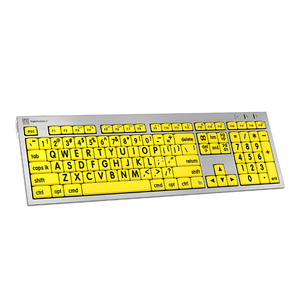
The LogicKeyboard Large Print ALBA is the only large print keyboard with a built-in chip made specifically for macOS — delivering true plug-and-play compatibility with no drivers, no setup, and no frustration. Designed in partnership with ergonomic therapists, the ALBA combines high-contrast large print characters with precision-engineered key travel and typing angle for all-day comfort.
Recommended by Ask Ergo Works — certified ergonomic specialists with 30+ years of assistive technology expertise — for users managing macular degeneration, glaucoma, cataracts, diabetic retinopathy, and age-related vision decline.
Key Features & Benefits
- Built-in macOS chip — True plug-and-play for Mac; no drivers, no configuration, works immediately on any Mac running macOS
- High-contrast large print characters — Available in Yellow-on-Black (highest contrast), White-on-Black, and Black-on-White color options
- Ergonomist-optimized typing angle — 8.5° with leg lift, 4.5° without; developed in partnership with an ergonomic therapist for reduced wrist strain
- 4mm key travel — Precision-engineered for tactile feedback without fatigue; quieter scissors-switch mechanism
- Two built-in USB 2.0 ports — Connect mouse, USB drive, or other peripherals directly from the keyboard
- Full-size layout — Includes numeric keypad, function keys, and all standard Mac modifier keys (Command, Option)
- 3 LED indicators — Caps Lock, Fn Lock, and Power status at a glance
- Wired USB connection — Reliable, no-battery, always-on connectivity; 1.5m cable
Technical Specifications
- Connection: USB wired (1.5m / 59" cable)
- Compatibility: macOS (plug-and-play, no drivers required)
- Key mechanism: Scissors switch, quieter typing
- Key travel: 4mm
- Typing angle: 8.5° with leg lift / 4.5° without
- Built-in USB hub: 2× USB 2.0 ports (100mA each)
- LED indicators: Caps Lock, Fn Lock, Power
- Color options: Yellow-on-Black, White-on-Black, Black-on-White
- Letter width: 10mm (~3/8")
- Letter height: 13mm (~1/2")
- Dimensions: 446mm × 141mm × 23mm (17.6" × 5.6" × 0.9")
- Weight: 840g (~29.6 oz)
- Certifications: FCC, CE
Who This Keyboard Is For
Purpose-built for Mac users managing macular degeneration, glaucoma, cataracts, diabetic retinopathy, nystagmus, and age-related vision decline. Widely deployed in senior living facilities, hospital accessibility programs, corporate ADA compliance workstations, rehabilitation centers, and home office setups for visually impaired Mac users across the US.
Frequently Asked Questions
Does the ALBA work with all Mac computers?
Yes — the ALBA has a built-in chip specifically designed for macOS, making it true plug-and-play on any Mac. Simply connect via USB and it works immediately — no drivers, no software, no configuration required. Compatible with all current and recent macOS versions.
Which color option is best for macular degeneration?
Yellow-on-Black provides the highest contrast and is most recommended by vision specialists for macular degeneration, diabetic retinopathy, and severe low vision. White-on-Black offers strong contrast for general low vision. Black-on-White suits users who prefer a traditional color scheme with larger characters. If you're unsure, our certified specialists can advise based on your specific condition. Learn more about our consulting services.
Is this keyboard suitable for glaucoma?
Yes — the high-contrast color options and large print characters are beneficial for users managing glaucoma-related peripheral vision loss and contrast sensitivity reduction. The Yellow-on-Black option is typically most effective for users with significant contrast sensitivity impairment from glaucoma.
How does the ALBA compare to the LogicKeyboard Large Print Bluetooth keyboard?
The ALBA is a full-size wired USB keyboard with a numeric keypad, built-in USB hub, and a macOS-specific chip for guaranteed plug-and-play compatibility. The Large Print Bluetooth is a compact wireless option ideal for users who need multi-device switching (PC + iPad) or a smaller desk footprint. Choose the ALBA if you want a full-size Mac keyboard with a numpad and wired reliability; choose the Bluetooth if you need wireless freedom or tablet compatibility.
What is the benefit of the ergonomist-optimized typing angle?
The ALBA's typing angle (8.5° with leg lift, 4.5° without) was developed in partnership with an ergonomic therapist to minimize wrist extension during typing. This reduces strain on the wrist tendons and carpal tunnel, making the ALBA more comfortable for extended typing sessions than keyboards with steeper or flatter angles.
What are the built-in USB ports for?
The two USB 2.0 ports on the ALBA allow you to connect a mouse, USB drive, or other peripherals directly from the keyboard — reducing cable clutter and eliminating the need to reach behind your computer for USB connections. Each port supports up to 100mA.
Is this keyboard suitable for bulk purchase by senior living facilities or healthcare organizations?
Yes — Ask Ergo Works works with senior living communities, hospitals, rehabilitation centers, and corporate ADA compliance teams on bulk orders and assistive technology assessments. Contact our certified ergonomic specialists to discuss volume pricing and deployment support.
Can I use this keyboard with a PC or Windows computer?
The ALBA is specifically designed and optimized for macOS. While it may function on Windows via USB, the Mac-specific modifier keys (Command, Option) and macOS chip optimization make it best suited for Mac users. For Windows users, we recommend the LogicKeyboard Windows Astra 2 instead.
Is there a wireless version of the ALBA for Mac?
The ALBA is a wired USB keyboard. For wireless large print Mac keyboard options, see the LogicKeyboard Large Print Bluetooth, which offers Bluetooth connectivity for Mac, iPad, and other devices.
Complete Your Accessibility Workstation
- LogicKeyboard Large Print Bluetooth — Wireless compact alternative for multi-device Mac and iPad users
- LogicKeyboard Braille ALBA — For users with severe vision impairment or blindness requiring tactile Braille characters
- Accessibility Workstation Assessment — Full evaluation by certified specialists covering keyboard, monitor, lighting, and assistive technology
Why Ask Ergo Works?
With 30+ years of ergonomic and assistive technology expertise, Ask Ergo Works is not a general accessories retailer — we are certified ergonomic specialists who have helped hundreds of individuals with vision impairments find the right accessibility solutions for their Mac workstations.
- Certified specialists — Professional ergonomic and assistive technology certifications
- Evidence-based recommendations — We assess your specific vision profile and computing needs before recommending any solution
- Trusted by healthcare & senior care organizations — Institutional deployments across senior living, rehabilitation, and hospital settings
- Bay Area presence, nationwide reach — In-person assessments in the Bay Area; virtual consultations available nationwide
- Post-purchase support — Available to help with setup and ongoing accessibility guidance
Need help choosing the right accessibility keyboard for your Mac? Our ergonomic consulting services include personalized accessibility assessments covering keyboard selection, monitor positioning, lighting optimization, and assistive technology recommendations.
The Dedicated Apple Large Print Keyboard — Built for Mac, Designed for Low Vision
The LogicKeyboard Large Print ALBA is the only large print keyboard with a built-in chip made specifically for macOS — delivering true plug-and-play compatibility with no drivers, no setup, and no frustration. Designed in partnership with ergonomic therapists, the ALBA combines high-contrast large print characters with precision-engineered key travel and typing angle for all-day comfort.
Recommended by Ask Ergo Works — certified ergonomic specialists with 30+ years of assistive technology expertise — for users managing macular degeneration, glaucoma, cataracts, diabetic retinopathy, and age-related vision decline.
Key Features & Benefits
- Built-in macOS chip — True plug-and-play for Mac; no drivers, no configuration, works immediately on any Mac running macOS
- High-contrast large print characters — Available in Yellow-on-Black (highest contrast), White-on-Black, and Black-on-White color options
- Ergonomist-optimized typing angle — 8.5° with leg lift, 4.5° without; developed in partnership with an ergonomic therapist for reduced wrist strain
- 4mm key travel — Precision-engineered for tactile feedback without fatigue; quieter scissors-switch mechanism
- Two built-in USB 2.0 ports — Connect mouse, USB drive, or other peripherals directly from the keyboard
- Full-size layout — Includes numeric keypad, function keys, and all standard Mac modifier keys (Command, Option)
- 3 LED indicators — Caps Lock, Fn Lock, and Power status at a glance
- Wired USB connection — Reliable, no-battery, always-on connectivity; 1.5m cable
Technical Specifications
- Connection: USB wired (1.5m / 59" cable)
- Compatibility: macOS (plug-and-play, no drivers required)
- Key mechanism: Scissors switch, quieter typing
- Key travel: 4mm
- Typing angle: 8.5° with leg lift / 4.5° without
- Built-in USB hub: 2× USB 2.0 ports (100mA each)
- LED indicators: Caps Lock, Fn Lock, Power
- Color options: Yellow-on-Black, White-on-Black, Black-on-White
- Letter width: 10mm (~3/8")
- Letter height: 13mm (~1/2")
- Dimensions: 446mm × 141mm × 23mm (17.6" × 5.6" × 0.9")
- Weight: 840g (~29.6 oz)
- Certifications: FCC, CE
Who This Keyboard Is For
Purpose-built for Mac users managing macular degeneration, glaucoma, cataracts, diabetic retinopathy, nystagmus, and age-related vision decline. Widely deployed in senior living facilities, hospital accessibility programs, corporate ADA compliance workstations, rehabilitation centers, and home office setups for visually impaired Mac users across the US.
Frequently Asked Questions
Does the ALBA work with all Mac computers?
Yes — the ALBA has a built-in chip specifically designed for macOS, making it true plug-and-play on any Mac. Simply connect via USB and it works immediately — no drivers, no software, no configuration required. Compatible with all current and recent macOS versions.
Which color option is best for macular degeneration?
Yellow-on-Black provides the highest contrast and is most recommended by vision specialists for macular degeneration, diabetic retinopathy, and severe low vision. White-on-Black offers strong contrast for general low vision. Black-on-White suits users who prefer a traditional color scheme with larger characters. If you're unsure, our certified specialists can advise based on your specific condition. Learn more about our consulting services.
Is this keyboard suitable for glaucoma?
Yes — the high-contrast color options and large print characters are beneficial for users managing glaucoma-related peripheral vision loss and contrast sensitivity reduction. The Yellow-on-Black option is typically most effective for users with significant contrast sensitivity impairment from glaucoma.
How does the ALBA compare to the LogicKeyboard Large Print Bluetooth keyboard?
The ALBA is a full-size wired USB keyboard with a numeric keypad, built-in USB hub, and a macOS-specific chip for guaranteed plug-and-play compatibility. The Large Print Bluetooth is a compact wireless option ideal for users who need multi-device switching (PC + iPad) or a smaller desk footprint. Choose the ALBA if you want a full-size Mac keyboard with a numpad and wired reliability; choose the Bluetooth if you need wireless freedom or tablet compatibility.
What is the benefit of the ergonomist-optimized typing angle?
The ALBA's typing angle (8.5° with leg lift, 4.5° without) was developed in partnership with an ergonomic therapist to minimize wrist extension during typing. This reduces strain on the wrist tendons and carpal tunnel, making the ALBA more comfortable for extended typing sessions than keyboards with steeper or flatter angles.
What are the built-in USB ports for?
The two USB 2.0 ports on the ALBA allow you to connect a mouse, USB drive, or other peripherals directly from the keyboard — reducing cable clutter and eliminating the need to reach behind your computer for USB connections. Each port supports up to 100mA.
Is this keyboard suitable for bulk purchase by senior living facilities or healthcare organizations?
Yes — Ask Ergo Works works with senior living communities, hospitals, rehabilitation centers, and corporate ADA compliance teams on bulk orders and assistive technology assessments. Contact our certified ergonomic specialists to discuss volume pricing and deployment support.
Can I use this keyboard with a PC or Windows computer?
The ALBA is specifically designed and optimized for macOS. While it may function on Windows via USB, the Mac-specific modifier keys (Command, Option) and macOS chip optimization make it best suited for Mac users. For Windows users, we recommend the LogicKeyboard Windows Astra 2 instead.
Is there a wireless version of the ALBA for Mac?
The ALBA is a wired USB keyboard. For wireless large print Mac keyboard options, see the LogicKeyboard Large Print Bluetooth, which offers Bluetooth connectivity for Mac, iPad, and other devices.
Complete Your Accessibility Workstation
- LogicKeyboard Large Print Bluetooth — Wireless compact alternative for multi-device Mac and iPad users
- LogicKeyboard Braille ALBA — For users with severe vision impairment or blindness requiring tactile Braille characters
- Accessibility Workstation Assessment — Full evaluation by certified specialists covering keyboard, monitor, lighting, and assistive technology
Why Ask Ergo Works?
With 30+ years of ergonomic and assistive technology expertise, Ask Ergo Works is not a general accessories retailer — we are certified ergonomic specialists who have helped hundreds of individuals with vision impairments find the right accessibility solutions for their Mac workstations.
- Certified specialists — Professional ergonomic and assistive technology certifications
- Evidence-based recommendations — We assess your specific vision profile and computing needs before recommending any solution
- Trusted by healthcare & senior care organizations — Institutional deployments across senior living, rehabilitation, and hospital settings
- Bay Area presence, nationwide reach — In-person assessments in the Bay Area; virtual consultations available nationwide
- Post-purchase support — Available to help with setup and ongoing accessibility guidance
Need help choosing the right accessibility keyboard for your Mac? Our ergonomic consulting services include personalized accessibility assessments covering keyboard selection, monitor positioning, lighting optimization, and assistive technology recommendations.
LogicKeyboard Large Print ALBA Keyboard for Mac — High-Contrast Wired USB Keyboard for Low Vision
SKU:LKBU-LPRNTBW-CWMU-US
- Regular price
- $147.00
- Sale price
- $147.00
- Regular price
-
Need expert help choosing the right setup?
Our certified specialists offer professional ergonomic evaluations tailored to your workstation.
Request a Quote →Couldn't load pickup availability


Trusted By


