


About
Next-Generation Split Contoured Keyboard with USB Reliability
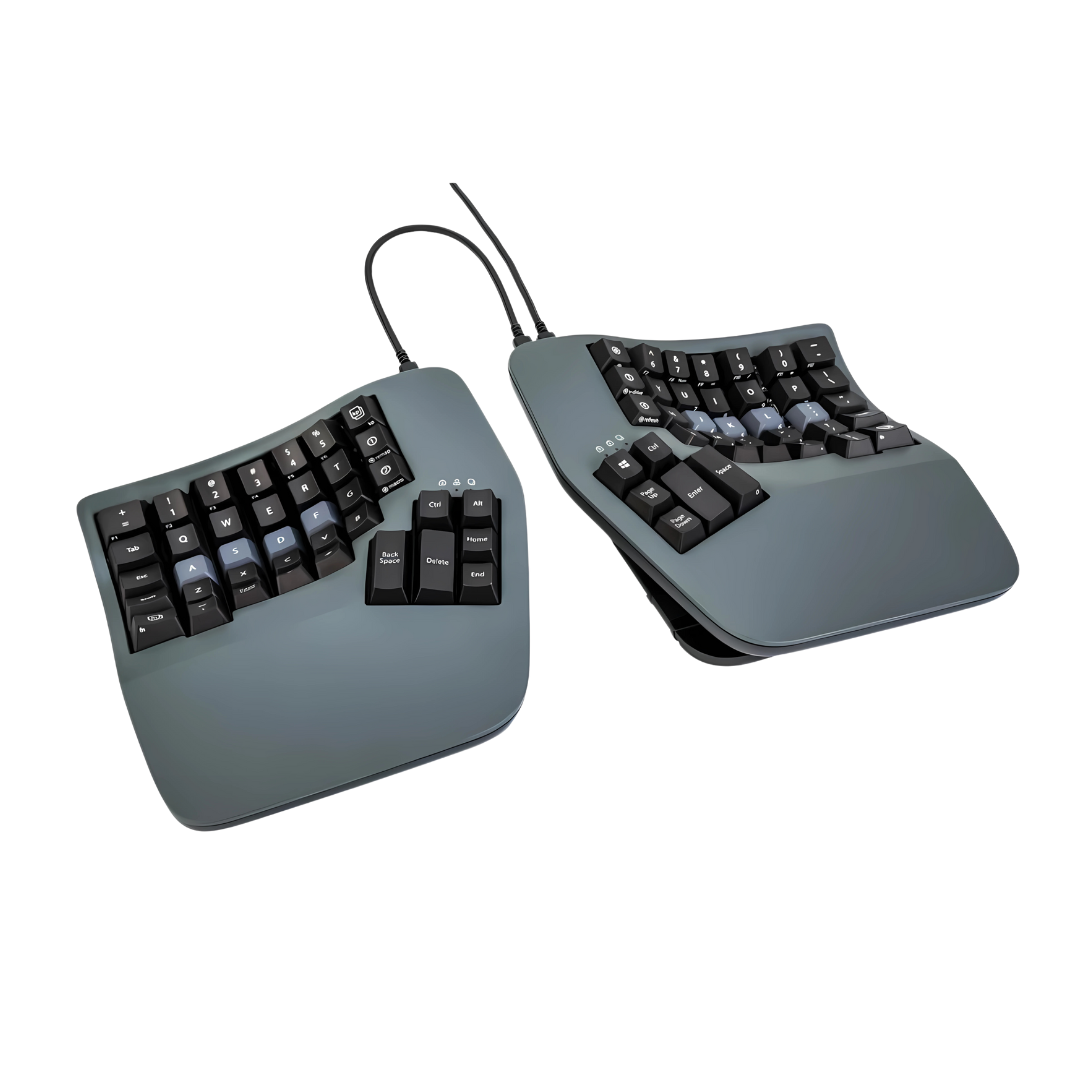
The Kinesis Advantage360 USB is the latest evolution of the legendary Advantage keyboard—combining the proven 3D contoured design that eliminates wrist pain with modern split architecture, premium mechanical switches, and powerful SmartSet programming. The wired USB connection delivers zero-latency performance for professionals who demand reliability.
Why Advantage360 USB is the Ultimate Ergonomic Keyboard
- 3D Contoured Key Wells: Patented concave design matches natural finger motion, reducing reach and strain by up to 20% compared to flat keyboards
- Adjustable Split Design: Separate keyboard halves from 0-20 inches apart to match shoulder width and eliminate ulnar deviation
- Premium Mechanical Switches: Choose Gateron Brown (tactile, quiet) or Kailh Box Brown (tactile, crisp) switches for superior typing feel and 50 million keystroke durability
- SmartSet Programming: Powerful onboard programming lets you remap keys, create macros, and customize layouts without software
- Zero-Latency USB Connection: Wired reliability eliminates wireless interference, battery concerns, and input lag
Clinical Benefits for Wrist Pain & RSI
The Advantage360's 3D contoured wells position hands in natural alignment, eliminating wrist extension and ulnar deviation—the primary causes of carpal tunnel syndrome and RSI. The split design allows shoulder-width hand positioning, reducing forearm pronation and muscle strain. Integrated thumb clusters redistribute high-frequency keys (Enter, Space, Backspace, Delete) to stronger thumb muscles, reducing pinky strain. Users report significant pain reduction within 2-4 weeks of consistent use.
Trusted by Medical Professionals
Recommended by ergonomists, physical therapists, and occupational health specialists for treating and preventing repetitive strain injuries. The Advantage keyboard family has helped tens of thousands of professionals eliminate chronic pain and avoid surgery since 1992.
Who It's Built For
Essential for programmers, writers, data analysts, gamers, and anyone spending 4+ hours daily at a keyboard. Particularly effective for those experiencing wrist pain, carpal tunnel symptoms, RSI, or forearm strain from traditional keyboards. Ideal for professionals who need wired reliability for gaming, trading, or mission-critical applications where wireless latency is unacceptable.
Technical Specifications
- 3D concave key wells with patented contoured design
- Adjustable split architecture (0-20 inch separation)
- Premium mechanical switches: Gateron Brown or Kailh Box Brown (tactile)
- 50 million keystroke lifespan per key
- SmartSet onboard programming (no software required)
- Dual-layer key remapping with 100+ macro storage
- Integrated thumb clusters (8 keys per side)
- Integrated palm supports with cushioned pads
- Adjustable tenting: 0-15° per side (tenting kit sold separately)
- USB-C wired connection (zero latency)
- Compatible with Windows, Mac, Linux
- Dimensions: Each half 8" W × 11" D × 2.5" H
- Weight: 6.5 lbs total
- Detachable connecting cable between halves
- 3-year manufacturer warranty
- Made in USA
Mechanical Switch Options
Gateron Brown (Standard): Smooth tactile switches with quiet operation—ideal for office environments and shared workspaces. Tactile bump provides feedback without loud clicking.
Kailh Box Brown (KLQ Linear Quiet): Crisp tactile switches with enhanced dust/moisture resistance. Sharper tactile feedback and slightly quieter than standard Browns. Box design prevents switch wobble for precision typing.
SmartSet Programming Power
Program the Advantage360 directly on the keyboard without software installation. Remap any key, create complex macros, switch between QWERTY/Dvorak/Colemak layouts, and customize dual-layer functionality. Settings stored in onboard memory travel with the keyboard to any computer. Optional SmartSet App (Windows/Mac) available for advanced programming with visual interface.
What's Included
- Kinesis Advantage360 USB keyboard (2 halves)
- Magnetic cushioned palm pads (attached)
- Detachable connecting cable (TRRS)
- USB-C cable (6 feet)
- Quick start guide
- SmartSet programming manual
- Keycap puller tool
Frequently Asked Questions
How long does it take to adapt to the contoured layout?
The 3D contoured layout requires 1-2 weeks adaptation as your fingers learn the new key positions. Start with short sessions (30-60 minutes) and gradually increase usage. Most users achieve full typing speed within 2-3 weeks. Pain relief typically begins within the first week, with maximum benefit after 3-4 weeks of consistent use.
What's the difference between Advantage360 USB and Advantage360 Pro?
The USB version uses wired USB-C connection for zero-latency performance. The Pro version offers wireless connectivity with Bluetooth multi-device pairing. Both have identical 3D contoured wells, split design, and SmartSet programming. Choose USB for wired reliability and gaming; choose Pro for wireless freedom.
Which mechanical switch should I choose?
Choose Gateron Brown for smooth, quiet tactile typing ideal for office environments. Choose Kailh Box Brown (KLQ) for crisper tactile feedback and enhanced durability. Both are tactile (not clicky) and suitable for shared workspaces.
Can I use this for gaming?
Absolutely! The zero-latency USB connection, mechanical switches, and programmable macros make the Advantage360 USB excellent for gaming. The wired connection eliminates wireless lag critical for competitive gaming. The learning curve for the contoured layout applies to gaming as well as typing.
Will this help my carpal tunnel syndrome?
The Advantage360's 3D contoured design and split architecture eliminate the wrist positions that cause carpal tunnel syndrome. Many users report significant symptom reduction within 2-4 weeks. However, carpal tunnel has multiple causes—consult with our ergonomic specialists or your healthcare provider for personalized guidance.
Can I remap keys without installing software?
Yes! SmartSet programming is built into the keyboard. Remap keys, create macros, and customize layouts directly on the keyboard without installing software. Settings are stored in keyboard memory and work on any computer.
How far apart can I separate the keyboard halves?
The detachable connecting cable allows 0-20 inches of separation between halves. Most users position halves at shoulder width (12-16 inches) for optimal ergonomic benefit.
Do I need the tenting kit?
The tenting kit (sold separately) provides 0-15° adjustable tenting per side for enhanced forearm rotation and wrist alignment. It's optional but recommended for users with significant wrist pronation or forearm pain. Our ergonomic specialists can help determine if tenting would benefit your setup.
Is this compatible with Mac?
Yes! The Advantage360 USB works with Windows, Mac, and Linux via USB-C connection. SmartSet programming allows switching between OS-specific layouts.
What's the warranty?
The Advantage360 USB includes a 3-year manufacturer warranty covering defects in materials and workmanship. Kinesis keyboards are built to last 10+ years with proper care.
Why AskErgoWorks
As certified ergonomics specialists with over 30 years of experience, we've helped hundreds of professionals eliminate chronic wrist pain and RSI through proper keyboard selection and setup. The Kinesis Advantage360 USB consistently ranks as our top recommendation for users with severe wrist pain or carpal tunnel syndrome—it's the only keyboard that combines clinical-grade 3D contoured design with modern split architecture and zero-latency wired performance.
We don't just sell ergonomic keyboards; we provide the expertise to ensure successful adaptation, proper setup, and maximum pain relief.
Need help determining if the Advantage360 USB is right for your symptoms? Our ergonomic evaluation services include personalized keyboard recommendations, adaptation coaching, and workstation setup guidance based on your pain profile, typing volume, and work requirements.
Free shipping on orders over $99. 3-year warranty. Made in USA. Gateron or Kailh switch options. Zero-latency USB connection. Eliminates wrist pain & carpal tunnel.
Next-Generation Split Contoured Keyboard with USB Reliability
The Kinesis Advantage360 USB is the latest evolution of the legendary Advantage keyboard—combining the proven 3D contoured design that eliminates wrist pain with modern split architecture, premium mechanical switches, and powerful SmartSet programming. The wired USB connection delivers zero-latency performance for professionals who demand reliability.
Why Advantage360 USB is the Ultimate Ergonomic Keyboard
- 3D Contoured Key Wells: Patented concave design matches natural finger motion, reducing reach and strain by up to 20% compared to flat keyboards
- Adjustable Split Design: Separate keyboard halves from 0-20 inches apart to match shoulder width and eliminate ulnar deviation
- Premium Mechanical Switches: Choose Gateron Brown (tactile, quiet) or Kailh Box Brown (tactile, crisp) switches for superior typing feel and 50 million keystroke durability
- SmartSet Programming: Powerful onboard programming lets you remap keys, create macros, and customize layouts without software
- Zero-Latency USB Connection: Wired reliability eliminates wireless interference, battery concerns, and input lag
Clinical Benefits for Wrist Pain & RSI
The Advantage360's 3D contoured wells position hands in natural alignment, eliminating wrist extension and ulnar deviation—the primary causes of carpal tunnel syndrome and RSI. The split design allows shoulder-width hand positioning, reducing forearm pronation and muscle strain. Integrated thumb clusters redistribute high-frequency keys (Enter, Space, Backspace, Delete) to stronger thumb muscles, reducing pinky strain. Users report significant pain reduction within 2-4 weeks of consistent use.
Trusted by Medical Professionals
Recommended by ergonomists, physical therapists, and occupational health specialists for treating and preventing repetitive strain injuries. The Advantage keyboard family has helped tens of thousands of professionals eliminate chronic pain and avoid surgery since 1992.
Who It's Built For
Essential for programmers, writers, data analysts, gamers, and anyone spending 4+ hours daily at a keyboard. Particularly effective for those experiencing wrist pain, carpal tunnel symptoms, RSI, or forearm strain from traditional keyboards. Ideal for professionals who need wired reliability for gaming, trading, or mission-critical applications where wireless latency is unacceptable.
Technical Specifications
- 3D concave key wells with patented contoured design
- Adjustable split architecture (0-20 inch separation)
- Premium mechanical switches: Gateron Brown or Kailh Box Brown (tactile)
- 50 million keystroke lifespan per key
- SmartSet onboard programming (no software required)
- Dual-layer key remapping with 100+ macro storage
- Integrated thumb clusters (8 keys per side)
- Integrated palm supports with cushioned pads
- Adjustable tenting: 0-15° per side (tenting kit sold separately)
- USB-C wired connection (zero latency)
- Compatible with Windows, Mac, Linux
- Dimensions: Each half 8" W × 11" D × 2.5" H
- Weight: 6.5 lbs total
- Detachable connecting cable between halves
- 3-year manufacturer warranty
- Made in USA
Mechanical Switch Options
Gateron Brown (Standard): Smooth tactile switches with quiet operation—ideal for office environments and shared workspaces. Tactile bump provides feedback without loud clicking.
Kailh Box Brown (KLQ Linear Quiet): Crisp tactile switches with enhanced dust/moisture resistance. Sharper tactile feedback and slightly quieter than standard Browns. Box design prevents switch wobble for precision typing.
SmartSet Programming Power
Program the Advantage360 directly on the keyboard without software installation. Remap any key, create complex macros, switch between QWERTY/Dvorak/Colemak layouts, and customize dual-layer functionality. Settings stored in onboard memory travel with the keyboard to any computer. Optional SmartSet App (Windows/Mac) available for advanced programming with visual interface.
What's Included
- Kinesis Advantage360 USB keyboard (2 halves)
- Magnetic cushioned palm pads (attached)
- Detachable connecting cable (TRRS)
- USB-C cable (6 feet)
- Quick start guide
- SmartSet programming manual
- Keycap puller tool
Frequently Asked Questions
How long does it take to adapt to the contoured layout?
The 3D contoured layout requires 1-2 weeks adaptation as your fingers learn the new key positions. Start with short sessions (30-60 minutes) and gradually increase usage. Most users achieve full typing speed within 2-3 weeks. Pain relief typically begins within the first week, with maximum benefit after 3-4 weeks of consistent use.
What's the difference between Advantage360 USB and Advantage360 Pro?
The USB version uses wired USB-C connection for zero-latency performance. The Pro version offers wireless connectivity with Bluetooth multi-device pairing. Both have identical 3D contoured wells, split design, and SmartSet programming. Choose USB for wired reliability and gaming; choose Pro for wireless freedom.
Which mechanical switch should I choose?
Choose Gateron Brown for smooth, quiet tactile typing ideal for office environments. Choose Kailh Box Brown (KLQ) for crisper tactile feedback and enhanced durability. Both are tactile (not clicky) and suitable for shared workspaces.
Can I use this for gaming?
Absolutely! The zero-latency USB connection, mechanical switches, and programmable macros make the Advantage360 USB excellent for gaming. The wired connection eliminates wireless lag critical for competitive gaming. The learning curve for the contoured layout applies to gaming as well as typing.
Will this help my carpal tunnel syndrome?
The Advantage360's 3D contoured design and split architecture eliminate the wrist positions that cause carpal tunnel syndrome. Many users report significant symptom reduction within 2-4 weeks. However, carpal tunnel has multiple causes—consult with our ergonomic specialists or your healthcare provider for personalized guidance.
Can I remap keys without installing software?
Yes! SmartSet programming is built into the keyboard. Remap keys, create macros, and customize layouts directly on the keyboard without installing software. Settings are stored in keyboard memory and work on any computer.
How far apart can I separate the keyboard halves?
The detachable connecting cable allows 0-20 inches of separation between halves. Most users position halves at shoulder width (12-16 inches) for optimal ergonomic benefit.
Do I need the tenting kit?
The tenting kit (sold separately) provides 0-15° adjustable tenting per side for enhanced forearm rotation and wrist alignment. It's optional but recommended for users with significant wrist pronation or forearm pain. Our ergonomic specialists can help determine if tenting would benefit your setup.
Is this compatible with Mac?
Yes! The Advantage360 USB works with Windows, Mac, and Linux via USB-C connection. SmartSet programming allows switching between OS-specific layouts.
What's the warranty?
The Advantage360 USB includes a 3-year manufacturer warranty covering defects in materials and workmanship. Kinesis keyboards are built to last 10+ years with proper care.
Why AskErgoWorks
As certified ergonomics specialists with over 30 years of experience, we've helped hundreds of professionals eliminate chronic wrist pain and RSI through proper keyboard selection and setup. The Kinesis Advantage360 USB consistently ranks as our top recommendation for users with severe wrist pain or carpal tunnel syndrome—it's the only keyboard that combines clinical-grade 3D contoured design with modern split architecture and zero-latency wired performance.
We don't just sell ergonomic keyboards; we provide the expertise to ensure successful adaptation, proper setup, and maximum pain relief.
Need help determining if the Advantage360 USB is right for your symptoms? Our ergonomic evaluation services include personalized keyboard recommendations, adaptation coaching, and workstation setup guidance based on your pain profile, typing volume, and work requirements.
Free shipping on orders over $99. 3-year warranty. Made in USA. Gateron or Kailh switch options. Zero-latency USB connection. Eliminates wrist pain & carpal tunnel.
Kinesis Advantage360 USB | Wired Split Contoured Keyboard
Translation missing: en.products.product.sku:KB360-GBR
- Regular price
- $479.00
- Sale price
- $479.00
- Regular price
-
Couldn't load pickup availability


