




About
Flat Keyboards Force Your Wrists Into Three Unnatural Positions That Cause RSI
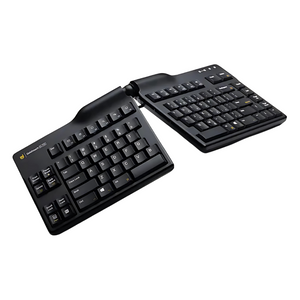
Trusted by Fortune 500 ergonomics programs and prescribed by occupational therapists for carpal tunnel prevention and RSI recovery. If you're experiencing wrist pain, forearm tension, or hand numbness after hours of typing, your flat keyboard is forcing your wrists into ulnar deviation, pronation, and extension—the three biomechanical positions that cause repetitive strain injuries. The Goldtouch Elite eliminates all three with fully adjustable 3D positioning.
Why Customers Choose the Goldtouch Elite Keyboard
- Adjustable 0–60° tenting prevents pronation: Raise the center to any angle that keeps your palms facing each other naturally—eliminates the forearm twist that causes wrist and elbow pain
- Adjustable 0–30° splay eliminates ulnar deviation: Angle the keyboard halves to match your shoulder width—keeps your wrists straight instead of bent inward
- Split design with 6\" separation reduces shoulder strain: Position each hand directly in front of its shoulder for neutral posture—no more hunching or internal rotation
- Soft-touch palm supports included: Removable cushioned rests provide comfort without forcing wrist extension—use them or remove them based on your preference
- Durable membrane keys with tactile feedback: Quiet, responsive typing with 10+ million keystroke lifespan—professional feel without mechanical keyboard noise
- Mac + PC compatible with hardware switch: Toggle between operating systems instantly—works with Windows, macOS, Linux, Chrome OS without drivers
- Made in USA with 3-year warranty: Premium construction built to last—this is the last ergonomic keyboard you'll need to buy
What's Included
- Goldtouch Elite Adjustable Keyboard
- Detachable USB cable (6 feet)
- Soft-touch palm supports (removable)
- Quick-start guide with ergonomic setup recommendations
- 3-year manufacturer warranty
- Lifetime free technical support from Goldtouch
Perfect For
- Office workers and knowledge professionals typing 4–8 hours daily who are starting to experience wrist discomfort or want to prevent future RSI
- Developers and programmers who need customizable ergonomics that adapt to different desk setups (standing desk, laptop riser, traditional desk)
- Carpal tunnel and RSI sufferers whose doctors recommended an adjustable keyboard for recovery and prevention of re-injury
- Hot-deskers and remote workers who move between workstations and need a keyboard that adjusts to any desk height or monitor position
- Tall or broad-shouldered users whose natural shoulder width doesn't match standard keyboard layouts—the splay adjustment is a game-changer
- Standing desk users who need different tenting angles for sitting vs. standing positions throughout the day
- Anyone who's tried fixed ergonomic keyboards and found them "almost right"—the Elite's adjustability lets you dial in your perfect position
Goldtouch Elite vs. Fixed Ergonomic Keyboards
| Feature | Goldtouch Elite | Fixed Split Keyboard | Standard Keyboard |
|---|---|---|---|
| Tenting Adjustment | ✅ 0–60° (infinite positions) | ⚠️ Fixed angle (10–20° typical) | ❌ Flat (0°) |
| Splay Adjustment | ✅ 0–30° (matches your shoulders) | ⚠️ Fixed angle (15–20° typical) | ❌ Straight (0°) |
| Separation Distance | ✅ Up to 6\" (adjustable) | ⚠️ Fixed separation (2–4\" typical) | ❌ No separation |
| Adapts to Desk Height | ✅ Adjust tenting for any setup | ❌ One position only | ❌ Flat only |
| Adapts to Body Size | ✅ Splay matches shoulder width | ❌ One-size-fits-all compromise | ❌ Forces narrow position |
| Palm Supports | ✅ Removable soft-touch cushions | ⚠️ Fixed or none | ⚠️ Hard plastic or none |
| Mac + PC Hardware Switch | ✅ Toggle switch on keyboard | ⚠️ Software or key combo | ⚠️ OS-specific usually |
| Keystroke Lifespan | ✅ 10+ million | ⚠️ 5–10 million typical | ❌ 2–5 million |
| Made In | ✅ USA | ⚠️ Varies | ❌ Overseas |
| Warranty | ✅ 3 years | ⚠️ 1–2 years | ⚠️ 90 days – 1 year |
How to Adjust Your Goldtouch Elite for Maximum Comfort
The Elite's dual-adjustment system lets you customize both tenting (vertical angle) and splay (horizontal angle) to match your unique body and workspace:
Tenting Adjustment (0–60°):
- 0–10° (minimal tenting): Good starting point for ergonomic keyboard beginners or very low desk setups
- 20–30° (moderate tenting): Most popular range—eliminates pronation for most users without feeling extreme
- 40–60° (aggressive tenting): Maximum pronation relief for RSI recovery, standing desks, or users with severe wrist pain
- Adjustment tip: Start at 20° and increase gradually over 2–3 days until you find your sweet spot
Splay Adjustment (0–30°):
- 0–10° (minimal splay): Best for narrow shoulders or compact desk spaces
- 15–20° (moderate splay): Ideal for average shoulder width—most users land here
- 25–30° (maximum splay): Perfect for broad shoulders, tall users, or those who want maximum ulnar deviation relief
- Adjustment tip: Set splay so each keyboard half aligns directly with its shoulder—your forearms should be parallel
Separation Distance: The Elite's split design allows up to 6\" of separation between halves. Position them shoulder-width apart to eliminate internal shoulder rotation and reduce upper back tension.
Palm Supports: Use the included soft-touch palm supports if you prefer wrist cushioning, or remove them for a floating-hand typing position (recommended by many ergonomists to prevent wrist extension).
Product Specifications
- Dimensions (Flat): 18.5\" W × 9.5\" D × 1.5\" H
- Dimensions (Maximum Splay): Up to 24\" W with 6\" separation
- Tenting Range: 0–60° (infinite adjustment positions, locks at any angle)
- Splay Range: 0–30° (infinite adjustment positions, locks at any angle)
- Separation: Up to 6\" between keyboard halves
- Key Type: Membrane switches with tactile feedback (quiet, durable)
- Keystroke Lifespan: 10+ million keystrokes
- Layout: Full-size US QWERTY with numeric keypad
- Connectivity: USB 2.0 (detachable 6-foot cable)
- Compatibility: Mac and PC with hardware toggle switch (Windows, macOS, Linux, Chrome OS)
- Palm Supports: Removable soft-touch cushioned rests
- Special Keys: Dedicated media controls, volume, calculator, email
- Plug-and-Play: No drivers required
- Warranty: 3 years manufacturer + lifetime technical support
- Manufactured: USA (Goldtouch)
- Certifications: FCC, CE, RoHS compliant
- SKU: GTE-08899
The Science: Why Adjustable Tenting and Splay Prevent RSI
Repetitive strain injuries are caused by three biomechanical stressors that flat keyboards force on your wrists and forearms: pronation (forearm twist with palms facing down), ulnar deviation (wrists bent inward toward your pinkies), and extension (wrists bent upward). These unnatural positions compress the median nerve (causing carpal tunnel syndrome), strain tendons (causing tendonitis), and restrict blood flow (causing numbness and fatigue). The Goldtouch Elite's dual-adjustment system addresses all three: tenting (0–60°) rotates your palms toward each other to eliminate pronation, splay (0–30°) angles the keyboard halves to keep your wrists straight and eliminate ulnar deviation, and the split design with adjustable separation allows neutral shoulder positioning that reduces extension. Peer-reviewed ergonomic studies show that adjustable keyboards reduce wrist strain by 35–50% compared to flat keyboards, and users with existing RSI report measurable pain reduction within 7–10 days. Occupational therapists prescribe adjustable keyboards like the Elite because every body is different—fixed ergonomic keyboards offer a one-size-fits-all compromise, while adjustable keyboards let you dial in the exact angles that match your unique biomechanics, desk height, and shoulder width. The result: personalized ergonomics that prevent injury for healthy users and accelerate recovery for RSI sufferers.
Shipping & Returns
Ships same business day when ordered by 2 PM PT. 60-day satisfaction guarantee: if the Goldtouch Elite doesn't eliminate your wrist pain and provide the most comfortable typing experience you've ever had, return it for a full refund—no questions asked. All units backed by Goldtouch's 3-year warranty and lifetime technical support.
Don't Spend Another Week Typing in Pain
Limited units in stock. The Goldtouch Elite is the #1-rated adjustable ergonomic keyboard and frequently sells out—restocks can take 4–6 weeks due to USA manufacturing. If you're experiencing wrist pain, forearm tension, or hand numbness right now, waiting means more damage and longer recovery time. Order today and start typing pain-free this week—your wrists deserve the perfect fit.
Flat Keyboards Force Your Wrists Into Three Unnatural Positions That Cause RSI
Trusted by Fortune 500 ergonomics programs and prescribed by occupational therapists for carpal tunnel prevention and RSI recovery. If you're experiencing wrist pain, forearm tension, or hand numbness after hours of typing, your flat keyboard is forcing your wrists into ulnar deviation, pronation, and extension—the three biomechanical positions that cause repetitive strain injuries. The Goldtouch Elite eliminates all three with fully adjustable 3D positioning.
Why Customers Choose the Goldtouch Elite Keyboard
- Adjustable 0–60° tenting prevents pronation: Raise the center to any angle that keeps your palms facing each other naturally—eliminates the forearm twist that causes wrist and elbow pain
- Adjustable 0–30° splay eliminates ulnar deviation: Angle the keyboard halves to match your shoulder width—keeps your wrists straight instead of bent inward
- Split design with 6\" separation reduces shoulder strain: Position each hand directly in front of its shoulder for neutral posture—no more hunching or internal rotation
- Soft-touch palm supports included: Removable cushioned rests provide comfort without forcing wrist extension—use them or remove them based on your preference
- Durable membrane keys with tactile feedback: Quiet, responsive typing with 10+ million keystroke lifespan—professional feel without mechanical keyboard noise
- Mac + PC compatible with hardware switch: Toggle between operating systems instantly—works with Windows, macOS, Linux, Chrome OS without drivers
- Made in USA with 3-year warranty: Premium construction built to last—this is the last ergonomic keyboard you'll need to buy
What's Included
- Goldtouch Elite Adjustable Keyboard
- Detachable USB cable (6 feet)
- Soft-touch palm supports (removable)
- Quick-start guide with ergonomic setup recommendations
- 3-year manufacturer warranty
- Lifetime free technical support from Goldtouch
Perfect For
- Office workers and knowledge professionals typing 4–8 hours daily who are starting to experience wrist discomfort or want to prevent future RSI
- Developers and programmers who need customizable ergonomics that adapt to different desk setups (standing desk, laptop riser, traditional desk)
- Carpal tunnel and RSI sufferers whose doctors recommended an adjustable keyboard for recovery and prevention of re-injury
- Hot-deskers and remote workers who move between workstations and need a keyboard that adjusts to any desk height or monitor position
- Tall or broad-shouldered users whose natural shoulder width doesn't match standard keyboard layouts—the splay adjustment is a game-changer
- Standing desk users who need different tenting angles for sitting vs. standing positions throughout the day
- Anyone who's tried fixed ergonomic keyboards and found them "almost right"—the Elite's adjustability lets you dial in your perfect position
Goldtouch Elite vs. Fixed Ergonomic Keyboards
| Feature | Goldtouch Elite | Fixed Split Keyboard | Standard Keyboard |
|---|---|---|---|
| Tenting Adjustment | ✅ 0–60° (infinite positions) | ⚠️ Fixed angle (10–20° typical) | ❌ Flat (0°) |
| Splay Adjustment | ✅ 0–30° (matches your shoulders) | ⚠️ Fixed angle (15–20° typical) | ❌ Straight (0°) |
| Separation Distance | ✅ Up to 6\" (adjustable) | ⚠️ Fixed separation (2–4\" typical) | ❌ No separation |
| Adapts to Desk Height | ✅ Adjust tenting for any setup | ❌ One position only | ❌ Flat only |
| Adapts to Body Size | ✅ Splay matches shoulder width | ❌ One-size-fits-all compromise | ❌ Forces narrow position |
| Palm Supports | ✅ Removable soft-touch cushions | ⚠️ Fixed or none | ⚠️ Hard plastic or none |
| Mac + PC Hardware Switch | ✅ Toggle switch on keyboard | ⚠️ Software or key combo | ⚠️ OS-specific usually |
| Keystroke Lifespan | ✅ 10+ million | ⚠️ 5–10 million typical | ❌ 2–5 million |
| Made In | ✅ USA | ⚠️ Varies | ❌ Overseas |
| Warranty | ✅ 3 years | ⚠️ 1–2 years | ⚠️ 90 days – 1 year |
How to Adjust Your Goldtouch Elite for Maximum Comfort
The Elite's dual-adjustment system lets you customize both tenting (vertical angle) and splay (horizontal angle) to match your unique body and workspace:
Tenting Adjustment (0–60°):
- 0–10° (minimal tenting): Good starting point for ergonomic keyboard beginners or very low desk setups
- 20–30° (moderate tenting): Most popular range—eliminates pronation for most users without feeling extreme
- 40–60° (aggressive tenting): Maximum pronation relief for RSI recovery, standing desks, or users with severe wrist pain
- Adjustment tip: Start at 20° and increase gradually over 2–3 days until you find your sweet spot
Splay Adjustment (0–30°):
- 0–10° (minimal splay): Best for narrow shoulders or compact desk spaces
- 15–20° (moderate splay): Ideal for average shoulder width—most users land here
- 25–30° (maximum splay): Perfect for broad shoulders, tall users, or those who want maximum ulnar deviation relief
- Adjustment tip: Set splay so each keyboard half aligns directly with its shoulder—your forearms should be parallel
Separation Distance: The Elite's split design allows up to 6\" of separation between halves. Position them shoulder-width apart to eliminate internal shoulder rotation and reduce upper back tension.
Palm Supports: Use the included soft-touch palm supports if you prefer wrist cushioning, or remove them for a floating-hand typing position (recommended by many ergonomists to prevent wrist extension).
Product Specifications
- Dimensions (Flat): 18.5\" W × 9.5\" D × 1.5\" H
- Dimensions (Maximum Splay): Up to 24\" W with 6\" separation
- Tenting Range: 0–60° (infinite adjustment positions, locks at any angle)
- Splay Range: 0–30° (infinite adjustment positions, locks at any angle)
- Separation: Up to 6\" between keyboard halves
- Key Type: Membrane switches with tactile feedback (quiet, durable)
- Keystroke Lifespan: 10+ million keystrokes
- Layout: Full-size US QWERTY with numeric keypad
- Connectivity: USB 2.0 (detachable 6-foot cable)
- Compatibility: Mac and PC with hardware toggle switch (Windows, macOS, Linux, Chrome OS)
- Palm Supports: Removable soft-touch cushioned rests
- Special Keys: Dedicated media controls, volume, calculator, email
- Plug-and-Play: No drivers required
- Warranty: 3 years manufacturer + lifetime technical support
- Manufactured: USA (Goldtouch)
- Certifications: FCC, CE, RoHS compliant
- SKU: GTE-08899
The Science: Why Adjustable Tenting and Splay Prevent RSI
Repetitive strain injuries are caused by three biomechanical stressors that flat keyboards force on your wrists and forearms: pronation (forearm twist with palms facing down), ulnar deviation (wrists bent inward toward your pinkies), and extension (wrists bent upward). These unnatural positions compress the median nerve (causing carpal tunnel syndrome), strain tendons (causing tendonitis), and restrict blood flow (causing numbness and fatigue). The Goldtouch Elite's dual-adjustment system addresses all three: tenting (0–60°) rotates your palms toward each other to eliminate pronation, splay (0–30°) angles the keyboard halves to keep your wrists straight and eliminate ulnar deviation, and the split design with adjustable separation allows neutral shoulder positioning that reduces extension. Peer-reviewed ergonomic studies show that adjustable keyboards reduce wrist strain by 35–50% compared to flat keyboards, and users with existing RSI report measurable pain reduction within 7–10 days. Occupational therapists prescribe adjustable keyboards like the Elite because every body is different—fixed ergonomic keyboards offer a one-size-fits-all compromise, while adjustable keyboards let you dial in the exact angles that match your unique biomechanics, desk height, and shoulder width. The result: personalized ergonomics that prevent injury for healthy users and accelerate recovery for RSI sufferers.
Shipping & Returns
Ships same business day when ordered by 2 PM PT. 60-day satisfaction guarantee: if the Goldtouch Elite doesn't eliminate your wrist pain and provide the most comfortable typing experience you've ever had, return it for a full refund—no questions asked. All units backed by Goldtouch's 3-year warranty and lifetime technical support.
Don't Spend Another Week Typing in Pain
Limited units in stock. The Goldtouch Elite is the #1-rated adjustable ergonomic keyboard and frequently sells out—restocks can take 4–6 weeks due to USA manufacturing. If you're experiencing wrist pain, forearm tension, or hand numbness right now, waiting means more damage and longer recovery time. Order today and start typing pain-free this week—your wrists deserve the perfect fit.
Goldtouch Elite Keyboard – Adjustable 3D Positioning Ends Wrist Pain
Translation missing: en.products.product.sku:GTE-08899
- Regular price
- $96.00
- Sale price
- $96.00
- Regular price
-
Couldn't load pickup availability


