




About
LogicKeyboard Dyslexia Keyboard — Dyslexie Font | PC & Mac
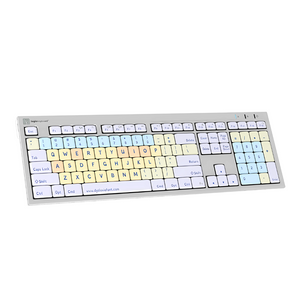
For someone with dyslexia, a standard keyboard is a daily obstacle — letters that look alike, mirror each other, or swap positions mid-thought. The LogicKeyboard Dyslexia Keyboard changes that. Developed in partnership with dyslexiefont.com, it uses the clinically designed Dyslexie font on every key, with color-coded groupings that make it immediately clear where vowels, consonants, numbers, and function keys live. Plug it in, and typing becomes a more confident, less frustrating experience — for students, professionals, and anyone who learns differently.
Key Features
- Dyslexie font keycaps — each letter has a heavier bottom, unique shape, and longer ascenders/descenders to prevent turning, mirroring, and swapping
- Color-coded key groups — vowels, consonants, numbers, and function keys are visually distinct for faster orientation and reduced cognitive load
- Developed with dyslexiefont.com — the typeface is backed by research into how dyslexic readers process letterforms
- Includes LogicLight LED — USB-powered light illuminates the keyboard for low-light environments
- Plug-and-play USB — no software or drivers required; works immediately on PC and Mac
- Two built-in USB 2.0 ports — connect a mouse or other peripheral directly from the keyboard
- Soft-touch scissor switch keys — quiet, comfortable actuation ideal for all-day use in classrooms, offices, and home environments
- Available for PC (Windows XP–11) and Mac
Technical Specifications
- Interface: USB wired, plug-and-play
- Built-in USB ports: 2 × USB 2.0 (100mA each)
- Key mechanism: Scissor switch
- Key travel: 4 mm
- Typing angle: 8.5° with leg lift / 4.5° without
- LED indicators: Caps Lock, Fn Lock, Power
- Certifications: FCC, CE
- PC compatibility: Windows XP, Vista, 7–11
- Dimensions: 446 mm × 141 mm × 23 mm (17.6" × 5.6" × 0.9")
- Weight: 840 g (29.6 oz)
- Cable length: 1.5 m (59")
- Key letter size: 10 mm W × 13 mm H
What’s Included
- LogicKeyboard Dyslexia Keyboard (PC or Mac)
- LogicLight USB LED light
- Cleaning tissue and instructions
- Warranty information
Frequently Asked Questions
What is the Dyslexie font and how does it help with dyslexia?
Dyslexie is a typeface specifically designed to reduce the letter confusion that many people with dyslexia experience. Each letter has a heavier bottom (creating a visual center of gravity), unique shapes that minimize similarity between easily confused pairs (like b/d and p/q), and longer ascenders and descenders. These design choices make it harder for the brain to flip, mirror, or swap letters — the core reading errors associated with dyslexia. The font was developed by Christian Boer, who has dyslexia himself, and is used in educational and professional settings worldwide.
Is this keyboard good for children with dyslexia?
Yes. The LogicKeyboard Dyslexia Keyboard is widely used in educational settings for students with dyslexia, from early learners through secondary school. The color-coded key groups (vowels, consonants, numbers, function keys) help children learn keyboard layout faster, while the Dyslexie font reduces the letter confusion that makes typing frustrating. It’s plug-and-play, so no IT setup is required — ideal for classrooms and home learning environments.
Can adults with dyslexia benefit from this keyboard?
Absolutely. Many adults with dyslexia find that the Dyslexie font reduces the cognitive effort required to type accurately, particularly for those who are not touch typists or who frequently mistype similar-looking letters. It’s used by professionals in office, creative, and healthcare environments who want to reduce typing errors and fatigue associated with dyslexia.
Is this keyboard suitable for users with other learning disabilities, such as ADHD or dyscalculia?
The color-coded layout and visually distinct key groupings can benefit users with a range of learning differences, including ADHD (by reducing visual clutter and improving orientation) and dyscalculia (by clearly distinguishing number keys from letter keys). It is primarily designed for dyslexia but is used broadly in special education and assistive technology contexts.
Does the keyboard work with assistive technology software like screen readers or text-to-speech tools?
Yes. The LogicKeyboard Dyslexia Keyboard is a standard USB HID keyboard — it is fully compatible with assistive technology software including screen readers (JAWS, NVDA), text-to-speech tools (Read&Write, Kurzweil), and other accessibility software on both PC and Mac. No special drivers are required.
How does this compare to a standard keyboard with a dyslexia-friendly font applied in software?
Software-based dyslexia fonts change what appears on screen, but the keyboard itself still shows standard lettering — meaning the disconnect between what you see on the keys and what you see on screen remains. The LogicKeyboard Dyslexia Keyboard puts the Dyslexie font directly on the physical keys, so the visual experience is consistent from hand to screen. For users who look at the keyboard while typing, this is a meaningful difference. It also requires no software configuration and works across all applications automatically.
Is there a wireless or Bluetooth version available?
The current LogicKeyboard Dyslexia Keyboard is USB wired only. The wired connection ensures plug-and-play reliability with no pairing, battery management, or connectivity issues — which is particularly valuable in classroom and institutional settings. If wireless is a priority for your setup, contact us and we can advise on alternatives.
Does it work with Mac and iPad?
The Mac version (LKB-DYSLEX-CWMU-US) is designed for macOS. For iPad use, compatibility depends on your iPad model and iOS version — many USB keyboards work with iPad via a USB-C or Lightning adapter, but we recommend confirming compatibility with your specific device before ordering. Contact us if you need guidance.
What is the difference between the PC and Mac versions?
The PC version (LKB-DYSLEX-BJPU-US) is optimized for Windows (XP through 11) with standard PC key labeling including Windows and Alt keys. The Mac version (LKB-DYSLEX-CWMU-US) uses Mac-specific key labeling including Command, Option, and Control keys. Both use the same Dyslexie font and color-coded layout — the difference is purely in key labeling and OS optimization.
Can Ask Ergo Works help me choose the right assistive keyboard for my needs?
Yes. Our certified ergonomic specialists work with individuals, schools, and enterprise teams to identify the right assistive technology for specific needs — including dyslexia, low vision, motor impairments, and other learning differences. We offer ergonomic consulting services to help you make the right choice before you buy.
Why Ask Ergo Works
Ask Ergo Works has been a trusted ergonomic and assistive technology solutions provider for over 30 years. Our certified ergonomic specialists don’t just sell products — we assess your specific needs, environment, and user requirements to ensure every product we recommend actually works for you.
- 30+ years of ergonomic and assistive technology expertise serving education, healthcare, enterprise, and government clients
- Certified ergonomic specialists on staff for professional assessment and product matching
- Personalized recommendations — we match products to your specific learning profile, workflow, and environment
- Bay Area roots, nationwide reach — virtual ergonomic consulting available across the U.S.
- Enterprise and institutional procurement support — volume pricing, net terms, and procurement documentation available for schools and organizations
Not sure if this is the right keyboard for your student or team? Schedule an ergonomic consultation with one of our specialists before you buy.
Complete Your Setup
- Ergonomic Mice — pair with a vertical or trackball mouse for a complete accessible workstation
- More Assistive Keyboards — explore large print, Braille, and other specialty keyboards
- Ergonomic Consulting — get a full workstation assessment tailored to your learning and accessibility needs
LogicKeyboard Dyslexia Keyboard — Dyslexie Font | PC & Mac
For someone with dyslexia, a standard keyboard is a daily obstacle — letters that look alike, mirror each other, or swap positions mid-thought. The LogicKeyboard Dyslexia Keyboard changes that. Developed in partnership with dyslexiefont.com, it uses the clinically designed Dyslexie font on every key, with color-coded groupings that make it immediately clear where vowels, consonants, numbers, and function keys live. Plug it in, and typing becomes a more confident, less frustrating experience — for students, professionals, and anyone who learns differently.
Key Features
- Dyslexie font keycaps — each letter has a heavier bottom, unique shape, and longer ascenders/descenders to prevent turning, mirroring, and swapping
- Color-coded key groups — vowels, consonants, numbers, and function keys are visually distinct for faster orientation and reduced cognitive load
- Developed with dyslexiefont.com — the typeface is backed by research into how dyslexic readers process letterforms
- Includes LogicLight LED — USB-powered light illuminates the keyboard for low-light environments
- Plug-and-play USB — no software or drivers required; works immediately on PC and Mac
- Two built-in USB 2.0 ports — connect a mouse or other peripheral directly from the keyboard
- Soft-touch scissor switch keys — quiet, comfortable actuation ideal for all-day use in classrooms, offices, and home environments
- Available for PC (Windows XP–11) and Mac
Technical Specifications
- Interface: USB wired, plug-and-play
- Built-in USB ports: 2 × USB 2.0 (100mA each)
- Key mechanism: Scissor switch
- Key travel: 4 mm
- Typing angle: 8.5° with leg lift / 4.5° without
- LED indicators: Caps Lock, Fn Lock, Power
- Certifications: FCC, CE
- PC compatibility: Windows XP, Vista, 7–11
- Dimensions: 446 mm × 141 mm × 23 mm (17.6" × 5.6" × 0.9")
- Weight: 840 g (29.6 oz)
- Cable length: 1.5 m (59")
- Key letter size: 10 mm W × 13 mm H
What’s Included
- LogicKeyboard Dyslexia Keyboard (PC or Mac)
- LogicLight USB LED light
- Cleaning tissue and instructions
- Warranty information
Frequently Asked Questions
What is the Dyslexie font and how does it help with dyslexia?
Dyslexie is a typeface specifically designed to reduce the letter confusion that many people with dyslexia experience. Each letter has a heavier bottom (creating a visual center of gravity), unique shapes that minimize similarity between easily confused pairs (like b/d and p/q), and longer ascenders and descenders. These design choices make it harder for the brain to flip, mirror, or swap letters — the core reading errors associated with dyslexia. The font was developed by Christian Boer, who has dyslexia himself, and is used in educational and professional settings worldwide.
Is this keyboard good for children with dyslexia?
Yes. The LogicKeyboard Dyslexia Keyboard is widely used in educational settings for students with dyslexia, from early learners through secondary school. The color-coded key groups (vowels, consonants, numbers, function keys) help children learn keyboard layout faster, while the Dyslexie font reduces the letter confusion that makes typing frustrating. It’s plug-and-play, so no IT setup is required — ideal for classrooms and home learning environments.
Can adults with dyslexia benefit from this keyboard?
Absolutely. Many adults with dyslexia find that the Dyslexie font reduces the cognitive effort required to type accurately, particularly for those who are not touch typists or who frequently mistype similar-looking letters. It’s used by professionals in office, creative, and healthcare environments who want to reduce typing errors and fatigue associated with dyslexia.
Is this keyboard suitable for users with other learning disabilities, such as ADHD or dyscalculia?
The color-coded layout and visually distinct key groupings can benefit users with a range of learning differences, including ADHD (by reducing visual clutter and improving orientation) and dyscalculia (by clearly distinguishing number keys from letter keys). It is primarily designed for dyslexia but is used broadly in special education and assistive technology contexts.
Does the keyboard work with assistive technology software like screen readers or text-to-speech tools?
Yes. The LogicKeyboard Dyslexia Keyboard is a standard USB HID keyboard — it is fully compatible with assistive technology software including screen readers (JAWS, NVDA), text-to-speech tools (Read&Write, Kurzweil), and other accessibility software on both PC and Mac. No special drivers are required.
How does this compare to a standard keyboard with a dyslexia-friendly font applied in software?
Software-based dyslexia fonts change what appears on screen, but the keyboard itself still shows standard lettering — meaning the disconnect between what you see on the keys and what you see on screen remains. The LogicKeyboard Dyslexia Keyboard puts the Dyslexie font directly on the physical keys, so the visual experience is consistent from hand to screen. For users who look at the keyboard while typing, this is a meaningful difference. It also requires no software configuration and works across all applications automatically.
Is there a wireless or Bluetooth version available?
The current LogicKeyboard Dyslexia Keyboard is USB wired only. The wired connection ensures plug-and-play reliability with no pairing, battery management, or connectivity issues — which is particularly valuable in classroom and institutional settings. If wireless is a priority for your setup, contact us and we can advise on alternatives.
Does it work with Mac and iPad?
The Mac version (LKB-DYSLEX-CWMU-US) is designed for macOS. For iPad use, compatibility depends on your iPad model and iOS version — many USB keyboards work with iPad via a USB-C or Lightning adapter, but we recommend confirming compatibility with your specific device before ordering. Contact us if you need guidance.
What is the difference between the PC and Mac versions?
The PC version (LKB-DYSLEX-BJPU-US) is optimized for Windows (XP through 11) with standard PC key labeling including Windows and Alt keys. The Mac version (LKB-DYSLEX-CWMU-US) uses Mac-specific key labeling including Command, Option, and Control keys. Both use the same Dyslexie font and color-coded layout — the difference is purely in key labeling and OS optimization.
Can Ask Ergo Works help me choose the right assistive keyboard for my needs?
Yes. Our certified ergonomic specialists work with individuals, schools, and enterprise teams to identify the right assistive technology for specific needs — including dyslexia, low vision, motor impairments, and other learning differences. We offer ergonomic consulting services to help you make the right choice before you buy.
Why Ask Ergo Works
Ask Ergo Works has been a trusted ergonomic and assistive technology solutions provider for over 30 years. Our certified ergonomic specialists don’t just sell products — we assess your specific needs, environment, and user requirements to ensure every product we recommend actually works for you.
- 30+ years of ergonomic and assistive technology expertise serving education, healthcare, enterprise, and government clients
- Certified ergonomic specialists on staff for professional assessment and product matching
- Personalized recommendations — we match products to your specific learning profile, workflow, and environment
- Bay Area roots, nationwide reach — virtual ergonomic consulting available across the U.S.
- Enterprise and institutional procurement support — volume pricing, net terms, and procurement documentation available for schools and organizations
Not sure if this is the right keyboard for your student or team? Schedule an ergonomic consultation with one of our specialists before you buy.
Complete Your Setup
- Ergonomic Mice — pair with a vertical or trackball mouse for a complete accessible workstation
- More Assistive Keyboards — explore large print, Braille, and other specialty keyboards
- Ergonomic Consulting — get a full workstation assessment tailored to your learning and accessibility needs
LogicKeyboard Dyslexia Keyboard | Dyslexie Font | PC & Mac
SKU:LKB-DYSLEX-BJPU-US
- Regular price
- $99.90
- Sale price
- $99.90
- Regular price
-
Need expert help choosing the right setup?
Our certified specialists offer professional ergonomic evaluations tailored to your workstation.
Request a Quote →Couldn't load pickup availability


Trusted By


