




About
LogicKeyboard Adobe Filmmaker Keyboard for Mac — Premiere Pro + After Effects ASTRA 2
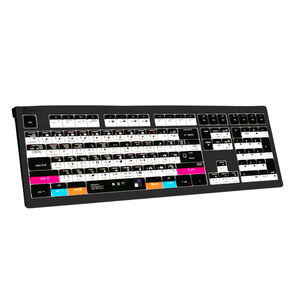
One keyboard. Two powerhouse applications. The LogicKeyboard ASTRA 2 Adobe Filmmaker for Mac packs 200 shortcuts for both Adobe Premiere Pro CC and Adobe After Effects CC into a single backlit keyboard — color-coded, graphically labeled, and designed for filmmakers who move fluidly between editing and compositing on macOS. Switch between your applications without losing your shortcut reference. Keep your creative flow uninterrupted from first cut to final composite.
Designed specifically for macOS with Mac-native modifier keys (Command, Option, Control), it integrates seamlessly into your Mac workflow for video editors, motion graphics artists, and filmmakers who work across both applications daily.
Key Features & Benefits
- 200 shortcuts in one keyboard — covers both Adobe Premiere Pro CC and Adobe After Effects CC; switch between apps without losing your shortcut reference
- Mac-native modifier keys — Command, Option, and Control keys properly labeled for macOS workflows
- Color-coded dual-app shortcut keys — every command labeled with graphical icons and color-coding for instant visual recognition across both applications
- Backlit keys with 5 brightness levels — dimmable backlight adapts from bright production offices to dark edit and compositing suites
- Built-in USB 3.0 hub — connect Contour ShuttlePRO, USB dongle, phone, or other peripherals directly from the keyboard
- Dual USB cable design — separate grey cable for keyboard and black cable for USB hub; eliminates KVM extender conflicts in complex facility setups
- Low-profile scissor-switch keys — light, responsive feel with quiet operation for long creative sessions
- Full-size F-row and multimedia keys — complete keyboard functionality alongside Premiere Pro and After Effects shortcuts
- 10 million keystroke durability — built for professional daily use in film and video production environments
- Plug-and-play — no software installation required; works immediately on macOS
Who This Keyboard Is For
The Adobe Filmmaker ASTRA 2 for Mac is the essential tool for video editors, motion graphics artists, VFX artists, and filmmakers who work across both Premiere Pro and After Effects on Mac. Ideal for post-production facilities, advertising agencies, broadcast networks, YouTube creators, and independent filmmakers running Mac workstations who want all their shortcuts in one place. Also used in film schools and media education programs teaching both applications on Mac.
Technical Specifications
- Software: Adobe Premiere Pro CC + After Effects CC (macOS)
- Compatibility: macOS (plug-and-play)
- Modifier keys: Command, Option, Control (Mac-native)
- Shortcuts: 200 (combined Premiere Pro + After Effects)
- Backlight: Yes — 5 selectable brightness levels
- Key mechanism: Scissor-switch, low-profile
- USB hub: Built-in USB 3.0 port
- USB cables: Dual cable (grey for keyboard, black for hub)
- Number of keys: 108 (ANSI) / 109 (ISO)
- Durability: 10,000,000 keystrokes per key
- Dimensions: 446mm × 150mm × 30mm (17 5/8" × 6" × 1 1/4")
- Weight: 950g (2.1 lbs)
- Connection: Wired USB (dual cable)
Frequently Asked Questions
What makes this keyboard different from the Premiere Pro-only Mac keyboard?
The Adobe Filmmaker ASTRA 2 includes shortcuts for both Adobe Premiere Pro CC and Adobe After Effects CC — 200 shortcuts total in a single keyboard. If you work exclusively in Premiere Pro, the Premiere Pro ASTRA 2 for Mac is the right choice. If you move between Premiere and After Effects regularly, the Filmmaker keyboard eliminates the need to switch keyboards or rely on memory for either application.
How are the Premiere Pro and After Effects shortcuts differentiated on the keyboard?
The keys are color-coded and graphically labeled to distinguish between Premiere Pro and After Effects shortcuts. This allows you to visually identify which shortcut belongs to which application at a glance, even when switching rapidly between the two on your Mac.
Is there a PC/Windows version of this keyboard?
Yes — see the LogicKeyboard Adobe Filmmaker ASTRA 2 for PC for the Windows-compatible version with standard PC modifier keys.
Does this keyboard work with Apple Silicon Macs (M1, M2, M3, M4)?
Yes. The ASTRA 2 is a standard USB HID keyboard compatible with Apple Silicon and Intel Macs running macOS. No drivers or software installation required — plug in the grey USB cable and it works immediately.
Does this keyboard work with the latest versions of Premiere Pro and After Effects on Mac?
The shortcut labels reflect the standard default keymaps for Adobe Premiere Pro CC and After Effects CC. The keyboard functions as a standard Mac keyboard regardless of your specific application version. If Adobe updates default shortcuts in a future version, the physical labels remain as printed.
What is the dual USB cable design for?
The ASTRA 2 uses two USB cables: a grey cable for the keyboard itself and a black cable for the built-in USB 3.0 hub. This separation prevents conflicts with KVM extenders commonly used in post-production facilities. You only need to plug in the grey cable to use the keyboard; the black cable activates the USB hub.
Can I connect a Contour ShuttlePRO to the keyboard’s USB hub?
Yes — the built-in USB 3.0 hub is ideal for connecting a Contour ShuttlePRO, USB dongle, or other peripherals directly from the keyboard. This is a common setup in professional Mac Premiere Pro and After Effects workstations.
Can this keyboard be used as a regular Mac keyboard when not using Adobe applications?
Yes — all standard letter, number, and symbol keys are labeled alongside the Adobe shortcuts, and Mac modifier keys (Command, Option, Control) are properly labeled. The keyboard functions as a full standard Mac keyboard for any macOS application.
Is this keyboard suitable for film school or media education programs on Mac?
Yes — the color-coded shortcut labels make the Adobe Filmmaker ASTRA 2 an excellent teaching tool for courses covering both Premiere Pro and After Effects on Mac. Ask Ergo Works works with educational institutions on bulk orders. Contact our specialists for volume pricing.
Can Ask Ergo Works help configure a full ergonomic Mac filmmaker workstation?
Absolutely. Our certified ergonomic specialists work with filmmakers, VFX artists, and post-production professionals to optimize full Mac workstation setups — including keyboard positioning, monitor height, chair configuration, and peripheral placement for long creative sessions. We offer ergonomic consulting services for individuals and enterprise teams.
Why Ask Ergo Works
With 30+ years of ergonomic and professional workstation expertise, Ask Ergo Works serves creative professionals, post-production facilities, and enterprise teams who demand both performance and comfort.
- Certified ergonomic specialists — professional workstation optimization expertise for film, video, and VFX production environments
- Trusted by production studios & creative teams — advertising, broadcast, documentary, film, and corporate video
- Bay Area roots, nationwide reach — in-person assessments in the Bay Area; virtual consultations available nationwide
- Enterprise procurement support — volume pricing, net terms, and procurement documentation available
Need help optimizing your full Mac filmmaker workstation? Our ergonomic consulting services cover keyboard selection, monitor positioning, chair setup, and peripheral configuration.
Complete Your Mac Filmmaker Workstation
- LogicKeyboard Adobe Filmmaker ASTRA 2 for PC — Windows version with PC modifier keys
- LogicKeyboard Adobe Premiere Pro CC ASTRA 2 for Mac — Premiere Pro-only version for Mac
- Ergonomic Mice — pair with a vertical or trackball mouse for a complete low-strain Mac filmmaker workstation
- Professional Workstation Assessment — ergonomic evaluation for long creative sessions
LogicKeyboard Adobe Filmmaker Keyboard for Mac — Premiere Pro + After Effects ASTRA 2
One keyboard. Two powerhouse applications. The LogicKeyboard ASTRA 2 Adobe Filmmaker for Mac packs 200 shortcuts for both Adobe Premiere Pro CC and Adobe After Effects CC into a single backlit keyboard — color-coded, graphically labeled, and designed for filmmakers who move fluidly between editing and compositing on macOS. Switch between your applications without losing your shortcut reference. Keep your creative flow uninterrupted from first cut to final composite.
Designed specifically for macOS with Mac-native modifier keys (Command, Option, Control), it integrates seamlessly into your Mac workflow for video editors, motion graphics artists, and filmmakers who work across both applications daily.
Key Features & Benefits
- 200 shortcuts in one keyboard — covers both Adobe Premiere Pro CC and Adobe After Effects CC; switch between apps without losing your shortcut reference
- Mac-native modifier keys — Command, Option, and Control keys properly labeled for macOS workflows
- Color-coded dual-app shortcut keys — every command labeled with graphical icons and color-coding for instant visual recognition across both applications
- Backlit keys with 5 brightness levels — dimmable backlight adapts from bright production offices to dark edit and compositing suites
- Built-in USB 3.0 hub — connect Contour ShuttlePRO, USB dongle, phone, or other peripherals directly from the keyboard
- Dual USB cable design — separate grey cable for keyboard and black cable for USB hub; eliminates KVM extender conflicts in complex facility setups
- Low-profile scissor-switch keys — light, responsive feel with quiet operation for long creative sessions
- Full-size F-row and multimedia keys — complete keyboard functionality alongside Premiere Pro and After Effects shortcuts
- 10 million keystroke durability — built for professional daily use in film and video production environments
- Plug-and-play — no software installation required; works immediately on macOS
Who This Keyboard Is For
The Adobe Filmmaker ASTRA 2 for Mac is the essential tool for video editors, motion graphics artists, VFX artists, and filmmakers who work across both Premiere Pro and After Effects on Mac. Ideal for post-production facilities, advertising agencies, broadcast networks, YouTube creators, and independent filmmakers running Mac workstations who want all their shortcuts in one place. Also used in film schools and media education programs teaching both applications on Mac.
Technical Specifications
- Software: Adobe Premiere Pro CC + After Effects CC (macOS)
- Compatibility: macOS (plug-and-play)
- Modifier keys: Command, Option, Control (Mac-native)
- Shortcuts: 200 (combined Premiere Pro + After Effects)
- Backlight: Yes — 5 selectable brightness levels
- Key mechanism: Scissor-switch, low-profile
- USB hub: Built-in USB 3.0 port
- USB cables: Dual cable (grey for keyboard, black for hub)
- Number of keys: 108 (ANSI) / 109 (ISO)
- Durability: 10,000,000 keystrokes per key
- Dimensions: 446mm × 150mm × 30mm (17 5/8" × 6" × 1 1/4")
- Weight: 950g (2.1 lbs)
- Connection: Wired USB (dual cable)
Frequently Asked Questions
What makes this keyboard different from the Premiere Pro-only Mac keyboard?
The Adobe Filmmaker ASTRA 2 includes shortcuts for both Adobe Premiere Pro CC and Adobe After Effects CC — 200 shortcuts total in a single keyboard. If you work exclusively in Premiere Pro, the Premiere Pro ASTRA 2 for Mac is the right choice. If you move between Premiere and After Effects regularly, the Filmmaker keyboard eliminates the need to switch keyboards or rely on memory for either application.
How are the Premiere Pro and After Effects shortcuts differentiated on the keyboard?
The keys are color-coded and graphically labeled to distinguish between Premiere Pro and After Effects shortcuts. This allows you to visually identify which shortcut belongs to which application at a glance, even when switching rapidly between the two on your Mac.
Is there a PC/Windows version of this keyboard?
Yes — see the LogicKeyboard Adobe Filmmaker ASTRA 2 for PC for the Windows-compatible version with standard PC modifier keys.
Does this keyboard work with Apple Silicon Macs (M1, M2, M3, M4)?
Yes. The ASTRA 2 is a standard USB HID keyboard compatible with Apple Silicon and Intel Macs running macOS. No drivers or software installation required — plug in the grey USB cable and it works immediately.
Does this keyboard work with the latest versions of Premiere Pro and After Effects on Mac?
The shortcut labels reflect the standard default keymaps for Adobe Premiere Pro CC and After Effects CC. The keyboard functions as a standard Mac keyboard regardless of your specific application version. If Adobe updates default shortcuts in a future version, the physical labels remain as printed.
What is the dual USB cable design for?
The ASTRA 2 uses two USB cables: a grey cable for the keyboard itself and a black cable for the built-in USB 3.0 hub. This separation prevents conflicts with KVM extenders commonly used in post-production facilities. You only need to plug in the grey cable to use the keyboard; the black cable activates the USB hub.
Can I connect a Contour ShuttlePRO to the keyboard’s USB hub?
Yes — the built-in USB 3.0 hub is ideal for connecting a Contour ShuttlePRO, USB dongle, or other peripherals directly from the keyboard. This is a common setup in professional Mac Premiere Pro and After Effects workstations.
Can this keyboard be used as a regular Mac keyboard when not using Adobe applications?
Yes — all standard letter, number, and symbol keys are labeled alongside the Adobe shortcuts, and Mac modifier keys (Command, Option, Control) are properly labeled. The keyboard functions as a full standard Mac keyboard for any macOS application.
Is this keyboard suitable for film school or media education programs on Mac?
Yes — the color-coded shortcut labels make the Adobe Filmmaker ASTRA 2 an excellent teaching tool for courses covering both Premiere Pro and After Effects on Mac. Ask Ergo Works works with educational institutions on bulk orders. Contact our specialists for volume pricing.
Can Ask Ergo Works help configure a full ergonomic Mac filmmaker workstation?
Absolutely. Our certified ergonomic specialists work with filmmakers, VFX artists, and post-production professionals to optimize full Mac workstation setups — including keyboard positioning, monitor height, chair configuration, and peripheral placement for long creative sessions. We offer ergonomic consulting services for individuals and enterprise teams.
Why Ask Ergo Works
With 30+ years of ergonomic and professional workstation expertise, Ask Ergo Works serves creative professionals, post-production facilities, and enterprise teams who demand both performance and comfort.
- Certified ergonomic specialists — professional workstation optimization expertise for film, video, and VFX production environments
- Trusted by production studios & creative teams — advertising, broadcast, documentary, film, and corporate video
- Bay Area roots, nationwide reach — in-person assessments in the Bay Area; virtual consultations available nationwide
- Enterprise procurement support — volume pricing, net terms, and procurement documentation available
Need help optimizing your full Mac filmmaker workstation? Our ergonomic consulting services cover keyboard selection, monitor positioning, chair setup, and peripheral configuration.
Complete Your Mac Filmmaker Workstation
- LogicKeyboard Adobe Filmmaker ASTRA 2 for PC — Windows version with PC modifier keys
- LogicKeyboard Adobe Premiere Pro CC ASTRA 2 for Mac — Premiere Pro-only version for Mac
- Ergonomic Mice — pair with a vertical or trackball mouse for a complete low-strain Mac filmmaker workstation
- Professional Workstation Assessment — ergonomic evaluation for long creative sessions
LogicKeyboard Adobe Filmmaker Pr+Ae Mac Keyboard — ASTRA 2
Translation missing: en.products.product.sku:LKB-AEPP-A2M-US
- Regular price
- $159.90
- Sale price
- $159.90
- Regular price
-
Couldn't load pickup availability


