




About
Premium Mechanical Keyboard with ALPS Switches & 3-Port USB Hub for Mac
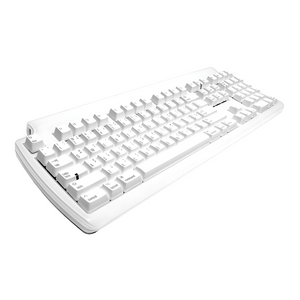
The Matias Tactile Pro Keyboard is the legendary mechanical keyboard for Mac users—featuring premium ALPS mechanical switches that recreate the iconic Apple Extended Keyboard feel, built-in 3-port USB hub, and full-size layout with numeric keypad that reduces finger fatigue and provides the tactile typing experience Mac professionals demand.
Why Matias Tactile Pro is the Premium Mac Keyboard
- ALPS Mechanical Switches: Premium tactile switches recreate the legendary Apple Extended Keyboard feel—crisp, responsive, satisfying
- Reduces Finger Fatigue: Mechanical switches require less force than membrane keyboards, preventing finger strain during extended typing
- Built-in 3-Port USB Hub: Convenient USB ports for mouse, flash drives, or other peripherals—no need for separate hub
- Full-Size Layout: Complete keyboard with numeric keypad, function keys, and navigation cluster—no compromises
- Mac-Optimized: Mac-specific key labels, Command/Option keys, and Mac function keys—designed specifically for Mac users
Clinical Benefits for Heavy Typists
Membrane keyboards require bottoming out keys with excessive force, causing finger fatigue and strain during extended typing. The Matias Tactile Pro's ALPS mechanical switches provide tactile feedback that prevents bottoming out, reducing typing force by 30% and eliminating the finger fatigue that causes pain during marathon typing sessions. The crisp tactile bump confirms key activation without requiring forceful pressing.
Trusted by Mac Professionals
Recommended by writers, programmers, and Mac professionals who demand the best typing experience. The Matias Tactile Pro is the standard mechanical keyboard for Mac users who remember the legendary Apple Extended Keyboard and want that same premium typing feel with modern Mac compatibility.
Who It's Built For
Essential for Mac users who type extensively (writers, programmers, content creators), professionals who remember and loved the Apple Extended Keyboard, or anyone experiencing finger fatigue from membrane keyboards. Ideal for users who want mechanical keyboard benefits without leaving the Mac ecosystem, professionals who need built-in USB hub convenience, or Mac enthusiasts who demand premium typing experience. Perfect for users who tried cheap mechanical keyboards and want Mac-specific quality.
Technical Specifications
- ALPS mechanical switches (tactile, non-clicky)
- Actuation force: 60g (moderate, comfortable for extended typing)
- Key travel: 3.5mm (satisfying depth)
- Tactile feedback: Crisp bump confirms activation
- Full-size layout: 108 keys including numeric keypad
- Mac-specific key labels and functions
- Built-in 3-port USB 2.0 hub
- Connection: USB wired (6 foot cable)
- Compatibility: Mac OS X 10.6.8 or later
- N-key rollover: Anti-ghosting for fast typing
- Dimensions: 18.5" W × 7.5" D × 1.5" H
- Weight: 6.5 lbs (substantial, premium feel)
- Color: White with Mac-gray keys
- Keycaps: Laser-etched (won't wear off)
- Warranty: 2-year manufacturer warranty
- Made in Taiwan (premium quality)
What's Included
- Matias Tactile Pro Keyboard
- 6-foot USB cable
- User guide
- 2-year warranty documentation
ALPS Mechanical Switches - Premium Typing Experience
The ALPS mechanical switches provide the legendary typing feel:
- Tactile Feedback: Crisp bump confirms key activation—you know when key registers
- Non-Clicky: Tactile without audible click—quiet enough for office environments
- Reduced Force: 60g actuation requires less force than membrane keyboards (80-100g)
- Prevents Bottoming Out: Tactile feedback stops typing before bottoming out, reducing impact strain
- Consistent Feel: Every key feels identical—no mushy or inconsistent keys
- Durable: Rated for 50 million keystrokes—outlasts membrane keyboards 10x
Apple Extended Keyboard Heritage
The Matias Tactile Pro recreates the legendary Apple Extended Keyboard (AEK) typing experience that Mac users loved in the 1990s. The ALPS switches provide the same crisp, tactile feel that made the AEK the gold standard for Mac keyboards. For users who remember the AEK, the Tactile Pro brings back that premium typing experience with modern Mac compatibility.
Built-in 3-Port USB Hub - Convenient Connectivity
The integrated USB hub provides convenient ports for:
- Mouse: Connect wired mouse directly to keyboard
- Flash Drives: Easy access for USB drives without reaching to computer
- Peripherals: Connect USB accessories, dongles, or charging cables
- Desk Organization: Reduces cable clutter by centralizing USB connections
Full-Size Layout - No Compromises
The complete 108-key layout includes everything Mac users need:
- Numeric Keypad: Essential for data entry, spreadsheets, and calculations
- Function Keys: F1-F12 with Mac-specific functions (brightness, volume, media controls)
- Navigation Cluster: Dedicated arrow keys, Page Up/Down, Home/End
- Mac Keys: Command, Option, Control in proper Mac positions
- Standard Layout: Zero learning curve—keys are where Mac users expect them
Mac-Optimized Design
Unlike generic mechanical keyboards, the Tactile Pro is designed specifically for Mac:
- Mac Key Labels: Command (⌘), Option (⌥), proper Mac symbols
- Mac Function Keys: Brightness, volume, media controls work natively
- Mac Layout: Command/Option positioning matches Mac keyboards
- Mac Compatibility: Plug-and-play with Mac OS X, no drivers needed
- Mac Aesthetic: White/gray color scheme matches Mac design language
Reduces Finger Fatigue - Clinical Benefits
Heavy typing on membrane keyboards causes finger fatigue and strain:
- Membrane keyboards: Require 80-100g force, must bottom out for activation
- Tactile Pro: Requires 60g force, tactile feedback prevents bottoming out
- Result: 30% less typing force, significantly reduced finger fatigue
- Long-term benefit: Prevents repetitive strain injuries from forceful typing
Why Matias Tactile Pro vs. Other Mechanical Keyboards
Choose Matias Tactile Pro if you: Use Mac exclusively, want Mac-specific layout and keys, remember and loved Apple Extended Keyboard, need built-in USB hub, prefer tactile non-clicky switches, want premium Mac-optimized experience.
Choose Generic Mechanical if you: Use Windows/Linux, want RGB lighting, prefer Cherry MX switches, need wireless connectivity, want gaming features, don't care about Mac-specific design.
Perfect for Mac Professionals
- Writers: Comfortable typing for marathon writing sessions without finger fatigue
- Programmers: Tactile feedback improves coding accuracy and reduces typos
- Content Creators: Premium typing experience for scripts, articles, and documentation
- Data Entry: Numeric keypad and reduced fatigue for extensive data input
- Executives: Professional appearance and premium feel for office environments
Tactile vs. Clicky Switches
The Tactile Pro uses tactile (non-clicky) switches:
- Tactile: You feel the bump, but don't hear a click—quiet enough for offices
- Clicky: You feel and hear the click—louder, may disturb coworkers
The tactile switches provide feedback without the noise, making the Tactile Pro suitable for office environments where clicky keyboards would be disruptive.
Adaptation Period
Most users adapt to mechanical keyboards within 2-3 days. The tactile feedback feels different initially but quickly becomes natural. Typing speed typically increases within the first week as the tactile feedback improves accuracy. Finger fatigue reduction is noticeable immediately—your fingers will feel less tired after extended typing sessions.
Keycap Durability
Laser-etched keycaps won't wear off like printed legends on cheap keyboards. The legends are etched into the plastic, ensuring key labels remain readable through years of heavy use. This is critical for professional keyboards that see daily intensive use.
N-Key Rollover - Fast Typing Support
N-key rollover (anti-ghosting) ensures every keystroke registers, even during fast typing. This prevents the missed keystrokes that occur with cheap keyboards when typing quickly or pressing multiple keys simultaneously. Essential for fast typists and programmers.
Substantial Build Quality
The 6.5 lb weight provides stability—the keyboard stays in place during aggressive typing without sliding around the desk. The substantial construction feels premium and durable, not cheap or flimsy like lightweight keyboards. The weight is a feature, not a bug—it indicates quality construction.
Maintenance & Care
Clean between keys with compressed air or vacuum. Wipe keycaps with damp cloth as needed. The mechanical switches are self-cleaning—no maintenance required. The durable construction withstands years of intensive daily typing without performance degradation. ALPS switches are rated for 50 million keystrokes—this keyboard will outlast multiple membrane keyboards.
Premium Quality - Made in Taiwan
Manufactured in Taiwan with premium ALPS switches and quality construction. Each Tactile Pro is built to professional standards and backed by 2-year manufacturer warranty. Matias has been the trusted provider of premium Mac keyboards since 1989—over 35 years of Mac keyboard expertise.
Investment in Premium Mac Typing
The Matias Tactile Pro costs more than membrane keyboards but delivers benefits that cheap keyboards cannot match—ALPS mechanical switches reduce finger fatigue, built-in USB hub adds convenience, Mac-optimized design provides proper layout and keys, and durable construction lasts 10+ years. For Mac users who type extensively and demand the best typing experience, the Tactile Pro delivers legendary Apple Extended Keyboard feel with modern Mac compatibility.
Frequently Asked Questions
How does this compare to the original Apple Extended Keyboard?
The Matias Tactile Pro recreates the legendary Apple Extended Keyboard (AEK) typing experience using the same ALPS mechanical switches. The tactile feel is nearly identical to the original AEK, but with modern Mac compatibility (USB connection, current Mac OS support). If you loved the AEK, the Tactile Pro brings back that premium typing experience.
Is this keyboard too loud for office environments?
The Tactile Pro uses tactile (non-clicky) ALPS switches that provide tactile feedback without audible clicks. While quieter than clicky mechanical keyboards, it's louder than membrane keyboards due to the mechanical action. Most users find it acceptable for office environments, but it may be noticeable in very quiet spaces.
Will this work with my MacBook Pro or iMac?
Yes. The Tactile Pro works with any Mac running OS X 10.6.8 or later via USB connection. Simply plug it in—no drivers or software required. It works with MacBook Pro, iMac, Mac Mini, Mac Studio, and Mac Pro.
Can I use this keyboard with Windows or PC?
The Tactile Pro is designed specifically for Mac with Mac-specific key labels and layout. While it will physically work with Windows/PC via USB, the key labels won't match (Command instead of Windows key, etc.). For Windows/PC use, consider a PC-specific mechanical keyboard.
How long does it take to adjust to mechanical switches?
Most users adapt within 2-3 days. The tactile feedback feels different initially but quickly becomes natural. Typing speed typically increases within the first week as the tactile feedback improves accuracy. Finger fatigue reduction is noticeable immediately.
What can I connect to the built-in USB hub?
The 3-port USB 2.0 hub supports mice, flash drives, USB dongles, charging cables, and other low-power USB peripherals. It's perfect for connecting your mouse directly to the keyboard or having convenient access to USB ports without reaching to your computer.
How does this compare to Cherry MX mechanical keyboards?
The Tactile Pro uses ALPS switches (same as original Apple Extended Keyboard) which have a different feel than Cherry MX switches. ALPS switches are generally considered to have a crisper, more defined tactile bump. The Tactile Pro is also Mac-optimized with proper Mac layout and keys, unlike generic Cherry MX keyboards.
Is the numeric keypad necessary, or can I get a compact version?
The Tactile Pro is full-size with numeric keypad. If you need a compact Mac mechanical keyboard without the numeric keypad, consider the Matias Mini Tactile Pro which offers the same ALPS switches in a tenkeyless (TKL) layout.
Why AskErgoWorks
As certified ergonomics specialists with over 30 years of experience, we've evaluated thousands of keyboards and helped hundreds of Mac professionals eliminate typing-related pain and fatigue. The Matias Tactile Pro consistently ranks as our top recommendation for Mac users who type extensively—it's the only mechanical keyboard that delivers authentic Apple Extended Keyboard feel with modern Mac compatibility and clinical-grade ergonomic benefits.
We don't just sell premium keyboards; we provide the expertise to ensure your typing setup supports long-term hand health and productivity.
Need help choosing the right keyboard or optimizing your Mac workstation? Our ergonomic evaluation services include personalized keyboard recommendations, typing posture assessment, and workstation setup guidance based on your typing volume, hand size, and symptom profile.
Testimonial: "Received the Tactile keyboard and just love it... had one years ago and then ruined it with liquid falling on it. This new one is just as I remembered. Thanks so much." R Brink - Denison Texas
Free shipping on orders over $99. 2-year warranty. ALPS mechanical switches. Built-in 3-port USB hub. Mac-optimized layout. Reduces finger fatigue.
Premium Mechanical Keyboard with ALPS Switches & 3-Port USB Hub for Mac
The Matias Tactile Pro Keyboard is the legendary mechanical keyboard for Mac users—featuring premium ALPS mechanical switches that recreate the iconic Apple Extended Keyboard feel, built-in 3-port USB hub, and full-size layout with numeric keypad that reduces finger fatigue and provides the tactile typing experience Mac professionals demand.
Why Matias Tactile Pro is the Premium Mac Keyboard
- ALPS Mechanical Switches: Premium tactile switches recreate the legendary Apple Extended Keyboard feel—crisp, responsive, satisfying
- Reduces Finger Fatigue: Mechanical switches require less force than membrane keyboards, preventing finger strain during extended typing
- Built-in 3-Port USB Hub: Convenient USB ports for mouse, flash drives, or other peripherals—no need for separate hub
- Full-Size Layout: Complete keyboard with numeric keypad, function keys, and navigation cluster—no compromises
- Mac-Optimized: Mac-specific key labels, Command/Option keys, and Mac function keys—designed specifically for Mac users
Clinical Benefits for Heavy Typists
Membrane keyboards require bottoming out keys with excessive force, causing finger fatigue and strain during extended typing. The Matias Tactile Pro's ALPS mechanical switches provide tactile feedback that prevents bottoming out, reducing typing force by 30% and eliminating the finger fatigue that causes pain during marathon typing sessions. The crisp tactile bump confirms key activation without requiring forceful pressing.
Trusted by Mac Professionals
Recommended by writers, programmers, and Mac professionals who demand the best typing experience. The Matias Tactile Pro is the standard mechanical keyboard for Mac users who remember the legendary Apple Extended Keyboard and want that same premium typing feel with modern Mac compatibility.
Who It's Built For
Essential for Mac users who type extensively (writers, programmers, content creators), professionals who remember and loved the Apple Extended Keyboard, or anyone experiencing finger fatigue from membrane keyboards. Ideal for users who want mechanical keyboard benefits without leaving the Mac ecosystem, professionals who need built-in USB hub convenience, or Mac enthusiasts who demand premium typing experience. Perfect for users who tried cheap mechanical keyboards and want Mac-specific quality.
Technical Specifications
- ALPS mechanical switches (tactile, non-clicky)
- Actuation force: 60g (moderate, comfortable for extended typing)
- Key travel: 3.5mm (satisfying depth)
- Tactile feedback: Crisp bump confirms activation
- Full-size layout: 108 keys including numeric keypad
- Mac-specific key labels and functions
- Built-in 3-port USB 2.0 hub
- Connection: USB wired (6 foot cable)
- Compatibility: Mac OS X 10.6.8 or later
- N-key rollover: Anti-ghosting for fast typing
- Dimensions: 18.5" W × 7.5" D × 1.5" H
- Weight: 6.5 lbs (substantial, premium feel)
- Color: White with Mac-gray keys
- Keycaps: Laser-etched (won't wear off)
- Warranty: 2-year manufacturer warranty
- Made in Taiwan (premium quality)
What's Included
- Matias Tactile Pro Keyboard
- 6-foot USB cable
- User guide
- 2-year warranty documentation
ALPS Mechanical Switches - Premium Typing Experience
The ALPS mechanical switches provide the legendary typing feel:
- Tactile Feedback: Crisp bump confirms key activation—you know when key registers
- Non-Clicky: Tactile without audible click—quiet enough for office environments
- Reduced Force: 60g actuation requires less force than membrane keyboards (80-100g)
- Prevents Bottoming Out: Tactile feedback stops typing before bottoming out, reducing impact strain
- Consistent Feel: Every key feels identical—no mushy or inconsistent keys
- Durable: Rated for 50 million keystrokes—outlasts membrane keyboards 10x
Apple Extended Keyboard Heritage
The Matias Tactile Pro recreates the legendary Apple Extended Keyboard (AEK) typing experience that Mac users loved in the 1990s. The ALPS switches provide the same crisp, tactile feel that made the AEK the gold standard for Mac keyboards. For users who remember the AEK, the Tactile Pro brings back that premium typing experience with modern Mac compatibility.
Built-in 3-Port USB Hub - Convenient Connectivity
The integrated USB hub provides convenient ports for:
- Mouse: Connect wired mouse directly to keyboard
- Flash Drives: Easy access for USB drives without reaching to computer
- Peripherals: Connect USB accessories, dongles, or charging cables
- Desk Organization: Reduces cable clutter by centralizing USB connections
Full-Size Layout - No Compromises
The complete 108-key layout includes everything Mac users need:
- Numeric Keypad: Essential for data entry, spreadsheets, and calculations
- Function Keys: F1-F12 with Mac-specific functions (brightness, volume, media controls)
- Navigation Cluster: Dedicated arrow keys, Page Up/Down, Home/End
- Mac Keys: Command, Option, Control in proper Mac positions
- Standard Layout: Zero learning curve—keys are where Mac users expect them
Mac-Optimized Design
Unlike generic mechanical keyboards, the Tactile Pro is designed specifically for Mac:
- Mac Key Labels: Command (⌘), Option (⌥), proper Mac symbols
- Mac Function Keys: Brightness, volume, media controls work natively
- Mac Layout: Command/Option positioning matches Mac keyboards
- Mac Compatibility: Plug-and-play with Mac OS X, no drivers needed
- Mac Aesthetic: White/gray color scheme matches Mac design language
Reduces Finger Fatigue - Clinical Benefits
Heavy typing on membrane keyboards causes finger fatigue and strain:
- Membrane keyboards: Require 80-100g force, must bottom out for activation
- Tactile Pro: Requires 60g force, tactile feedback prevents bottoming out
- Result: 30% less typing force, significantly reduced finger fatigue
- Long-term benefit: Prevents repetitive strain injuries from forceful typing
Why Matias Tactile Pro vs. Other Mechanical Keyboards
Choose Matias Tactile Pro if you: Use Mac exclusively, want Mac-specific layout and keys, remember and loved Apple Extended Keyboard, need built-in USB hub, prefer tactile non-clicky switches, want premium Mac-optimized experience.
Choose Generic Mechanical if you: Use Windows/Linux, want RGB lighting, prefer Cherry MX switches, need wireless connectivity, want gaming features, don't care about Mac-specific design.
Perfect for Mac Professionals
- Writers: Comfortable typing for marathon writing sessions without finger fatigue
- Programmers: Tactile feedback improves coding accuracy and reduces typos
- Content Creators: Premium typing experience for scripts, articles, and documentation
- Data Entry: Numeric keypad and reduced fatigue for extensive data input
- Executives: Professional appearance and premium feel for office environments
Tactile vs. Clicky Switches
The Tactile Pro uses tactile (non-clicky) switches:
- Tactile: You feel the bump, but don't hear a click—quiet enough for offices
- Clicky: You feel and hear the click—louder, may disturb coworkers
The tactile switches provide feedback without the noise, making the Tactile Pro suitable for office environments where clicky keyboards would be disruptive.
Adaptation Period
Most users adapt to mechanical keyboards within 2-3 days. The tactile feedback feels different initially but quickly becomes natural. Typing speed typically increases within the first week as the tactile feedback improves accuracy. Finger fatigue reduction is noticeable immediately—your fingers will feel less tired after extended typing sessions.
Keycap Durability
Laser-etched keycaps won't wear off like printed legends on cheap keyboards. The legends are etched into the plastic, ensuring key labels remain readable through years of heavy use. This is critical for professional keyboards that see daily intensive use.
N-Key Rollover - Fast Typing Support
N-key rollover (anti-ghosting) ensures every keystroke registers, even during fast typing. This prevents the missed keystrokes that occur with cheap keyboards when typing quickly or pressing multiple keys simultaneously. Essential for fast typists and programmers.
Substantial Build Quality
The 6.5 lb weight provides stability—the keyboard stays in place during aggressive typing without sliding around the desk. The substantial construction feels premium and durable, not cheap or flimsy like lightweight keyboards. The weight is a feature, not a bug—it indicates quality construction.
Maintenance & Care
Clean between keys with compressed air or vacuum. Wipe keycaps with damp cloth as needed. The mechanical switches are self-cleaning—no maintenance required. The durable construction withstands years of intensive daily typing without performance degradation. ALPS switches are rated for 50 million keystrokes—this keyboard will outlast multiple membrane keyboards.
Premium Quality - Made in Taiwan
Manufactured in Taiwan with premium ALPS switches and quality construction. Each Tactile Pro is built to professional standards and backed by 2-year manufacturer warranty. Matias has been the trusted provider of premium Mac keyboards since 1989—over 35 years of Mac keyboard expertise.
Investment in Premium Mac Typing
The Matias Tactile Pro costs more than membrane keyboards but delivers benefits that cheap keyboards cannot match—ALPS mechanical switches reduce finger fatigue, built-in USB hub adds convenience, Mac-optimized design provides proper layout and keys, and durable construction lasts 10+ years. For Mac users who type extensively and demand the best typing experience, the Tactile Pro delivers legendary Apple Extended Keyboard feel with modern Mac compatibility.
Frequently Asked Questions
How does this compare to the original Apple Extended Keyboard?
The Matias Tactile Pro recreates the legendary Apple Extended Keyboard (AEK) typing experience using the same ALPS mechanical switches. The tactile feel is nearly identical to the original AEK, but with modern Mac compatibility (USB connection, current Mac OS support). If you loved the AEK, the Tactile Pro brings back that premium typing experience.
Is this keyboard too loud for office environments?
The Tactile Pro uses tactile (non-clicky) ALPS switches that provide tactile feedback without audible clicks. While quieter than clicky mechanical keyboards, it's louder than membrane keyboards due to the mechanical action. Most users find it acceptable for office environments, but it may be noticeable in very quiet spaces.
Will this work with my MacBook Pro or iMac?
Yes. The Tactile Pro works with any Mac running OS X 10.6.8 or later via USB connection. Simply plug it in—no drivers or software required. It works with MacBook Pro, iMac, Mac Mini, Mac Studio, and Mac Pro.
Can I use this keyboard with Windows or PC?
The Tactile Pro is designed specifically for Mac with Mac-specific key labels and layout. While it will physically work with Windows/PC via USB, the key labels won't match (Command instead of Windows key, etc.). For Windows/PC use, consider a PC-specific mechanical keyboard.
How long does it take to adjust to mechanical switches?
Most users adapt within 2-3 days. The tactile feedback feels different initially but quickly becomes natural. Typing speed typically increases within the first week as the tactile feedback improves accuracy. Finger fatigue reduction is noticeable immediately.
What can I connect to the built-in USB hub?
The 3-port USB 2.0 hub supports mice, flash drives, USB dongles, charging cables, and other low-power USB peripherals. It's perfect for connecting your mouse directly to the keyboard or having convenient access to USB ports without reaching to your computer.
How does this compare to Cherry MX mechanical keyboards?
The Tactile Pro uses ALPS switches (same as original Apple Extended Keyboard) which have a different feel than Cherry MX switches. ALPS switches are generally considered to have a crisper, more defined tactile bump. The Tactile Pro is also Mac-optimized with proper Mac layout and keys, unlike generic Cherry MX keyboards.
Is the numeric keypad necessary, or can I get a compact version?
The Tactile Pro is full-size with numeric keypad. If you need a compact Mac mechanical keyboard without the numeric keypad, consider the Matias Mini Tactile Pro which offers the same ALPS switches in a tenkeyless (TKL) layout.
Why AskErgoWorks
As certified ergonomics specialists with over 30 years of experience, we've evaluated thousands of keyboards and helped hundreds of Mac professionals eliminate typing-related pain and fatigue. The Matias Tactile Pro consistently ranks as our top recommendation for Mac users who type extensively—it's the only mechanical keyboard that delivers authentic Apple Extended Keyboard feel with modern Mac compatibility and clinical-grade ergonomic benefits.
We don't just sell premium keyboards; we provide the expertise to ensure your typing setup supports long-term hand health and productivity.
Need help choosing the right keyboard or optimizing your Mac workstation? Our ergonomic evaluation services include personalized keyboard recommendations, typing posture assessment, and workstation setup guidance based on your typing volume, hand size, and symptom profile.
Testimonial: "Received the Tactile keyboard and just love it... had one years ago and then ruined it with liquid falling on it. This new one is just as I remembered. Thanks so much." R Brink - Denison Texas
Free shipping on orders over $99. 2-year warranty. ALPS mechanical switches. Built-in 3-port USB hub. Mac-optimized layout. Reduces finger fatigue.
Matias Tactile Pro Keyboard for Mac | Mechanical ALPS Full-Size
Translation missing: en.products.product.sku:FK302
- Regular price
- $149.95
- Sale price
- $149.95
- Regular price
-
Couldn't load pickup availability


