




About
See every key clearly with the highest-contrast large print keyboard designed specifically for low vision, cataracts, and light sensitivity.
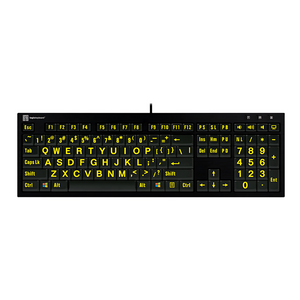
Recommended by accessibility specialists with over 30 years of experience, the LogicKeyboard Large Print Yellow on Black Keyboard features scientifically proven yellow-on-black contrast with characters 4x larger than standard keyboards. This professional-grade assistive technology keyboard is specifically engineered for people with macular degeneration, cataracts, photophobia, or aging eyes who need maximum visibility without eye strain.
Why You'll Love It:
- Maximum visibility with 4x larger print — Bold yellow characters are four times larger than standard keyboards, eliminating squinting and reducing typing errors
- Superior contrast for cataracts and light sensitivity — Yellow-on-black provides scientifically proven higher perceived contrast than white-on-black, with yellow wavelengths penetrating cataracts more effectively
- Eliminates glare and eye fatigue — Matte black non-reflective surface prevents glare in all lighting conditions, reducing photophobia and computer vision syndrome
- Full-size layout with no compromises — Standard QWERTY layout with numeric keypad and all function keys means no learning curve or adaptation required
- Plug-and-play simplicity — USB wired connection works immediately with Windows—no software, drivers, or setup required
Product Specifications:
- Print size: 4x larger than standard keyboard characters
- Color scheme: Bold yellow letters on matte black keys
- Layout: Full-size QWERTY with numeric keypad
- Key type: Low-profile scissor-switch keys (reduces finger travel)
- Surface finish: Matte, non-reflective (eliminates glare)
- Connection: USB wired, 6-foot cable (plug-and-play)
- Compatibility: Windows PC (all versions)
- Dimensions: Standard full-size keyboard footprint
- Weight: 6.5 lbs (stable, professional-grade construction)
- Model: LKBU-LPYB-BJPU-US
- UPC: 845173002310
- Brand: LogicKeyboard (trusted accessibility leader)
- What's included: Keyboard, 6-foot USB cable, user guide
Who This Helps:
Perfect for individuals with low vision, macular degeneration, cataracts, glaucoma, diabetic retinopathy, light sensitivity (photophobia), aging eyes, or computer vision syndrome. Ideal for seniors, visually impaired individuals, assistive technology users, and anyone who struggles to see standard keyboard keys. Also essential for organizations meeting ADA accessibility compliance requirements in workplaces, schools, libraries, and public facilities.
Why Yellow on Black is Superior for Low Vision
While white-on-black keyboards are common, yellow-on-black provides measurable advantages for many vision conditions. Yellow wavelengths penetrate cataracts more effectively than white light, making keys visible even with clouded lenses. Yellow creates higher perceived contrast for the human eye compared to white-on-black, especially for aging eyes. Yellow is less harsh than bright white, significantly reducing glare and photophobia for light-sensitive users. Additionally, yellow remains visible in bright lighting conditions where white can wash out, and it's easier for aging eyes to focus on compared to cooler white tones.
Vision Conditions That Benefit:
- Cataracts: Yellow light penetrates clouded lenses better than white
- Macular degeneration: High contrast helps compensate for central vision loss
- Light sensitivity (photophobia): Yellow is warmer and less harsh than bright white
- Aging eyes (presbyopia): Yellow wavelengths are easier to focus on as we age
- Glaucoma: Reduced glare helps manage light sensitivity symptoms
- Diabetic retinopathy: High contrast aids with reduced visual acuity
- Computer vision syndrome: Yellow reduces eye strain during extended computer use
Professional-Grade Construction
Unlike generic large print keyboards, LogicKeyboard products feature professional-grade construction designed for years of daily use, optimized font sizing and spacing engineered for maximum readability, true high-contrast color schemes that meet accessibility standards, matte finishes that eliminate glare in all lighting conditions, and full-size layouts with no compromises or missing keys.
Ergonomic Design Features
The low-profile scissor-switch keys reduce finger travel distance and typing fatigue while maintaining comfortable key spacing. The slim profile design promotes neutral wrist posture when positioned at proper elbow height. The stable 6.5 lb construction prevents keyboard movement during typing, and the standard full-size layout includes all keys in familiar positions for effortless use.
Simple Setup in 3 Steps
1. Unpack keyboard and plug USB cable into your Windows PC
2. Windows automatically recognizes the keyboard—no software or drivers needed
3. Start typing immediately with maximum visibility
Ergonomic Usage Tips from Ask Ergo Works:
- Position keyboard at elbow height to maintain neutral wrist posture
- Use proper task lighting that illuminates your workspace without creating glare on keys or screen
- Take regular breaks every 20-30 minutes to reduce eye strain and fatigue
- Consider a document holder positioned at eye level to reduce neck strain
- Pair with a large-print mouse or trackball for complete accessible workstation setup
- Adjust monitor brightness and contrast for optimal viewing comfort
Real User Results
Users consistently report the ability to see keys clearly without squinting or magnification, significantly reduced typing errors and frustration, less eye strain and fatigue during computer use, increased confidence and independence with technology, ability to use computers for longer periods comfortably, and reduced reliance on additional magnification or assistive devices.
Accessibility Compliance
This keyboard helps organizations meet ADA (Americans with Disabilities Act) requirements for accessible technology in workplaces, educational institutions, libraries, and public facilities. It's an essential tool for creating inclusive computing environments.
Yellow vs. White on Black Comparison
Yellow on Black advantages: Better for cataracts and light sensitivity, warmer and less harsh on eyes, higher perceived contrast for many users, reduces glare and photophobia, preferred by users with aging eyes, remains visible in bright lighting.
White on Black advantages: Maximum theoretical contrast, cooler and crisper appearance, better for some types of color blindness, more common and familiar option.
Expert-Backed Accessibility Solution
Backed by Ask Ergo Works' 30+ years of ergonomic and accessibility expertise, this LogicKeyboard represents the gold standard in large print keyboards. It's not just bigger letters—it's a scientifically designed visibility solution that addresses the specific challenges of low vision computing.
Reclaim your digital independence with maximum-contrast visibility. Join thousands who've transformed their computer experience with this expert-recommended large print keyboard from Ask Ergo Works.
Free shipping included. Professional-grade quality. USB plug-and-play for Windows. ADA accessibility compliant.
See every key clearly with the highest-contrast large print keyboard designed specifically for low vision, cataracts, and light sensitivity.
Recommended by accessibility specialists with over 30 years of experience, the LogicKeyboard Large Print Yellow on Black Keyboard features scientifically proven yellow-on-black contrast with characters 4x larger than standard keyboards. This professional-grade assistive technology keyboard is specifically engineered for people with macular degeneration, cataracts, photophobia, or aging eyes who need maximum visibility without eye strain.
Why You'll Love It:
- Maximum visibility with 4x larger print — Bold yellow characters are four times larger than standard keyboards, eliminating squinting and reducing typing errors
- Superior contrast for cataracts and light sensitivity — Yellow-on-black provides scientifically proven higher perceived contrast than white-on-black, with yellow wavelengths penetrating cataracts more effectively
- Eliminates glare and eye fatigue — Matte black non-reflective surface prevents glare in all lighting conditions, reducing photophobia and computer vision syndrome
- Full-size layout with no compromises — Standard QWERTY layout with numeric keypad and all function keys means no learning curve or adaptation required
- Plug-and-play simplicity — USB wired connection works immediately with Windows—no software, drivers, or setup required
Product Specifications:
- Print size: 4x larger than standard keyboard characters
- Color scheme: Bold yellow letters on matte black keys
- Layout: Full-size QWERTY with numeric keypad
- Key type: Low-profile scissor-switch keys (reduces finger travel)
- Surface finish: Matte, non-reflective (eliminates glare)
- Connection: USB wired, 6-foot cable (plug-and-play)
- Compatibility: Windows PC (all versions)
- Dimensions: Standard full-size keyboard footprint
- Weight: 6.5 lbs (stable, professional-grade construction)
- Model: LKBU-LPYB-BJPU-US
- UPC: 845173002310
- Brand: LogicKeyboard (trusted accessibility leader)
- What's included: Keyboard, 6-foot USB cable, user guide
Who This Helps:
Perfect for individuals with low vision, macular degeneration, cataracts, glaucoma, diabetic retinopathy, light sensitivity (photophobia), aging eyes, or computer vision syndrome. Ideal for seniors, visually impaired individuals, assistive technology users, and anyone who struggles to see standard keyboard keys. Also essential for organizations meeting ADA accessibility compliance requirements in workplaces, schools, libraries, and public facilities.
Why Yellow on Black is Superior for Low Vision
While white-on-black keyboards are common, yellow-on-black provides measurable advantages for many vision conditions. Yellow wavelengths penetrate cataracts more effectively than white light, making keys visible even with clouded lenses. Yellow creates higher perceived contrast for the human eye compared to white-on-black, especially for aging eyes. Yellow is less harsh than bright white, significantly reducing glare and photophobia for light-sensitive users. Additionally, yellow remains visible in bright lighting conditions where white can wash out, and it's easier for aging eyes to focus on compared to cooler white tones.
Vision Conditions That Benefit:
- Cataracts: Yellow light penetrates clouded lenses better than white
- Macular degeneration: High contrast helps compensate for central vision loss
- Light sensitivity (photophobia): Yellow is warmer and less harsh than bright white
- Aging eyes (presbyopia): Yellow wavelengths are easier to focus on as we age
- Glaucoma: Reduced glare helps manage light sensitivity symptoms
- Diabetic retinopathy: High contrast aids with reduced visual acuity
- Computer vision syndrome: Yellow reduces eye strain during extended computer use
Professional-Grade Construction
Unlike generic large print keyboards, LogicKeyboard products feature professional-grade construction designed for years of daily use, optimized font sizing and spacing engineered for maximum readability, true high-contrast color schemes that meet accessibility standards, matte finishes that eliminate glare in all lighting conditions, and full-size layouts with no compromises or missing keys.
Ergonomic Design Features
The low-profile scissor-switch keys reduce finger travel distance and typing fatigue while maintaining comfortable key spacing. The slim profile design promotes neutral wrist posture when positioned at proper elbow height. The stable 6.5 lb construction prevents keyboard movement during typing, and the standard full-size layout includes all keys in familiar positions for effortless use.
Simple Setup in 3 Steps
1. Unpack keyboard and plug USB cable into your Windows PC
2. Windows automatically recognizes the keyboard—no software or drivers needed
3. Start typing immediately with maximum visibility
Ergonomic Usage Tips from Ask Ergo Works:
- Position keyboard at elbow height to maintain neutral wrist posture
- Use proper task lighting that illuminates your workspace without creating glare on keys or screen
- Take regular breaks every 20-30 minutes to reduce eye strain and fatigue
- Consider a document holder positioned at eye level to reduce neck strain
- Pair with a large-print mouse or trackball for complete accessible workstation setup
- Adjust monitor brightness and contrast for optimal viewing comfort
Real User Results
Users consistently report the ability to see keys clearly without squinting or magnification, significantly reduced typing errors and frustration, less eye strain and fatigue during computer use, increased confidence and independence with technology, ability to use computers for longer periods comfortably, and reduced reliance on additional magnification or assistive devices.
Accessibility Compliance
This keyboard helps organizations meet ADA (Americans with Disabilities Act) requirements for accessible technology in workplaces, educational institutions, libraries, and public facilities. It's an essential tool for creating inclusive computing environments.
Yellow vs. White on Black Comparison
Yellow on Black advantages: Better for cataracts and light sensitivity, warmer and less harsh on eyes, higher perceived contrast for many users, reduces glare and photophobia, preferred by users with aging eyes, remains visible in bright lighting.
White on Black advantages: Maximum theoretical contrast, cooler and crisper appearance, better for some types of color blindness, more common and familiar option.
Expert-Backed Accessibility Solution
Backed by Ask Ergo Works' 30+ years of ergonomic and accessibility expertise, this LogicKeyboard represents the gold standard in large print keyboards. It's not just bigger letters—it's a scientifically designed visibility solution that addresses the specific challenges of low vision computing.
Reclaim your digital independence with maximum-contrast visibility. Join thousands who've transformed their computer experience with this expert-recommended large print keyboard from Ask Ergo Works.
Free shipping included. Professional-grade quality. USB plug-and-play for Windows. ADA accessibility compliant.
Large Print Keyboard Yellow on Black - High Contrast for Low Vision
Translation missing: en.products.product.sku:LKBU-LPYB-BJPU-US
- Regular price
- $119.90
- Sale price
- $119.90
- Regular price
-
Couldn't load pickup availability


